WebGL2 Support
Introduction
Starting with v3.0, Babylon.js supports rendering with both WebGL1 and WebGL2 contexts. This support is transparent to developers. By default, the engine tries to get a WebGL2 context. If none is available, it falls back to a WebGL1 context.
You can check which version of WebGL is enabled with the engine.webGLVersion property.
Shaders
When WebGL2 is enabled, the shaders are automatically converted to GLSL v3.0. Babylon.js will then automatically take advantage of extended instruction/uniform counts.
If you are using custom shaders, the best approach is to provide GLSL v2.0 shaders. This way, your code will work on both contexts. You can, of course, provide only v3.0 shaders, but in that case your code will work only when WebGL2 is enabled.
Supported features
You can find the list of supported features and backward-compatibility options, when available, here:
| Feature | Description | WebGL1 compatibility | Demo | More info |
|---|---|---|---|---|
| Depth Frag | Used to compute logarithmic depth buffer | Yes through an extension | Depth Frag | Documentation |
| Multisample render targets | Rendertarget textures can be multisampled to get antialiasing effect | No. Has no effect on WebGL1 context | Multisample Render Targets | See below |
| Standard derivatives | Standard derivatives are used in Babylon.js to help compute real-time bump mapping | Yes through an extension | Demo | Documentation |
| Texture LOD | Used by PBRMaterial to simulate microsurface | Yes through an extension | Demo | Documentation |
| Vertex array objects (VAO) | A Vertex Array Object (or VAO) is an object that describes how the vertex attributes are stored in a Vertex Buffer Object (or VBO) | Yes through an extension | N/A. Every rendering is done with VAO by default | See below |
| Uniform buffer objects (UBO) | A uniform buffer object (or UBO) lets you specify a group of uniforms from a buffer | No. Uniforms are handled independently on a WebGL1 context | N/A. Materials supporting UBO automatically use them | See below |
| Multiple Render Target (MRT) | Several Render Targets can be rendered in the same draw call. | Yes through an extension | Multiple Render Target | See below |
| Occlusion Queries | Occlusion queries detect whether a Mesh is visible in the current scene or not | Yes through an extension | Occlusion Queries | See below |
| 3D Textures | 3D textures are textures with a 3rd dimension. You can see them as multiple 2D textures where every texture is a slice in the 3d texture. | No. Cannot be created in WebGL1 | This feature will automatically be used when possible. | See below |
| 2D Array Textures | 2D array textures are very similar to 3D textures but are designed for constructing a texture atlas instead of a volumetric texture. | No. Cannot be created in WebGL1 | 2D Array Textures | See below |
| Power of two textures | In the past, to achieve the best performance and higher quality texture rendering, images with dimensions that are a power of two were required. With support for WebGL2 this is no longer the case, any sized texture will be rendered optimally. | Yes, however Babylon will resize textures to be a power of two causing a hit to performance | N/A. This is done by default | See below |
| Transform feedback buffer | Transform feedback buffer can be used to update vertex buffers from GPU. Babylon.js uses it to implement GPU particles | No. Not supported on WebGL1 | Power Of Two Textures | See particles documentation |
| Shadow Samplers | Shadow samplers are used to enable PCF depth comparison on the hardware. Babylon.js uses it to implement PCF and PCSS shadows. | No. Not supported on WebGL1 (shadows fall back to poisson sampling) | Shadow Samplers | See shadows documentation |
| More precise shadows | Shadow maps can now use 32 bits depth buffers improving by a large scale the precision of the shadows. | No. Not supported on WebGL1 (shadows precision will fall back to 16 bits) | #ZT8BKT#57More Precise Shadows | See shadows documentation |
Multisample render targets
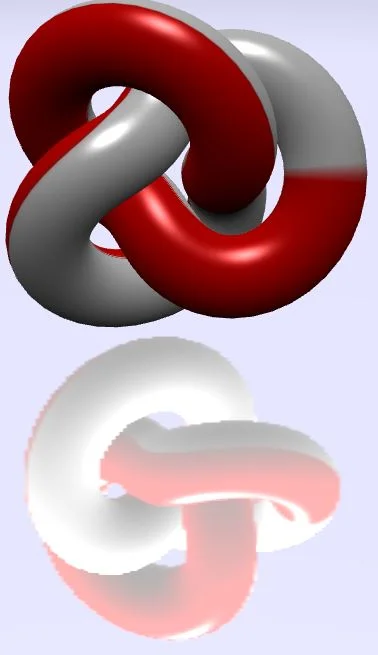
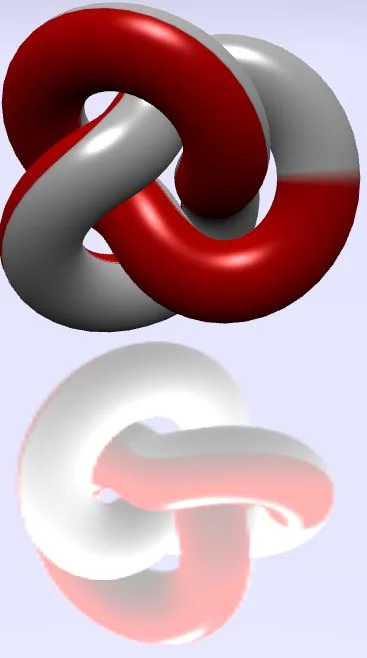
By default, render targets, such as mirrors, are created without support for multisampling. To turn it on, set renderTarget.samples to a value greater than 1.
On a WebGL1 context, this does nothing. On a WebGL2 context, it enables multisampling. More samples imply better antialiasing but slower rendering.
Here is an example of a mirror (512x512) with and without multisampling:
| No MSAA (1 sample) | MSAA (8 samples) |
|---|---|
 |  |
Vertex array objects
When possible, either on a WebGL2 context or when the extension is available on a WebGL1 context, Babylon.js uses VAOs to control rendering. VAOs are a kind of geometry object. Instead of sending all the attributes and buffers used by a mesh—one for position, one for normal, one for indices, one for texture coordinates, and so on—you can build a VAO that keeps track of all the attributes and buffers used.
At render time, you only need to bind one VAO instead of multiple VBOs (vertex buffer objects).
You can find more details on Tojicode's blog.
Uniform buffer objects
On a WebGL1 context, all uniforms are sent to the GPU independently. This means that if your shader uses 16 matrices, you will call the WebGL API 16 times to update them before using your shader.
On a WebGL2 context, you can use a UBO to set the values in a typed array in JavaScript. This is much faster. Once all the values are set, you can send them to the GPU with a single call.
You can find more details on WebGL 2 specification
Multiple Render Target
With WebGL1, one draw call meant one target texture. Now you can bind several target textures to a shader and specify in the fragment shader which colors to write to each texture. This saves a lot of CPU time and enables advanced effects like Deferred Shading.
In Babylon.js, our first use of this technique is to render a geometry buffer of the scene.
Occlusion queries
Occlusion queries detect whether a mesh is visible in the current scene, and based on that result the mesh is drawn or not. Occlusion queries are useful when you have an expensive object in the scene and want to make sure it is drawn only if it is visible to the camera and not behind an opaque object. Babylon.js provides an implementation for occlusion queries through the occlusionType property on the AbstractMesh class.
Babylon.js Occlusion Queries Feature
3D textures
3D textures are mostly used for volumetric effects like color grading, fire, and smoke. WebGL 2 support for 3D textures is as good as its support for 2D textures.
So far, Babylon.js uses them for color grading textures: 3D Textures Example
2D array textures
2D array textures allow you to pass a texture atlas to a custom shader. This could be used whenever you have multiple, distinct, 2D textures that you want to blend or switch between inside your shader. For example tiles, terrain splatting or frames of an animation. Using array textures ensures that distinct layers are sampled as if they were separate textures, so there will be no bleeding between different sections of the atlas.
Usage is very similar to 3D textures: create a RawTexture2DArray, use setTexture on the shader material, and use a sampler of type sampler2DArray. Sample using texture(yourSampler, vec3(u,v,layerIndex)) where layerIndex is a 0-based index into the array.
More information is available on the Khronos wiki.
2D Array Textures ExamplePower of two textures
On WebGL1 context, all textures are resized to a power of two to produce the best quality. This resize may impact performance.
On WebGL2 context, no resize is required and any size texture will be rendered with the best quality.
You can find more details on WebGL 2 specification