Particle System Intro
An Introduction to the Particle System
The creation of a particle system requires a name and a capacity, which is the maximum number of particles alive at the same time in the system. The system is designed to produce particles that emit at a given rate, move, and last for a set lifetime before they are recycled and re-emitted.
import { ParticleSystem } from "@babylonjs/core/Particles/particleSystem";const myParticleSystem = new ParticleSystem("particles", capacity, scene); //scene is optional and defaults to the current sceneTexture
Before the particles in the system can be seen, they need to be assigned a texture. This same texture will be used for every particle in the system. By default, the entire texture will be mapped to each particle, though there are some advanced techniques that allow us to use only a portion of the texture for the particle. These techniques can be found in the Animating Particles section, which details how your texture can be used as a sprite sheet.
Emitter
We also need to tell the particle system a location from which the particles will emit. This is called the emitter, and it can be represented by a mesh, an abstract mesh, or even a simple Vector3 position in your scene. The emitter itself is just the base position for emission, and in the case of a mesh or an abstract mesh, we use the mesh position to determine where particles will emit. Coupled with the emitter is the Emitter Shape that determines the region from which particles can emit. We could use a Box Emitter Shape with an abstract mesh assigned as the particle system emitter to give us particles that emit from a random point within a box located at the position of the abstract mesh. This is a good way to animate an emitter, as the abstract mesh could be the target of a Babylon animation. On each animation frame, the emitter location will be updated and new particles will emit within the emitter shape located at the new position of the abstract mesh.
Example
The following code samples show the bare minimum needed to create a particle system.
import { Texture } from "@babylonjs/core/Materials/Textures/texture";myParticleSystem.particleTexture = new Texture("path to texture");myParticleSystem.emitter = mesh; // a mesh or abstract mesh in the scene// ormyParticleSystem.emitter = point; //a Vector3myParticleSystem.start(); //Starts the emission of particlesTo stop the emission, use
myParticleSystem.stop();While this stops the emission of new particles, the ones already emitted will continue to exist up to their time limit. To stop and clear particles at the same time, use
myParticleSystem.stop();myParticleSystem.reset(); //Reset to empty systemMinimal particle system: Minimal Particle System
You can do this all in one line using the ParticleHelper to create a default configured particle system.
Default particle system using the helper: Default Particle System Using The Helper
Emit particles from a box position: Emit Particles From a Box Position
By fixing the size of the emission region, you can constrain where particles emit. The values used will depend on the size of the emitted particles and the size of the region. The center of an emitted particle could be inside a box, say close to the edge, yet the particle could be big enough for its perimeter to be outside the box.
Emit particles from wholly inside the box: Emit Particles From Completely Inside a Box
When you want the particle system to start after 3 seconds, for example, you use one of the following:
myParticleSystem.start(3000); //time in milliseconds
myParticleSystem.startDelay = 3000;
Delayed start particle system: Particle System With a Delayed Start
To run the particle system for a limited time, you use:
myParticleSystem.targetStopDuration = 5;The time before the system stops depends on how fast the particle system updates particle frames. The faster the update speed, the shorter the time before the system stops. You set the update speed using
myParticleSystem.updateSpeed = 0.01;Once stopped, you can dispose of the particle system. Very useful if you want to create a one-shot particle system with a specific targetStopDuration.
myParticleSystem.disposeOnStop = true;Pre-warming
Starting with Babylon.js v3.3, you can now specify a pre-warming period to make sure your system is in the correct state before rendering.
To do so, you need to set up two properties:
system.preWarmCycles: Gets or sets a value indicating how many cycles (or frames) must be executed before first rendering (this value has to be set before starting the system). Default is 0 (i.e., no pre-warming).system.preWarmStepOffset: Gets or sets a value indicating the time step multiplier to use in pre-warm mode (default is 1).
So if you set your system like this:
system.preWarmCycles = 100;system.preWarmStepOffset = 5;system.start();It will execute the particle animation loop 100 times with a time step set to 5 times real time. The more cycles you want, the slower the system will be to start. It can therefore be useful to increase the time step so fewer cycles need to run. But keep in mind that too large a time step will introduce issues if the lifetime of a particle is smaller than the time step.
Here is an example of pre-warming: Particle Pre-Warming Example
Particle Texture
To apply a texture to the particles, such as

set the particleTexture:
import { Texture } from "@babylonjs/core/Materials/Textures/texture";myParticleSystem.particleTexture = new Texture("PATH TO IMAGE", scene);You can also apply a mask to a texture to filter some colors or a part of the alpha channel.
import { Color4 } from "@babylonjs/core/Maths/math.color";myParticleSystem.textureMask = new Color4(0.1, 0.8, 0.8, 1.0);This example produces the following
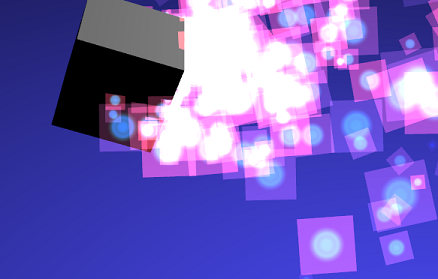
Texture mask example: Texture Mask Example
To use multiple textures in the scene, use multiple particle systems, all of which can use the same emitter object.
Multiple systems example: Multiple Systems With Mesh Emitter
Noise Texture
Starting with Babylon.js v3.3, you can now use a noise texture to perturb particle positions. Technically, the noise texture applies changes to particle direction:
import { NoiseProceduralTexture } from "@babylonjs/core/Materials/Textures/Procedurals/noiseProceduralTexture";import { Vector3 } from "@babylonjs/core/Maths/math.vector";var noiseTexture = new NoiseProceduralTexture("perlin", 256, scene);noiseTexture.animationSpeedFactor = 5;noiseTexture.persistence = 2;noiseTexture.brightness = 0.5;noiseTexture.octaves = 2;particleSystem.noiseTexture = noiseTexture;particleSystem.noiseStrength = new Vector3(100, 100, 100);Alongside setting the noiseTexture, you can also control the strength applied on each axis with particleSystem.noiseStrength.
Adjustable noise: Changing Particle Direction With Noise
Local Space
If the emitter is a mesh and you set particleSystem.isLocal = true, then all particles will be generated in the mesh local space (so rotating or transforming the mesh will transform the entire particle system).
Demo: Particles In Local Space
World Offset
Starting with Babylon.js v4.0, you can set up a world offset to your particles with:
import { Vector3 } from "@babylonjs/core/Maths/math.vector";particleSystem.worldOffset = new Vector3(100, 20, -453);This command will shift the particles using the offset (mostly used when you need to keep the camera at the center of the world to increase precision and then move the world instead).
Node-Based Particle Systems
Starting from Babylon.js v8.14, you can also design particle systems visually using the Node Particle Editor (NPE). NPE lets you wire together blocks in a graph to define creation, update, and rendering logic — no code required for the particle behavior itself. It produces a NodeParticleSystemSet that can be loaded and started in just a few lines:
import { NodeParticleSystemSet } from "@babylonjs/core/Particles/Node/nodeParticleSystemSet";const npe = await NodeParticleSystemSet.ParseFromSnippetAsync("#8O4BJ2");const particleSystemSet = await npe.buildAsync(scene);particleSystemSet.start();Many of the properties covered in this section — such as size, color, emitter shape, and gradients — have equivalent blocks in NPE. Each page in this section includes node-based examples alongside the code-based ones.
So far we have barely touched the surface of the particle system. There is a wide range of additional properties you can use to further tune the particle system.