Using An HDR Environment For PBR
Introduction
The highly recommended way to set up an environment texture is through an HDR-ready file (either DDS or ENV) containing a cube texture with prefiltered MipMaps.
To load an HDR environment, you can use createDefaultEnvironment:
scene.createDefaultEnvironment();This will load the file environmentSpecular.env from assets.babylonjs.com.
To load a custom env texture, simply set the scene.environmentTexture:
import { CubeTexture } from "@babylonjs/core/Materials/Textures/cubeTexture";const hdrTexture = CubeTexture.CreateFromPrefilteredData("textures/environment.env", scene);scene.environmentTexture = hdrTexture;You can also pass an option to createDefaultEnvironment():
scene.createDefaultEnvironment({ environmentTexture: "texture-url.env"}););We detail below the two supported ways of creating such files.
As of 4.2, Babylon.js supports prefiltering directly in the Sandbox!
.hdr files are easy to find on the web, so they are often the most convenient input for filtering.
Creating a compressed environment texture using the Sandbox
As the generated DDS files can be relatively large (32Mb for a 512px-wide file), we introduced a special way to pack your texture in Babylon.js. Here are the steps to follow to create the .env files used in Babylon.js:
- go to the sandbox
- drag & drop a PBR scene file (example)
- drag & drop your .dds environmentTexture file (example)
- open the Inspector, go to the Tools, and click on
Generate .env texture
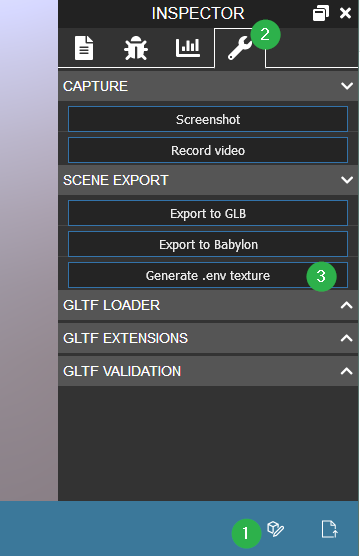
You can now download and use your .env environment, using this bit of code:
import { CubeTexture } from "@babylonjs/core/Materials/Textures/cubeTexture";scene.environmentTexture = new CubeTexture("environment.env", scene);Note that you can rotate your environmentTexture if needed:
import { Matrix } from "@babylonjs/core/Maths/math.vector";import { Tools } from "@babylonjs/core/Misc/tools";const hdrRotation = 10; // in degreesscene.environmentTexture.setReflectionTextureMatrix(Matrix.RotationY(Tools.ToRadians(hdrRotation)));As of 7.48.0, you can even check the diffuse box to ensure your env texture contains the diffuse information in a texture. This can help a lot with rendering quality at the expense of a slightly bigger file (about 10 more kb).
See the What is a .env (Tech Deep Dive) section at the bottom of this page for more details.
IBL Texture tool
If you have a .hdr texture, you can use the IBL Texture Tool to convert it easily to .env.
Just drag & drop your .hdr file, wait a bit, and save the .env wherever you want.
Directly use .hdr files
If you want to directly use a .hdr or .exr file and are not able to prefilter it to a .env or .dds file from the Sandbox or an external tool, you can do it when your texture is loaded.
import { EXRCubeTexture } from "@babylonjs/core/Materials/Textures/exrCubeTexture";import { HDRCubeTexture } from "@babylonjs/core/Materials/Textures/hdrCubeTexture";const hdrReflectionTexture = new HDRCubeTexture("./textures/environment.hdr", scene, 128, false, true, false, true);const exrReflectionTexture = new EXRCubeTexture("./textures/environment.exr", scene, 128, false, true, false, true);This method adds a small delay when loading the texture, because the prefiltering is done on the fly. Therefore, it is preferable to use .env or .dds files for optimal performance.
Please note that WebGL2 is required for prefiltering on-the-fly.
As you might sometimes want to filter in real time (for animated reflections, for instance), you may also want to look at the reflection probes tutorial.
As of 7.48.0 new options are available on the prefiltering front.
- The parameter
prefilterIrradianceOnLoadprefilters the HDR texture and stores the diffuse part of the IBL as a texture instead of harmonics. This provides much more dynamic range in the output and can allow "true" HDR. - The parameter
prefilterUsingCdfcan be used to generate the irradiance texture by relying on the HDR CDF data, which helps produce results closer to ray tracers.

Using a pure cube texture

While using a .dds or .env cube texture is the best option, you may still want to rely on a classic cube texture (mostly for size reasons).
So, you can still do this as well:
import { CubeTexture } from "@babylonjs/core/Materials/Textures/cubeTexture";scene.environmentTexture = new CubeTexture("textures/TropicalSunnyDay", scene);In this case you won't be able to get HDR rendering and some visual artifacts may appear (mostly when using glossiness or roughness).
What is a .env (Tech Deep Dive)
The issue we are addressing with .env is the size and quality of our IBL environment textures. We decided to implement our own packing format to simplify sharing and downloading those assets. This file needs to work cross-platform for easy deployment, which is why we are not relying directly on compressed textures.
We then pack into one file (similar to DDS or KTX) a JSON manifest header, the polynomial information, and all the faces of the mipmap chain from the prefiltered cube texture in .png format, which compresses well and decodes quickly in all browsers.
To keep HDR support with PNG, we chose to rely on RGBD because it offers a better distribution of values in the low range than RGBM while keeping the [0-1] range untouched, which is generally used more frequently. It is also less complex to decode at runtime than LogLUV when needed. It seems like the best tradeoff for us.
RGBD also offers little to no transparency in the lower range, preventing browsers that rely on premultiplication of alpha from losing data in the most visible area. We also introduced a special offset from the max range to ensure that we do not reach problematic alpha values in legacy browsers (when alpha is too close to 0, color quantization creates unacceptable banding artifacts).
In WebGL2 browsers, we unpack the data into HalfFloat or FullFloat textures, if supported, to speed up runtime and allow some interpolations to be computed correctly.
The file also packs the polynomial harmonics/spherical data in the format Babylon expects internally, speeding up load time by avoiding additional computation or transformation.
As rendering to LOD, or even copying to LOD, of Half/Full float textures does not work consistently in WebGL1-based browsers, we unpack the data live in the fragment shader. Because RGBD interpolation is not correct, we verified through different test cases that the resulting visual artifacts were worth the transfer-size savings. It looks acceptable in the sets of textures we have been testing.
For example, we can now rely on a 512px cube-sized texture with around 3Mb of data versus 32 Mb for the unpacked version, without noticing any significant quality loss. This also speeds up our time to first frame by removing the need to compute the polynomials.