Usage with the Smart Filter Editor
Overview
The Smart Filters Editor (SFE) is used to compose multiple shaders into complex effects, while the Node Material Editor (NME) is used to create shaders. These tools can complement each other: NME can export static shader files that you can import into SFE and chain like any other block. To enable this, NME offers a special "Smart Filters" mode.
The workflow is file-based and follows three steps:
- Build a shader in NME
- Export the shader as an annotated GLSL file
- Import the GLSL file into SFE
If you're new to either, start by reading more about Node Materials and Smart Filters.
Example
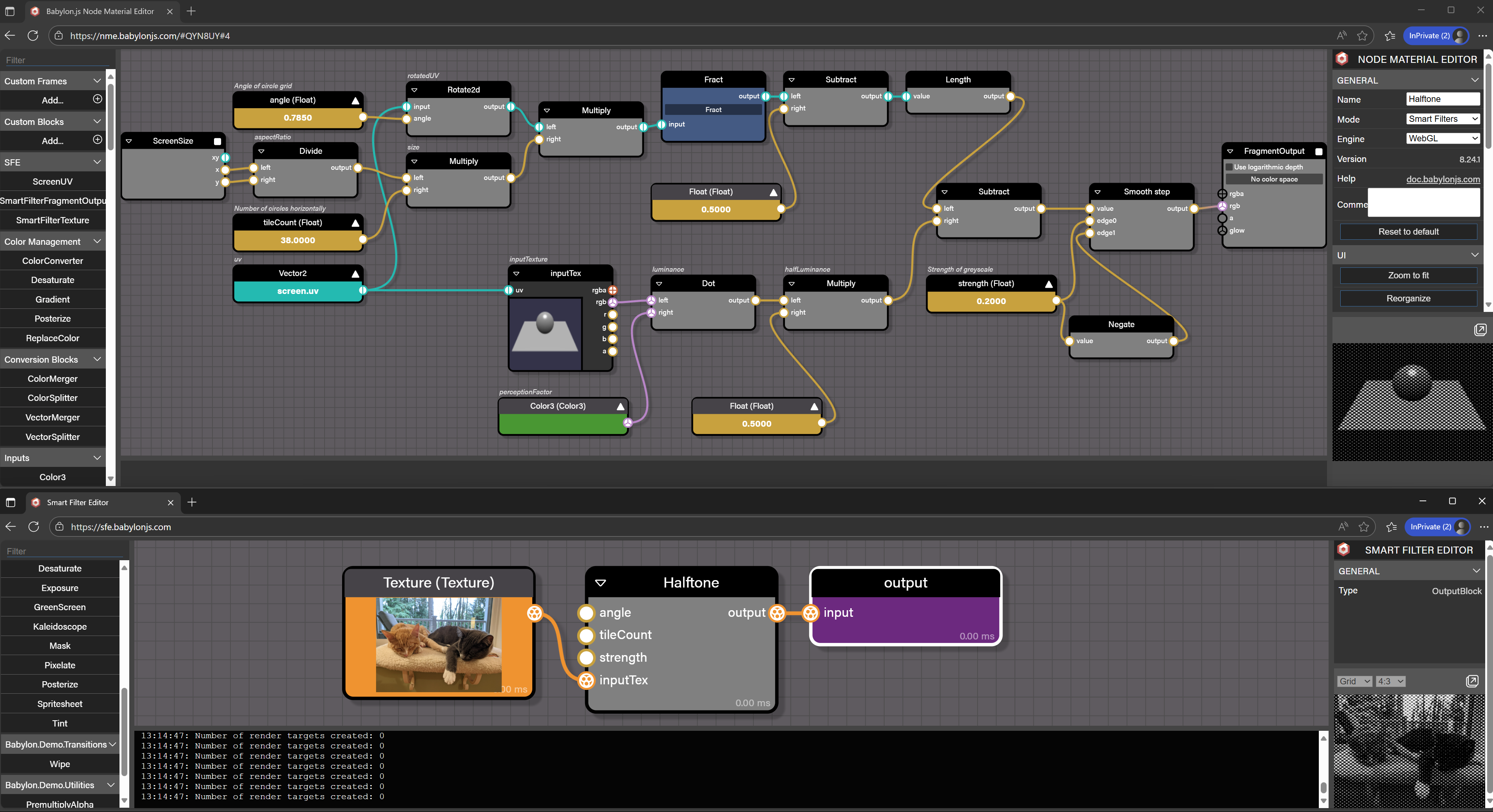
New NME Blocks
Alongside the standard 2D-compatible NME blocks, the Smart Filters mode introduces a few specialized blocks:
SmartFilterFragmentOutput
Required. Receives the final color output of the SFE block. Similar to a regular fragment output block, but distinct: since a SmartFilter composes multiple shaders together, this block doesn’t directly write to the final frame color.
ScreenUV
Optional. Provides the screen quad’s UV coordinates in the range of 0-1. This is a preconfigured input block for use with Smart Filter’s UV system.
SmartFilterTexture
Optional. Represents the sampling of a texture in a Smart Filter. If no source connection is provided, then this block also represents the texture itself.
Textures used in the Node Material graph are placeholders; they are not serialized on export. They will need to be reassigned after loading the block in SFE.
Input Connection Points
By default, each InputBlock (and blocks with texture sources) is exposed as an input connection point in the exported SFE block. The value you assign to an InputBlock in NME becomes the default for that connection point.
Naming
To name the exported shader block, modify the Name of the Node Material. This field is located under the graph's "General" property tab.
To name the input connection points for the shader block, repeat the same steps as above for each of:
- Textures: rename the corresponding SmartFilterTextureBlock or, if its
sourcepoint is connected, the ImageSourceBlock. - All other inputs: rename their corresponding InputBlocks.
Exporting
Once finished, use the Export shaders for SFE button under the graph's "File" property tab. This will download an annotated GLSL block definition file with the suffix .block.glsl. To import it into your SFE project, read about using custom blocks in SFE.