Flow Graph
The Babylon.js Flow Graph System
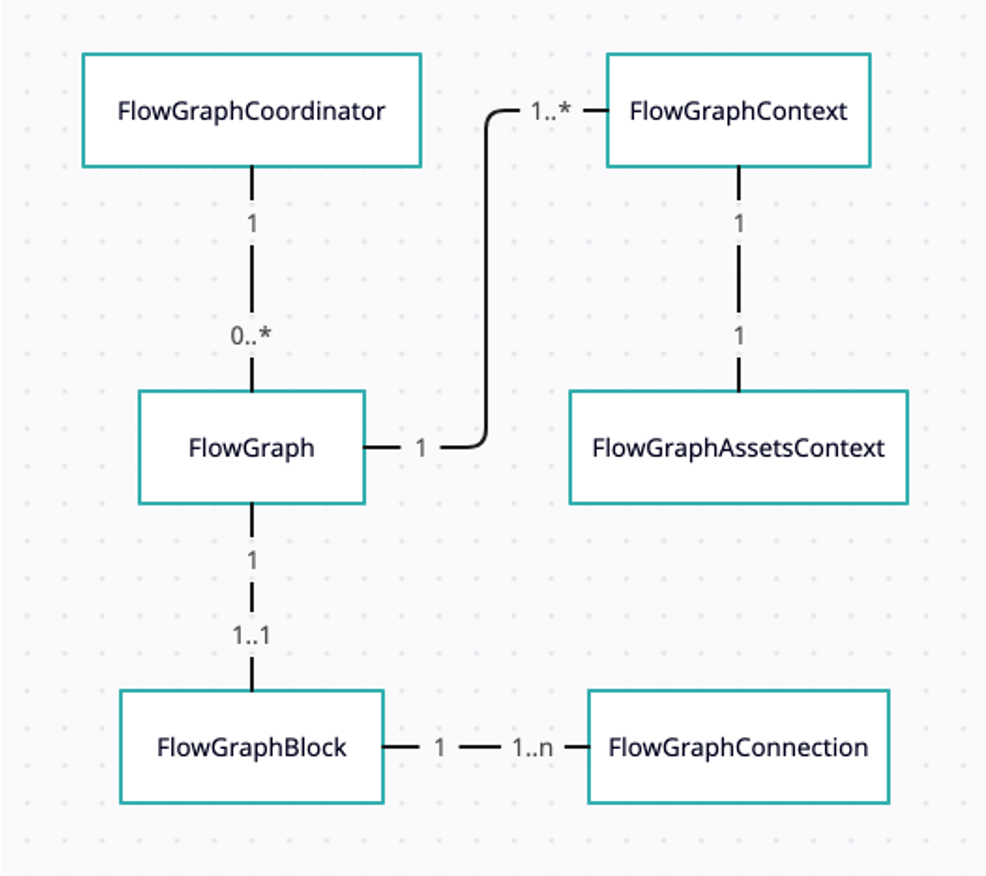
The Flow Graph system is a powerful tool for creating interactive scenes in Babylon.js. It allows developers to create complex interactions and behaviors without writing extensive code, making it accessible to both programmers and non-programmers alike. The Flow Graph system is designed to be intuitive and user-friendly, with a visual interface that allows users to create and manipulate blocks representing different actions and events. This makes it easy to create complex interactions by simply connecting blocks together. The Flow Graph system is particularly useful for creating interactive experiences in games, simulations, and other applications where user interaction is a key component. It allows developers to create dynamic and responsive environments that can adapt to user input in real-time.
A flow graph becomes much easier to author when it has a corresponding visual editor. Babylon.js now includes a dedicated Flow Graph Editor that lets you create, test, validate, and debug graphs visually.
Under the hood, the flow graph is used when a glTF asset with the ratified KHR_interactivity extension is loaded. Each valid behavior graph is converted to a Babylon Flow Graph, and the selected graph runs when the user interacts with the scene. See Loading KHR_interactivity Assets for validation rules, loader options, inspection APIs, and editor import behavior.
If you want to understand the runtime model, continue with the sections below. If you want to build graphs through a visual tool, start with the Flow Graph Editor documentation.
Coming next
Flow Graph Blocks
A detailed overview of the Flow Graph blocks.

Flow Graph Basic Concepts and Getting Started
Learn all about the Babylon.js Flow Graph system.
Flow Graph Examples and Write Your Own
Learn how to write your own flow graph.

Flow Graph Advanced Usage
Learn about advanced concepts of the Flow Graph system.