Flow Graph Basic Concepts and Getting Started
Flow Graph Basic Concepts
Let's dive into the basic concepts of the Flow Graph system in Babylon.js.
The flow graph system is controlled by a flow graph coordinator, which in turn controls one or more graphs. A graph is a collection of blocks connected to each other by edges. Each block has a type, which determines its behavior and the types of edges it can have. The starting blocks are event blocks, which are triggered by events in the scene. Each graph can have one or more execution contexts, which are used to store data and state information for the blocks in the graph.
Here is a deeper dive into the basic concepts of the flow graph system. Some concepts might be referenced at first without explanation, but they are explained at a later point in the documentation.
Note that we might use "block" and "node" interchangeably. The official name for the component is "block", but "node" is more common in the programming world.
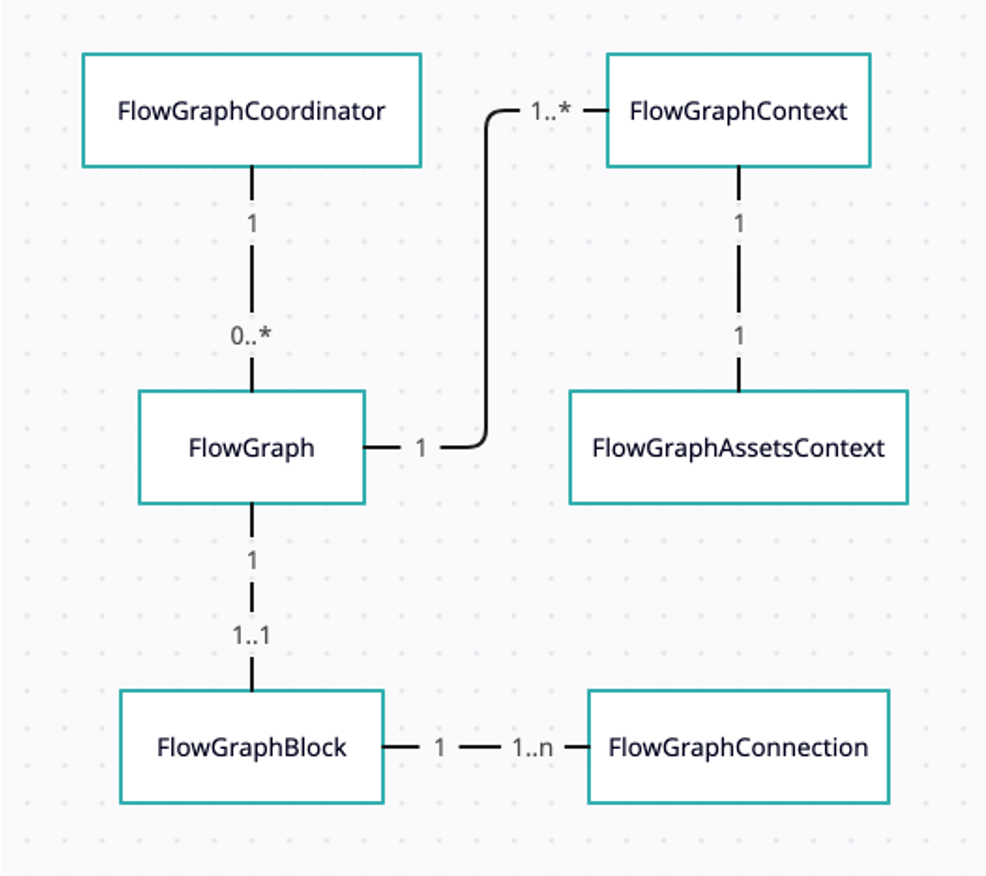
Flow Graph coordinator
The flow graph coordinator is the main entry point for the flow graph system. It is responsible for creating and managing graphs, as well as starting graph execution. The coordinator is directly related to a scene, which is the main container for all of the objects on which the flow graph system operates. When a scene is disposed, the flow graph coordinator (and with it all graphs, blocks, contexts, and so on) is also disposed. A scene can have more than one coordinator if the use case requires it.
Think of a coordinator as the "global object" for all graphs within it. Using the coordinator, graphs can "communicate" with each other using a simple event-based system. A custom global event triggered by one graph can be listened to by another graph because the coordinator allows it.
To create a new coordinator, simply use its constructor:
const coordinator = new FlowGraphCoordinator({ scene });Afterwards, the coordinator can be used to create graphs, as described in the next section.
To start all graphs connected to a coordinator, use the start method:
coordinator.start();Flow Graph
A flow graph is a collection of stateless blocks, each responsible for an action or a set of actions. The blocks are connected to each other using data or flow connections. Think of it as a list of instructions without the list of objects those instructions run on. In a cookbook, the graph would be the list of instructions without the ingredients. The list of ingredients comes from the execution context, which we will discuss in the next section.
A graph belongs to a coordinator, and is created using the createGraph method of the coordinator:
const graph = coordinator.createGraph();Each FlowGraph object has its own SceneEventCoordinator, which is the "glue" between scene events and the graph itself. When an event block is added to the graph, it is automatically connected to the ScenEventCoordinator, which listens to the scene events and triggers the event block when the event occurs.
A flow graph will usually be started by its coordinator. However, it can be manually started using the start method:
graph.start();As the blocks are not aware of the graph they belong to, you will need to add any new event block you create yourself to the graph. A graph can have 1 or more event blocks, but it is not required to have any. If a graph has no event blocks, it will be idle and will not execute any blocks.
To add an event block to a graph, use the addEventblock method:
const eventblock = new MyNewEventblock();graph.addEventBlock(eventblock);The different events that the flow graph currently supports are:
- SceneStart
- SceneDispose
- SceneBeforeRender
- SceneAfterRender
- MeshPick
- PointerDown
- PointerUp
- PointerMove
- PointerOver
- PointerOut
It is important to note that even if an event is supported by the graph, it will not be executed if there is no block to catch it. For example, if the graph itself can respond to a PointerMove event, but no PointerMove block is added to the graph, the event will not be executed.
When an event occurs, the SceneEventCoordinator will trigger the event block, which will then execute the block(s) connected to it. Each block's action will be executed with all available execution contexts. A graph can have one or more execution contexts. If none was created, a new one will be created when the graph starts.
Execution Context
The execution context is, as derived from its name, the context in which the graph is executed. It holds a list of variables and references to objects in the scene, which can be used by the blocks in the graph. The context is created when the graph is started, and is passed to each block when it is executed. Thinking of a cookbook again, the execution context is the list of ingredients. We can have the instructions to wash, cut and fry, but without knowing what we are executing it on, we cannot do anything.
To create a new context, use the createContext method of the FlowGraph class:
const context = graph.createContext();The context holds a few important lists of variables:
- user variables - A list of user-defined variables, which can be used by any of the blocks in the graph. These variables are created and managed by the user, and can be used to store data that needs to be accessed by the different blocks.
- Execution variables - A block doesn't have any internal state. Instead, it stores its state in the execution context. Think about these as the "private" variables of a specific block. This is important when implementing a new block - it should never have any internal state, but should use the execution context to store its state.
- global context variables - whereas an execution variable is for a specific block, the global variables are shared among blocks that are using the same context. This is a perfect way for the graph to share information between blocks that are not directly connected to each other.
- connection values - the (cached) values of the connections between blocks. This is important for performance, as it avoids recalculating the same value multiple times.
For a developer using the flow graph, only the first list is important. This is the list of variables that can be used in the blocks. The other lists are used internally by the flow graph system. To define a new variable, simply use the setVariable method:
context.setVariable("myVar", 42);To get the value of a variable, use the getVariable method:
const myVar = context.getVariable("myVar");However, most of the time you will only use the setVariable method. The rest will be handled by the blocks.
Blocks
Blocks are the building blocks of the flow graph system. Each block is responsible for a specific action or set of actions, and can be connected to other blocks to create complex interactions. There are 3 main types of blocks:
- Event blocks - These blocks are triggered by events in the scene, such as a pointer down or a mesh pick. They are the starting point of the graph, and are responsible for triggering the execution of the other blocks.
- Execution blocks - These blocks are responsible for controlling the flow of execution in the graph. They can be used to create loops, branches, and other control structures. These blocks can be asynchronous.
- Data blocks - These blocks are used to perform calculations and manipulate data. They are passive in nature, and can be used to create complex expressions and algorithms. Good examples are Math blocks - add, subtract, multiply, divide, etc.
You can read more about the specific blocks we have in the Flow Graph Blocks section. I will use different types of blocks in the next few examples, which I hope will be self-explanatory.
Connections
Blocks are connected using flow graph connections. A flow graph connection is a link between two blocks, which allows data to be passed from one block to another. There are two types of connections:
- Data connections - These connections are used to pass data between blocks. They are represented by a solid line in the graph. They have a specific type, which determines the type of data that can be passed through the connection. For example, a number connection can only pass numbers, while a string connection can only pass strings. "Any" is also a valid type, and can be used to pass any type of data.
- Signal connections - These connections are used to control the flow of execution in the graph. They can be seen as mini "events" between blocks. They will typically be added to execution blocks.
A data connection can hold a single value. The value can either come from a data output of a block, or directly from the connection itself. The connection can also hold a default value, which will be used if the connection is not connected to any block and doesn't have an explicit value. A signal connection holds no value, but can have a payload. Think of the payload as the event data passed when the event is triggered. It is mainly used to pass the type of error that occurred, but it can be used for other purposes as well.
The value of a connection will be cached per execution. This means that, for example, if a math block has two inputs, and both are connected to the same Random block, the Random block will be executed only once, and its value will be used for both inputs. This is important for performance, as it avoids recalculating the same value multiple times. If you want to have different random values, use two different Random blocks.
Execution blocks will typically have an "in" and an "out" signal connection. The "in" connection is used to trigger the execution of the block, and the "out" connection is used to signal that the block has executed. Asynchronous blocks will have an additional "done" signal connection, which is used to signal that the block has finished executing. In this case, the "out" can be thought of as a "passthrough" connection, which is used to pass execution to the next block. Most blocks also have an "error" signal connection, which is used to signal that an error has occurred during execution.
Simple abstract example to explain the concepts
To understand the different types of blocks and connections, let's think of a simple "rinse, cut, and fry a potato and a carrot" recipe (for developers, of course). I will mostly use pseudocode, so please don't take this example, run it in the playground, and wonder why your carrots are not frying.
The steps are these:
- Rinse
- Cut
- Fry
This is a list of execution blocks: Get, Rinse, Cut, Fry. Each of these instructions has a list of inputs and outputs:
| Block | Data inputs | Signal inputs | Data outputs | Signal outputs |
|---|---|---|---|---|
| Rinse | Vegetable To rinse, use soap | start rinsing | rinsed vegetable | started rinsing, done rinsing |
| Cut | rinsed vegetable, knife, type of cut | stat cutting | cut vegetable | started cutting, done cutting, error cutting |
| Fry | cut vegetable, oil, temperature | start frying, stop frying | fried vegetable | started frying, done frying, error frying |
There is another instruction missing - Start cooking. This is the event block that will be the trigger to start the entire process. All of those are added to a simple graph:
Start cooking -> Rinse -> Cut -> Fry
And since we have two vegetables to cut, we will have two contexts (because it makes sense in this case). The first context will be used for the potato, and the second one for the carrot. The graph will be executed twice, once for each context.
So, let's create the graph first:
const graph = coordinator.createGraph();Then, we will create the contexts and set the needed variables:
const potatoContext = graph.createContext();potatoContext.setVariable("vegetable", "potato");potatoContext.setVariable("cutType", "slices");
const carrotContext = graph.createContext();carrotContext.setVariable("vegetable", "carrot");carrotContext.setVariable("cutType", "sticks");
Now, we will create the blocks:
// data blocksconst getVegetableBlock = new GetVariableBlock({ variableName: "vegetable" });const getCutTypeBlock = new GetVariableBlock({ variableName: "cutType" });
// execution blocksconst rinseBlock = new RinseBlock();rinseBlock.vegetableToRinse.connectTo(getVegetableBlock);// using a value directly, on each of the contextsrinseBlock.useSoap.setValue(true, potatoContext);rinseBlock.useSoap.setValue(false, carrotContext);
const cutBlock = new CutBlock();cutBlock.rinsedVegetable.connectTo(rinseBlock.rinsedVegetable); // connect the two blocks using a data connectioncutBlock.cutType.connectTo(getCutTypeBlock);// trigger cut when done rinsingrinseBlock.doneRinsing.connectTo(cutBlock.startCutting);
const fryBlock = new FryBlock();fryBlock.cutVegetable.connectTo(cutBlock.cutVegetable); // connect the two blocks using a data connection
// now the event blockconst startCookingBlock = new StartCookingBlock();graph.addEventBlock(startCookingBlock);
graph.start();
Now the graph will be executed twice -- once for a potato and once for a carrot. We are still missing a few things (which you can think about how to implement yourself):
- Error handling
- Kids safety
- Serving
- Different temperatures, different knives, different types of frying
This is not the perfect example, but I hope it makes the concepts easier to understand.