Introduction to Frame Graph classes
The frame graph class framework consists of several main classes, described below.
FrameGraph
Link to class.
This is the main class, whose purpose is to allow you to build and execute a frame graph.
Main methods and properties
addTask(task). Adds a task to the graph.addPass(name, whenTaskDisabled),addRenderPass(name, whenTaskDisabled),addObjectListPass(name, whenTaskDisabled). Methods that create a new pass for the currently processed task and return that pass. These methods can only be called from aFrameGraphTask.record()method, which is the method responsible for creating the passes of a task.buildAsync(waitForReadiness = true). Traverses all tasks in the graph and calls theirrecord()method, which in turn will create the task's passes. This is also when the actual textures are allocated and linked to the texture handles created in the frame graph.whenReadyAsync(timeStep = 16, maxTimeout = 10000). Returns a promise that resolves when the frame graph is ready to be executed. In general, callingawait buildAsync()should suffice, as this function also waits for readiness by default.execute(). Traverses all tasks in the graph and executes the passes for each of them.- textureManager. This property gives you access to the frame graph's Texture manager.
- optimizeTextureAllocation. Boolean that determines whether texture allocation should be optimized (i.e., reuse existing textures when possible to limit GPU memory usage).
- pausedExecution. Indicates whether the execution of the frame graph is paused (default is false).
You should not have to call whenReadyAsync(), as buildAsync() already calls this function by default. However, if you disable this feature, your code should look like this:
await frameGraph.buildAsync(false);
frameGraph.pausedExecution = true;
await frameGraph.whenReadyAsync();
frameGraph.pausedExecution = false;
You should generally disable frame graph execution before calling await FrameGraph.whenReadyAsync(), so the frame graph is not executed by the main rendering loop before everything is ready, which could cause errors.
List of tasks
The graph itself is stored as a list (array) of tasks: explicit connections between task inputs and outputs are not stored in this class. It is up to the user to add tasks to the graph in the correct order, so that a task T2 that requires the result of another task T1 is added after T1.
Tasks are implicitly connected together through their input and output properties: these are simple properties declared at the class level. For existing tasks in the framework, output properties are generally prefixed with output to differentiate them from inputs.
Code example
Outline of operations for creating and using a frame graph:
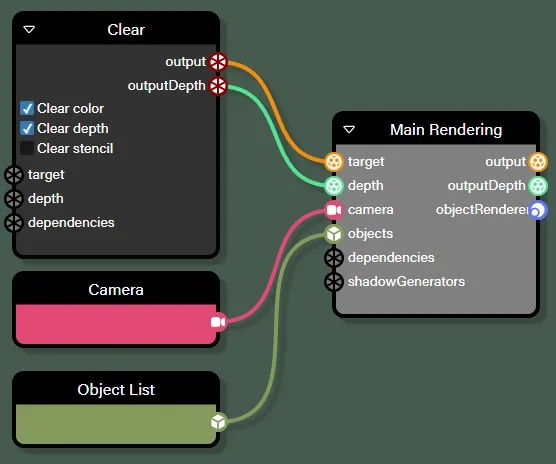
import { FrameGraph } from "@babylonjs/core/FrameGraph/frameGraph";import { FrameGraphObjectRendererTask } from "@babylonjs/core/FrameGraph/Tasks/Rendering/objectRendererTask";import { FrameGraphClearTextureTask } from "@babylonjs/core/FrameGraph/Tasks/Texture/clearTextureTask";const frameGraph = new FrameGraph(scene);
// Clear taskconst clearTask = new FrameGraphClearTextureTask("clear", frameGraph);
// Defines the task inputsclearTask.targetTexture = colorTexture;clearTask.depthTexture = depthTexture;
// Adds the task to the graphframeGraph.addTask(clearTask);
// Render taskconst renderTask = new FrameGraphObjectRendererTask("renderObjects", frameGraph, scene);
// Connects certain inputs of the class to the outputs of the Clear taskrenderTask.targetTexture = clearTask.outputTexture;renderTask.depthTexture = clearTask.outputDepthTexture;
// Defines other inpputsrenderTask.objectList = rlist;renderTask.camera = camera;
// Adds the task to the graphframeGraph.addTask(renderTask);
...adds other tasks...
// Builds the graph when all tasks have been added and wait until everything is ready to be run / executedawait frameGraph.buildAsync();
// When you want to render the graph, calls:frameGraph.execute();
// Alternatively, if you set the graph at scene level, execute() will be called automatically every framescene.frameGraph = frameGraph;
This code corresponds to this graph:
FrameGraphTask
Link to class.
This is the base class for a task in a frame graph. A task is usually a rendering process, but it may also be unrelated to rendering (for example, we have a culling task in the frame graph to cull objects relative to a camera).
Main methods and properties
initAsync(). This function is called once after the task has been added to the frame graph and before the frame graph is built for the first time. This allows you to initialize asynchronous resources, which is not possible in the constructor.record(). Called byFrameGraphat build time, it is responsible for creating passes for the task.isReady(). Checks if the task is ready to be executed.- onBeforeTaskExecute. An observable that is triggered before the task is executed.
- onAfterTaskExecute. An observable that is triggered after the task is executed.
- disabled. Property that allows you to enable/disable a task.
- dependencies. Property that allows you to define the dependencies (texture) of the task.
Note that as a user of a frame graph (as opposed to creating new tasks), you do not need to concern yourself with the methods outlined above: these methods are automatically called by the framework when you use it.
Passes
The main purpose of a task is to manage a list of passes: these passes are executed when the execute() method of the frame graph is called (which in turn calls the _execute() method of each task).
Passes are created by the record() method, which is the main method of a task, and must be implemented by classes extending FrameGraphTask (record() is abstract in FrameGraphTask). Different types of passes can be created (normal passes, rendering passes, and object list passes). The type of pass you create (by calling the appropriate method of FrameGraph) determines the type of context that the callback passed to Pass.setExecuteFunc(func: (context: T) => void) receives, which is the function executed when the pass is executed:
- FrameGraphContext for normal passes
- FrameGraphRenderContext for render passes
- FrameGraphContext for object list passes (there is no special context class for object list passes yet, but this may change in the future)
In turn, the context determines what you can do during the execution of the pass (the FrameGraphContext class does not have any rendering-related methods, for example, contrary to FrameGraphRenderContext).
Compared to other frame graph implementations, Babylon.js is a bit unusual when it comes to passes, as there are two sets of passes: regular passes and disabled passes. The latter are executed instead of the former if the task is disabled (disabled property set to true).
This allows you to easily “remove” a task from the graph without actually deleting it. Removing a task from a graph can be a bit complicated, as the inputs/outputs of other tasks must be reconnected to account for the removal, and the graph must be rebuilt to regenerate the passes. In comparison, disabling a task is very easy and does not require any of these operations. However, this simplicity comes at a price: performance may be (slightly) worse when a task is disabled than when it is removed from the graph. This is because some tasks still need to perform some processing when they are disabled. For example, a post-processing task must copy the contents of its source texture to the target texture when it is disabled. If a post-processing task is completely removed from the graph, you will save this copy. As is often the case, this is a trade-off between ease of use and performance.
Task dependencies
Another property worth mentioning is dependencies.
You can add a texture to a task's dependencies to indicate that a texture must retain its contents at least until that task before the texture optimizer can reuse it for subsequent tasks. If you do not do this, in some cases, a texture may be reused too early and the graph result may not match your expectations.
Note that this can only happen if you retrieve a texture from the frame graph to use it in external code. For example, if you generate a texture in the frame graph and then later use that texture as a diffuse texture for a material that will be used to render a mesh in another task in the graph, the texture optimizer could potentially reuse this texture for other purposes, as it does not know that the texture must retain its content even after it has been generated (we are assuming that this texture is not explicitly reused by another task in the graph afterwards, which would extend its lifetime).
Babylon.js already implements a number of tasks (see Frame Graph Task List), but you can also implement your own tasks (see the example Implementing volumetric lighting with frame graphs, which explains in detail how to implement a custom task).
Code example
As an illustration, here is the complete implementation of a simple task, the “copy to back buffer color” task (the class FrameGraphCopyToBackbufferColorTask):
export class FrameGraphCopyToBackbufferColorTask extends FrameGraphTask {    /**     * The source texture to copy to the backbuffer color texture.     */    public sourceTexture: FrameGraphTextureHandle;
    public record() {        if (this.sourceTexture === undefined) {            throw new Error(`FrameGraphCopyToBackbufferColorTask "${this.name}": sourceTexture is required`);        }
        const pass = this._frameGraph.addRenderPass(this.name);
        pass.addDependencies(this.sourceTexture);
        pass.setRenderTarget(backbufferColorTextureHandle);        pass.setExecuteFunc((context) => {            if (!context.isBackbuffer(this.sourceTexture)) {                context.copyTexture(this.sourceTexture);            }        });
        const passDisabled = this._frameGraph.addRenderPass(this.name + "_disabled", true);
        passDisabled.setRenderTarget(backbufferColorTextureHandle);        passDisabled.setExecuteFunc((_context) => {});    }}
Notes:
- For a render pass, you must specify which texture the pass should be rendered to by calling the
RenderPass.setRenderTarget(textureHandle)method. - To create a render pass that is used when the task is disabled, simply pass true as the second parameter to
FrameGraph.addXXXPass(name, whenTaskDisabled).
FrameGraphTaskMultiRenderTarget
Link to class.
This is the base class for frame graph tasks that involve multi-target rendering.
Main methods and properties
setOutputLayerAndFaceIndices(indices: LayerAndFaceIndex[]). Sets the output layer and face indices for multi-target rendering._updateLayerAndFaceIndices(pass: FrameGraphRenderPass).
If you are implementing a task that needs to support multi-target rendering, you should extend this class rather than FrameGraphTask:
- The user can use the
setOutputLayerAndFaceIndices()method to set the layer and face indices of the textures they want to render, in case they render to a 2D texture array, a 3D texture or a Cube texture. - In your implementation of the rendering pass, call
_updateLayerAndFaceIndices()to ensure that the user's choices are correctly applied.
You can refer to the code of the FrameGraphClearTextureTask and FrameGraphObjectRendererTask classes, both of which support multi-target rendering.
FrameGraphTextureManager
Link to class.
This class is responsible for managing textures (render target textures, i.e., the textures we render to) in a frame graph.
Main methods and properties
getTextureFromHandle(handle). Retrieves the actual texture (anInternalTextureinstance) from a texture handle.importTexture(name, internalTexture). Imports anInternalTextureinstance into the texture manager. This method returns a handle so that the texture can be used in the frame graph (see explanations below regarding handles).createRenderTargetTexture(name, creationOptions). Creates a texture to be used in the render graph. Returns a handle.createDanglingHandle(). Creates an empty handle. You must callresolveDanglingHandle()later, before building the graph, to associate a texture with this handle.resolveDanglingHandle(danglingHandle, handle?, newTextureName?, creationOptions?). Associates a texture with a dangling handle. If you do not provide a handle for a texture (second parameter), the third and fourth parameters are used to create a new texture handle by callingcreateRenderTargetTexture(newTextureName, creationOptions).
Texture Handles
To achieve texture reuse (enabled via FrameGraph.optimizeTextureAllocation), which is one of the main goals of frame graphs, textures must be manipulated via handles (which are just numbers under the hood) and not directly through a reference (pointer) to the actual texture. This way, the system is free to link the same texture to different handles without the user knowing. Whenever you need an actual texture pointer, use the getTextureFromHandle(handle) method.
When you want to create a texture (render target) to use in a frame graph, call the FrameGraphTextureManager.createRenderTargetTexture(name, creationOptions) method. This method will return a handle to the texture, which you can then use as input for certain tasks, for example:
import { Constants } from "@babylonjs/core/Engines/constants";import { FrameGraphClearTextureTask } from "@babylonjs/core/FrameGraph/Tasks/Texture/clearTextureTask";const colorTexture = frameGraph.textureManager.createRenderTargetTexture("color", {    size: { width: 100, height: 100 },    options: {        createMipMaps: false,        types: [Constants.TEXTURETYPE_FLOAT],        formats: [Constants.TEXTUREFORMAT_RGBA],        samples: 1,        useSRGBBuffers: [false],        labels: [“color”],    },    sizeIsPercentage: true,});
const clearTask = new FrameGraphClearTextureTask("clear", frameGraph);
clearTask.clearColor = true;clearTask.targetTexture = colorTexture;
frameGraph.addTask(clearTask);
Dangling texture handles
Sometimes you want to create a texture handle, but you don't yet know what the texture actually is. This happens for all tasks that have an output texture. For these tasks, we want to create the output handle as soon as possible, so that this handle can be used when we build and connect the tasks of a frame graph.
For example:
import { FrameGraphObjectRendererTask } from "@babylonjs/core/FrameGraph/Tasks/Rendering/objectRendererTask";import { FrameGraphClearTextureTask } from "@babylonjs/core/FrameGraph/Tasks/Texture/clearTextureTask";const clearTask = new FrameGraphClearTextureTask(“clear”, frameGraph);
...define the properties of clearTask...
const renderTask = new FrameGraphObjectRendererTask(“renderObjects”, frameGraph, scene);
renderTask.targetTexture = clearTask.outputTexture;
clearTask.outputTexture must have a value right after the task is created, because we use it immediately to set the value of renderTask.targetTexture. This means that the handle must be created in the FrameGraphClearTextureTask constructor, but at this point we don't have enough information to associate a texture with this handle. That's why we create a dangling handle in the constructor, which we assign to FrameGraphClearTextureTask.outputTexture (the same for the depth texture):
constructor(name: string, frameGraph: FrameGraph) {    super(name, frameGraph);
    this.outputTexture = this._frameGraph.textureManager.createDanglingHandle();    this.outputDepthTexture = this._frameGraph.textureManager.createDanglingHandle();}
Later (in FrameGraphClearTextureTask.record()), we will resolve the dangling handle (by calling FrameGraphTextureManager.resolveDanglingHandle()) with a real texture handle.
History textures
Babylon supports a simplified version of history textures: ping-pong textures.
A ping-pong texture is a set of two textures, where one texture is used during frame X, the other during frame X + 1, and then we return to the first texture in frame X + 2, etc.
This means that writes and reads to a ping-pong texture always use the same texture in a given frame, except when a rendering operation renders to the ping-pong texture and the shader used for that rendering also uses the ping-pong texture as input: in this case, the shader uses the other texture.
This can be useful for implementing certain effects. For example, the TAA (Temporal Anti-Aliasing) post-process task uses a ping-pong texture to accumulate different, slightly offset renderings for each frame.
It is very easy to use (extract from the record() method of FrameGraphTAATask):
- Create the ping-pong texture
const pingPongTextureCreationOptions: FrameGraphTextureCreationOptions = {    ...creation options here...
    isHistoryTexture: true,};
const pingPongHandle = textureManager.createRenderTargetTexture(`${this.name} history`, pingPongTextureCreationOptions);
textureManager.resolveDanglingHandle(this.outputTexture, pingPongHandle);
pass.setRenderTarget(this.outputTexture);
The important parameter is isHistoryTexture: true, which tells the system that this texture is actually a history texture (ping-pong). Note that we define this texture as the output texture of the task/render pass.
- Apply the post-process shader when the pass is executed
pass.setExecuteFunc((context) => { context.applyFullScreenEffect( this._postProcessDrawWrapper, () => { context.bindTextureHandle(this._postProcessDrawWrapper.effect!, "textureSampler", this.sourceTexture!); context.bindTextureHandle(this._postProcessDrawWrapper.effect!, "historySampler", pingPongHandle); this.postProcess.bind(); } );});You can see that the ping-pong texture is used in read mode by the TAA shader and is bound under the name “historySampler”. This means that it is the other texture of the ping-pong texture that will be bound to the shader during this frame (i.e., the texture we wrote to in the previous frame), not the texture we are writing to.
Pass, RenderPass, ObjectListPass
Link to Pass class.
Link to RenderPass class.
Link to ObjectListPass class.
These classes are used to create different types of passes within a task.
Main methods and properties
All types of passes:
setExecuteFunc(func). Sets the function that will be executed when the pass is run.
Render passes:
setRenderTarget(renderTargetHandle?). Sets the texture to render to during the pass execution.setRenderTargetDepth(renderTargetHandle?). Sets the depth attachment texture to use during pass execution.addDependencies(dependencies). Adds a texture dependency to this pass.
Object list passes:
setObjectList(objectList). Sets the list of objects output by the pass.
Working with passes
Passes must not be created directly (their constructor is marked as “internal”), but by calling FrameGraph.addPass(name, whenTaskDisabled), FrameGraph.addRenderPass(name, whenTaskDisabled), or FrameGraph.addObjectListPass(name, whenTaskDisabled). Furthermore, these methods will check that they are called from a FrameGraphTask.record() method, as you are not allowed to create passes from any other location. This is necessary for the frame graph class to manage the graph correctly.
Depending on the type of pass you are creating, the callback method you provide when calling setExecuteFunc(callback) will be called by the system with an appropriate context: FrameGraphContext for normal and object list passes, and FrameGraphRenderContext for a render pass. You can use this context in your callback function to implement the runtime of the pass.
As explained above, you can also create tasks to be executed when the task is disabled: simply pass true as the second parameter for the various methods for creating passes. If no passes have been created for the disabled state of a task, the normal passes will be used when the task is disabled.
Code example
Here's how the class FrameGraphCopyToBackbufferColorTask implements the record() method:
public record() {    if (this.sourceTexture === undefined) {        throw new Error(`FrameGraphCopyToBackbufferColorTask "${this.name}": sourceTexture is required`);    }
    const pass = this._frameGraph.addRenderPass(this.name);
    pass.addDependencies(this.sourceTexture);
    pass.setRenderTarget(backbufferColorTextureHandle);    pass.setExecuteFunc((context) => {        if (!context.isBackbuffer(this.sourceTexture)) {            context.copyTexture(this.sourceTexture);        }    });
    const passDisabled = this._frameGraph.addRenderPass(this.name + "_disabled", true);
    passDisabled.setRenderTarget(backbufferColorTextureHandle);    passDisabled.setExecuteFunc((_context) => {});}
A render pass is created, and sourceTexture is added to the pass dependencies. The output texture of the pass is set to backbufferColorTextureHandle, which is a special handle referring to the back buffer (the screen).
The callback passed to setExecuteFunc() is a simple function that just copies the source texture to the back buffer (we first check if the source texture is not already the back buffer, in which case we don't have to do the copy!).
We also create a specific pass for when the task is disabled: this pass is quite simple, as the callback simply does nothing!
Of course, you are not limited to a single pass per task; you can create multiple passes if your task is more complicated than the example above.