Project Files (.babylonproj)
Overview
A .babylonproj file is a single-file project bundle for a Babylon scene. It packages three layers in one zip:
- A Smart Asset map — the registry of external assets the scene references (Smart Assets).
- The Override Manager state — declarative property diffs applied after load (Override Manager).
- A companion
.babylon— meshes, lights, cameras, transform nodes, and materials that are not tracked by any smart asset (i.e. user-created scene content), plus a small side table mapping material texture slots back to SAM-tracked textures.
Together these three layers let a project capture both external content (glTF models, environment maps, textures) and local authoring (a sphere the user built, a PBR material, a camera placement) in a portable, declarative bundle. Reopening the project rebuilds the scene from the same external sources and reapplies the captured overrides on top.
.babylonproj is the save format produced by the Project Authoring pane in Inspector V2.
Working with project files in the Inspector
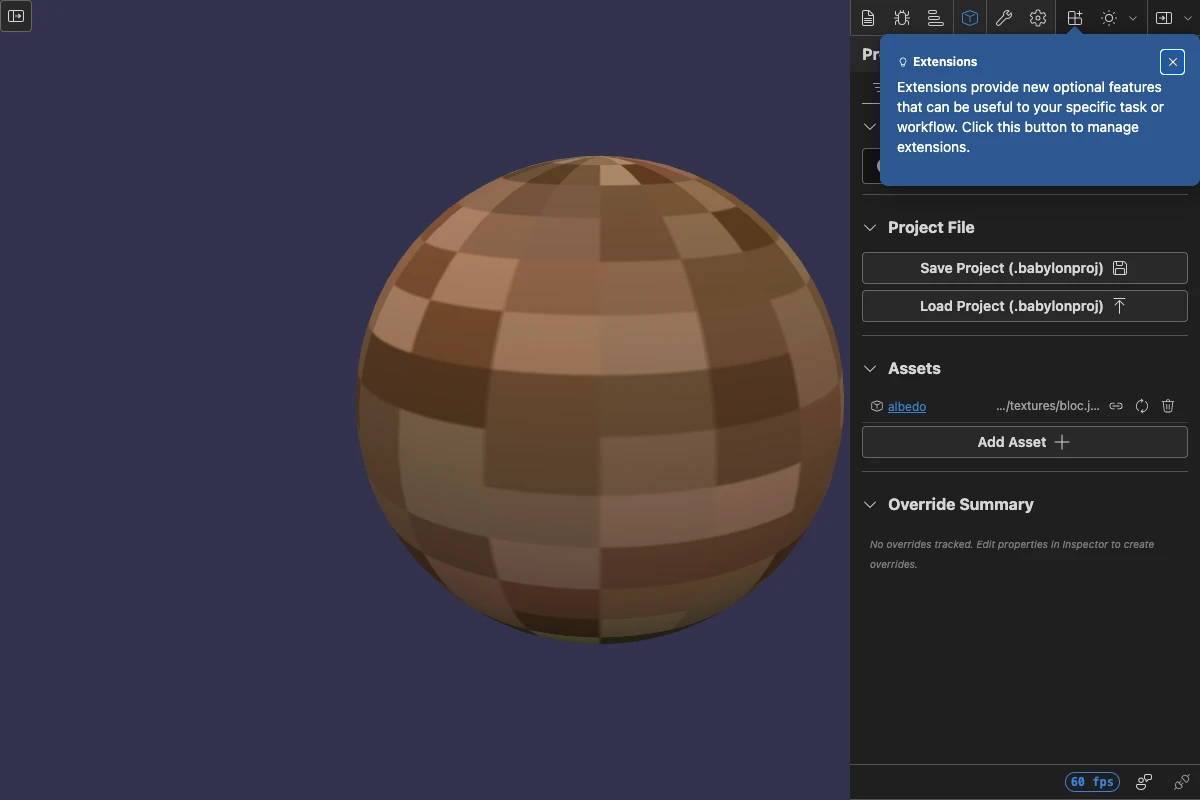
Open Inspector V2 against any scene and look for the Project Authoring pane in the right-hand pane toolbar (cube icon). It contains three sections:
- Project File — Save the current scene as
scene.babylonproj, or load an existing one. - Assets — The Smart Asset list. Drop glTFs, OBJs,
.babylonfiles, or textures here to register and load them under stable keys. Each row supports reload, unload, and remove. - Override Summary — A live list of every property override currently in the Override Manager registry.
The authoring loop is:
- Drag external assets into the Assets section (or call
RegisterSmartAsset/LoadSmartAssetAsyncfrom code). - Build any user content directly in the scene — code,
MeshBuilder, materials you author yourself, cameras and lights you place. - Tweak properties through the Properties pane. Each edit is captured as an override.
- Click Save Project (.babylonproj) to download the bundle.
- Reopen it later with Load Project (.babylonproj) in any session — the assets reload from their original URLs, your local content comes back from the companion
.babylon, and your overrides reapply on top.
File format
A .babylonproj is a standard zip archive with the following layout:
project.json__project_locals__.babylon (only if the scene has user-created objects)assets/<key>.<ext> (bundled local blobs, e.g. user-dragged files)project.json
{ "version": 2, "assets": { "boombox": { "url": "BoomBox/BoomBox.gltf" }, "albedo": { "url": "assets/albedo.png", "type": "texture" }, "__project_locals__": { "url": "__project_locals__.babylon" } }, "overrides": [ { "targetType": "materials", "targetName": "paintMat", "targetIndex": 0, "propertyPath": "albedoColor", "value": [1, 0, 0] } ], "companionBindings": { "paintMat": { "albedoTexture": "albedo" } }}assetsis the Smart Asset map, extended with one reserved key (__project_locals__) that points at the companion.babyloninside the zip.overridesis the serialized Override Manager registry.companionBindingsrecords which texture slot on which user-authored material should be reattached to which SAM-tracked texture after load. This is what lets aPBRMaterialthe user built reference a SAM texture without embedding texture bytes inside the companion.babylon.
Remote URLs (http://, https://) in the asset map are stored as references and not bundled into the zip. Local content (blob: and data: URIs — typically files the user dragged in) is fetched, written into assets/, and the entry's URL is rewritten to a relative path. On load, the loader recreates blob URLs for each bundled file and feeds them back through the Smart Asset Manager.
Companion .babylon and texture bindings
The companion .babylon is generated by SceneSerializer.SerializeMesh from the subset of scene content that is not owned by any external smart asset — every user-created Mesh, Light, Camera, TransformNode, and standalone Material.
Before the companion is written, every serialized material is walked for *Texture slots that resolve to a SAM-tracked texture. Each such slot is removed from the serialized material data and recorded in companionBindings instead. After the companion loads on the next open, the project loader walks companionBindings and reattaches each slot to the SAM texture by key — without ever needing to embed texture bytes or refer to a now-defunct blob: URL.
If there are no user-created objects at all, the companion .babylon is omitted and the __project_locals__ entry is not added to the asset map.
Code API
The same operations the Project Authoring pane performs are available as exported functions on @babylonjs/inspector-v2/projects/projectFile:
| Function | Purpose |
|---|---|
SaveProjectFileAsync(scene) | Produces a Blob containing the .babylonproj zip. |
LoadProjectFileAsync(scene, file) | Loads a .babylonproj zip into the scene. |
SerializeProject(scene, baseUrl?) | Lower-level: returns an IProjectBundle (the JSON document + an optional companion blob), useful for serving the JSON over a network without zipping. |
LoadProjectAsync(scene, source, rootUrl?) | Lower-level: load from a URL, File, or pre-parsed ISerializedProject JSON object. |
DeserializeProject(data) | Validate a parsed JSON document against the v2 schema. |
The zip layer uses fflate, loaded via dynamic import() so the dependency stays out of the main inspector bundle and zip/unzip runs in a Web Worker instead of blocking the UI thread.
import { SaveProjectFileAsync, LoadProjectFileAsync } from "@babylonjs/inspector-v2/projects/projectFile";import { Tools } from "@babylonjs/core";
// Saveconst blob = await SaveProjectFileAsync(scene);Tools.Download(blob, "scene.babylonproj");
// Loadawait LoadProjectFileAsync(scene, fileFromInputElement);
LoadProjectAsync and LoadProjectFileAsync both follow the same sequence: clear the existing smart-asset registry and dispose user-owned scene content, register every asset entry, LoadAllSmartAssetsAsync, then load the companion .babylon (so its bindings can find the now-loaded textures), then apply overrides. The active render loop is paused for the duration of the swap so disposing the camera mid-frame can't kill the loop with a "No camera defined" exception.
What round-trips, and what doesn't
Anything tracked by Smart Assets round-trips by URL (or, for local files, by being bundled into the zip). User-created Mesh geometry, Materials (Standard / PBR / Multi / Node), texture-slot bindings to SAM textures, Lights, Cameras, TransformNodes, and scene/material image processing all round-trip via the companion .babylon. Property overrides on any of the above are reapplied last.
Things that don't round-trip today:
PostProcessattachments to cameras (post-processes attach to a specific camera instance, which is disposed and recreated on load).AdvancedDynamicTextureGUI controls (not part of the.babylonformat).- Audio (
Sound/AudioEnginestate). - Particle systems with live runtime state and baked vertex animations.
- Complex shader-driven content like Gaussian Splatting (the mesh round-trips, but its companion utility materials get duplicated on each load cycle).
- Skeleton animation playback state.
If a scene "looks different after load," it is almost always one of the items above rather than camera or mesh state drift.
Related
- Smart Assets — the registry of external assets that the project's
assetslayer is built on. - Override Manager — the property-diff registry that the project's
overrideslayer is built on.
Further reading
Smart Assets
A scene-level registry that maps stable keys to asset URLs so models, textures, and materials can be reloaded, swapped, and persisted independently of the runtime objects they create.
Override Manager
A scene-level registry of property diffs that persists across reloads — the foundation for Inspector-driven authoring and the overrides layer of the .babylonproj project file.
