Step 2 - Move The Hero
Goal
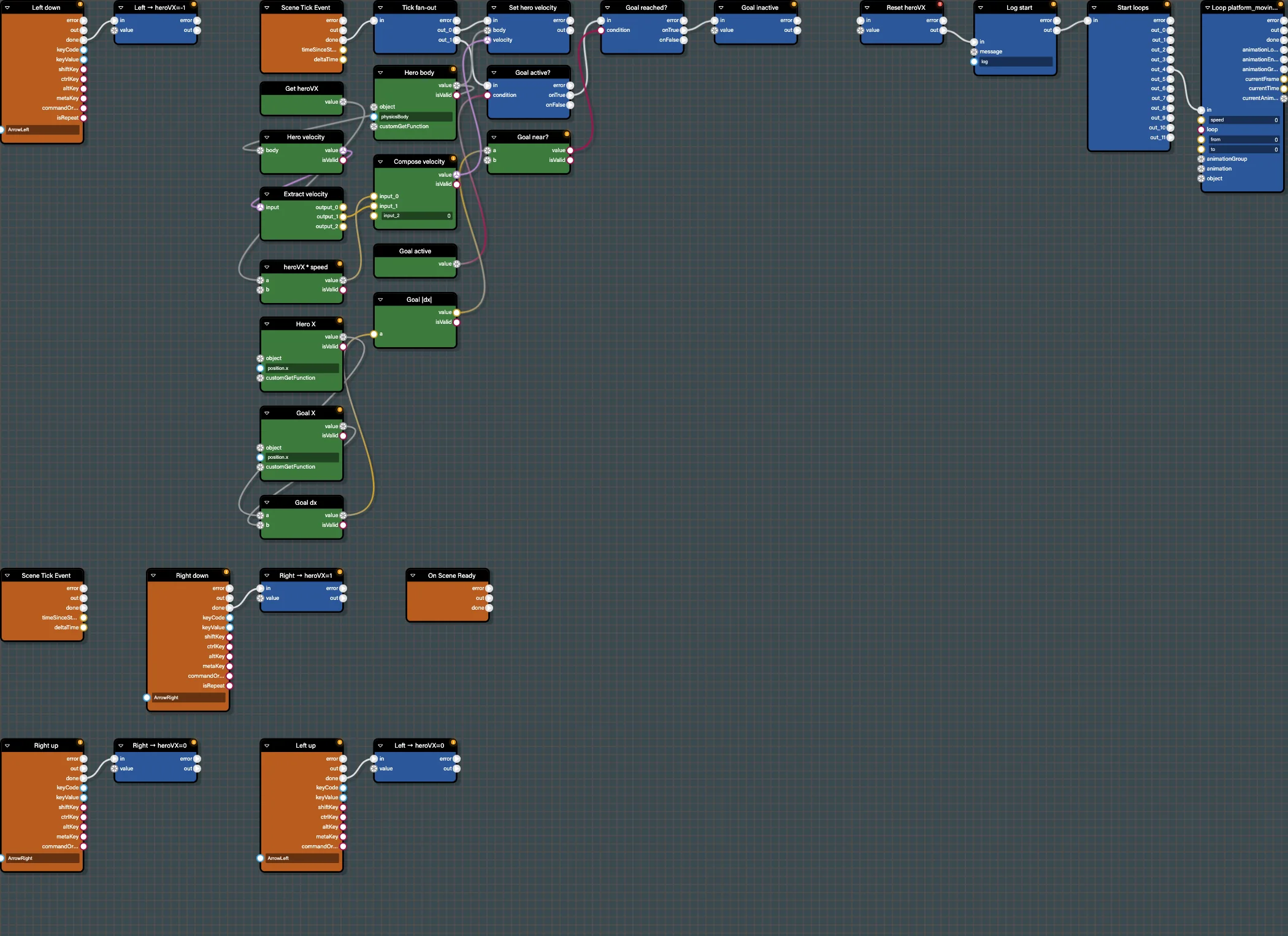
Make the hero run left and right with the arrow keys. The pattern is: keyboard events set a direction variable, and a per-frame tick converts that direction into physics velocity.
Open this step in the editor: #1CUUOO (load scene P41T6E#2 in the preview).
Run this step:
Babylon Bros - MoveBlocks Used
KeyDownEvent,KeyUpEvent(Events)SetVariable,GetVariable(Data Access)SceneTickEvent(Events)GetProperty/SetLinearVelocity(Data Access / Physics)Multiply,CombineVector3(Math / Data Conversion)
Step By Step
1. Initialize State
Add SceneReadyEvent and a SetVariable named heroVX = 0. This sets the starting horizontal direction once the scene is ready. Use the property panel to set the variable type to number.
2. Read The Keys
Add two KeyDownEvent blocks. Configure one for ArrowRight and one for ArrowLeft in the property panel. Wire each into a SetVariable that sets heroVX to 1 and -1. Add two KeyUpEvent blocks that reset heroVX to 0.
Use a sticky note (Ctrl/Cmd+M) to label this cluster "Input".
3. Apply Velocity Each Frame
Add SceneTickEvent. Read heroVX with GetVariable, multiply it by a speed Constant, and build a velocity vector with CombineVector3 (x = heroVX*speed, y = current vy, z = 0). Feed it into SetLinearVelocity targeting the hero physics body, selected from the scene picker.
4. Group It
Select the tick blocks and press Ctrl/Cmd+G to make a smart group. This keeps the canvas readable as later steps add more.
Test In The Editor
Press Start and use the arrow keys in the preview. The hero should run. Turn on Debug Mode to watch the tick blocks light up each frame, and inspect heroVX in the Variables panel as you press keys.
Save
Save to the snippet server. Your graph should match #1CUUOO. Continue with Step 3 - Add Jumping.
Further reading
Step 1 - Set Up The Editor
Load the Babylon Bros scene into the Flow Graph Editor, confirm physics, and create an empty graph ready for logic.

Step 3 - Add Jumping
Add a grounded jump to Babylon Bros using a key event, a ground check branch, an upward impulse, and a sound in the Flow Graph Editor.
Control Flow Blocks
Detailed reference for the Control Flow family in the Babylon.js Flow Graph Editor.