FidelityFX Super Resolution (FSR 1) Rendering Pipeline
Introduction
Rendering at the display's full resolution is often the most expensive thing a scene does, and the cost grows with the square of the resolution. Halving the resolution in each axis quarters the number of pixels the GPU has to shade, but a naive upscale back to display size gives you a soft, blurry image — the detail is simply gone.
Super resolution is the idea of getting some of that detail back. AMD's FidelityFX Super Resolution 1 (FSR 1) is a spatial upscaler: it looks only at the current frame, reconstructs edges from it, and then sharpens the result. Because it needs no motion vectors and no history, it is cheap, it cannot produce ghosting, and it drops into an existing pipeline without any change to how your scene is drawn.
Babylon.js implements FSR 1 as the FSR1RenderingPipeline, and it runs on WebGPU, WebGL 2, and Babylon Native.
FSR 1 rendering pipeline
Attaching the pipeline is all that is required — it renders the scene at a reduced resolution and upscales the result to the canvas:
import { FSR1RenderingPipeline } from "@babylonjs/core/PostProcesses/RenderPipeline/Pipelines/fsr1RenderingPipeline";const fsr = new FSR1RenderingPipeline("fsr", scene, [camera]);fsr.scaleFactor = FSR1RenderingPipeline.SCALE_QUALITY;fsr.sharpnessStops = 0.2;Judging the result
Compare FSR 1 against a naive upscale of the same reduced-resolution render, not against a full-resolution one. The pipeline's whole purpose is to render fewer pixels, so switching it off renders at full resolution and will always look sharper. That comparison measures the resolution you chose to give up, not the quality of the reconstruction.
The figure below is the same scene at SCALE_PERFORMANCE, with FSR 1 between its two reference points. The inset magnifies the marked region.
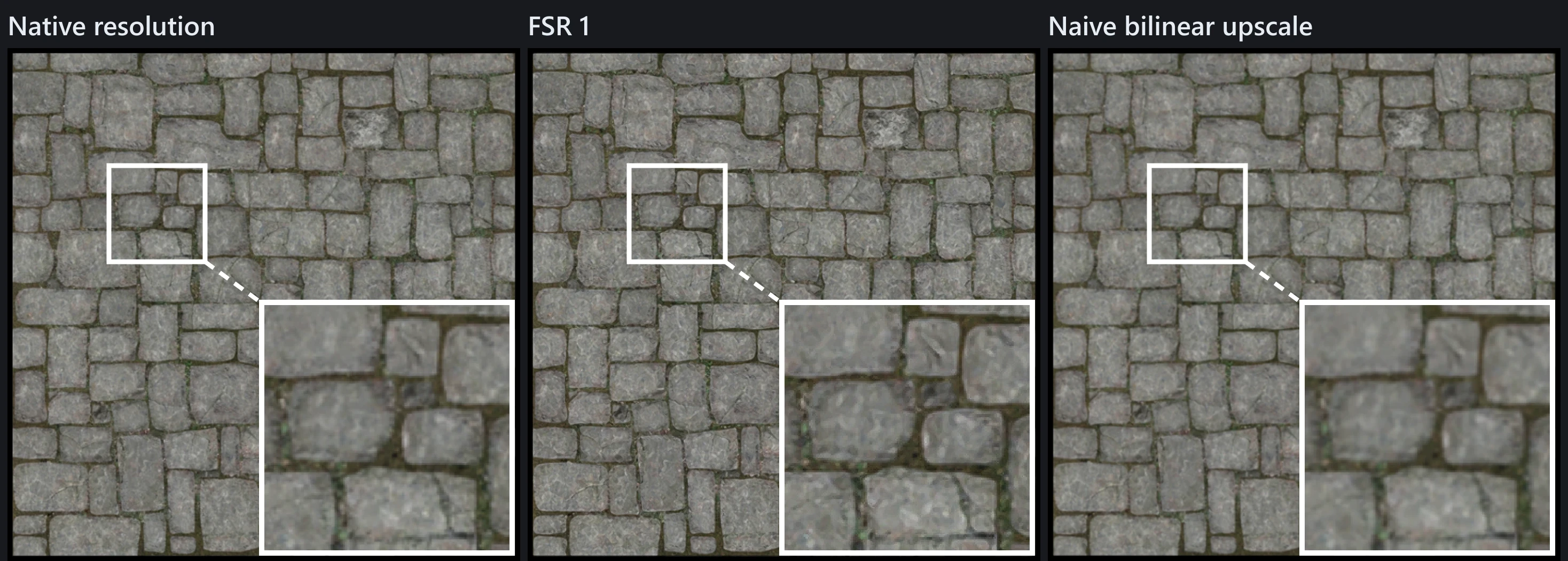
FSR 1 and the naive upscale cost the same to render. Look at the grout lines in the inset: FSR 1 holds them, the naive upscale lets them dissolve.
Settings
Scale factor
scaleFactor is how much smaller the scene is rendered in each axis, so a value of 2 renders a quarter as many pixels. AMD's recommended presets are available as constants:
| Constant | Value | Pixels rendered |
|---|---|---|
FSR1RenderingPipeline.SCALE_ULTRA_QUALITY | 1.3 | ~59% |
FSR1RenderingPipeline.SCALE_QUALITY | 1.5 | ~44% |
FSR1RenderingPipeline.SCALE_BALANCED | 1.7 | ~35% |
FSR1RenderingPipeline.SCALE_PERFORMANCE | 2.0 | 25% |
The default is SCALE_QUALITY. Larger values save more but give the upscaler less to work with; FSR 1 is a spatial algorithm, so detail that was never rendered cannot be invented.
Sharpness
fsr.sharpnessStops = 0.2;sharpnessStops is the number of stops — halvings — by which the sharpening pass is reduced, so 0 is maximum sharpness and larger values are progressively softer. The default is 0.2.
Anti-aliasing
fsr.samples = 4;samples sets the MSAA sample count used for the reduced-resolution render, defaulting to 4.
Do not turn anti-aliasing off. The upscaling pass amplifies aliased edges, so a jagged edge in the source becomes a more obvious artifact in the output. Keep MSAA on through this setting, or run a post-process solution such as FXAA or TAA.
Hardware support
if (fsr.isSupported) { // ...}FSR 1 requires WebGPU or WebGL 2, and is therefore unsupported on WebGL 1. Babylon Native is supported.
How it works
FSR 1 is two fragment passes, run in order.
EASU (Edge-Adaptive Spatial Upsampling) does the upscaling. For each output pixel it examines a neighbourhood of the reduced-resolution input, estimates the direction and strength of any edge running through it, and fits a filter that follows that edge rather than blurring across it. This is what separates it from bilinear filtering, which weights neighbours purely by distance and so softens every edge equally.
RCAS (Robust Contrast-Adaptive Sharpening) then sharpens the upscaled image. It adapts its strength to local contrast so that flat regions are left alone and detail is not over-sharpened into ringing. sharpnessStops scales this pass.
Both passes are fragment shaders rather than compute shaders, which is why the pipeline runs anywhere a standard post-process does — including backends with no compute support.
Choosing between FSR 1 and other options
FSR 1 is spatial: it sees one frame and nothing else. That is its strength and its limit.
- It cannot ghost, because it has no history to smear, which makes it well suited to scenes with fast movement.
- It cannot recover sub-pixel detail across frames, so it will not match a temporal technique on a static image. If your goal is anti-aliasing rather than performance, TAA accumulates detail over time and will produce a cleaner result.
The two solve different problems and can be used together: render smaller with FSR 1 for the performance, and anti-alias the source so the upscaler has clean edges to work from.