Introduction to Shaders
Introduction to Shaders in Babylon.js
A shader is a program processed by the Graphical Processing Unit (GPU) to produce a screen image by manipulating data to produce individual pixels. The GPU is optimised, through parallel processing, to deal with these thousands of operations in an extremely fast way.
Suggested Pre-Reading
- How To:
- Resources:
An Overview
Basic
To produce a Babylon.js scene, code is written in JavaScript, which the Babylon.js Engine processes and displays on screen. The scene can change through updates to the meshes, the lights, or the camera position. To show these changes in a timely way, the screen display (frame) is re-drawn up to 60 frames per second.
Simplified, the process is:
- Scene code is processed by the CPU through the BJS engine code to produce a virtual 3D model.
- The virtual 3D model is processed by the CPU through the BJS engine code to produce shader GPU code.
- The shader GPU code is processed by the GPU to produce the screen image.
For example, the Babylon.js Engine takes this code
import { MeshBuilder } from "@babylonjs/core/Meshes/meshBuilder";const box = MeshBuilder.CreateBox("box", {}, scene);and turns it into vertex data including positions, colors and normals.
The Babylon.js Engine creates shader code for this data and passes it to the GPU.
Custom
In addition to scene code, you can write your own shader code so that the process becomes:
- Scene code is processed by the CPU through the BJS engine code to produce a virtual 3D model.
- The virtual 3D model and user shader code are processed by the CPU through the BJS engine code to produce the shader GPU code.
- The shader GPU code is processed by the GPU to produce the screen image.
Types of Shader
Shaders are written in Graphics Library Shader Language (GLSL) and come in two parts:
-
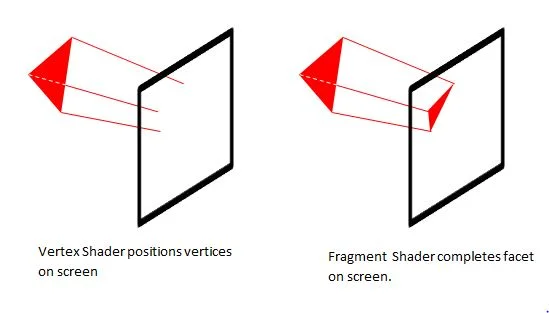
Vertex Shader: this takes the data for each vertex and determines where on the screen the pixel for it will be displayed and its color.
-
Fragment Shader: this uses data from the Vertex Shader to determine the position and color of the pixels to represent each facet of the mesh.
Fragment Shaders are sometimes referred to as Pixel Shaders.
Passing Variables
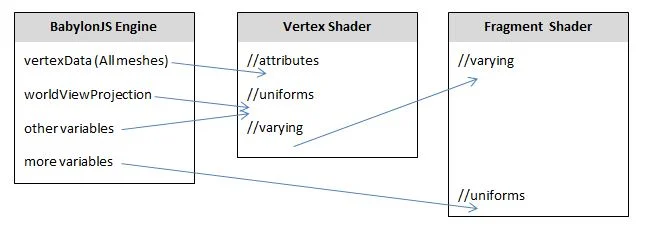
The vertex data for position, normal, and uv coordinates are passed to the Vertex Shader as attribute variables. User data can be passed to both the Vertex Shader and the Fragment Shader as uniform variables. Data can be passed from the Vertex Shader to the Fragment Shader using varying variables.
A vital uniform variable to declare in the Vertex Shader is worldViewProjection, as the Babylon.js Engine uses this to
pass scene 3D - 2D projection data to the Vertex Shader.
Variable types
All variables used in both shaders must be given a type and any numbers assigned to the variable must be consistent with its type.
For example:
int n = 2;float r = 2.0;The following example will throw an error:
float r = 2;Some examples of types are:
vec2: a two-dimensional vector of floating-point numbersvec3: a three-dimensional vector of floating-point numbersmat4: a matrix with 4 columns and 4 rows of floating-point numberssampler2D: a 2D texture image
Since vertex positions need to be as accurate as possible, all floating-point numbers should be set to high precision. This is done at the start of the code for each shader using:
precision highp floatBuilt In Variables
The GLSL language has a number of built-in variables. Two are vital to the operation of the two shaders and are always necessary:
| Variable | Description |
|---|---|
| gl_Position | provides positional data for screen coordinates |
| gl_FragColor | provides color data for the representation of a facet on screen |
Built In Inputs
| Attribute | Type | Description |
|---|---|---|
| position | vec3 | pixel: vertex position / fragment: face pixel position |
| normal | vec3 | pixel: vertex normal / fragment: face pixel normal |
| uv | vec2 | texture coordinate |
| Uniform | Type | Description |
|---|---|---|
| world | mat4 | mesh global transforming state (move + rotate + scale) |
| worldView | mat4 | global view part of mesh |
| worldViewProjection | mat4 | global camera |
| view | mat4 | mesh local view part |
| projection | mat4 | local camera |
| time | float | per each frame |
Functions
Functions need types, as do their parameters, and have the form:
float NAME(typed parameters) { *code*}Running Shader Code
Both the Vertex Shader and the Fragment Shader are run from a function that must be called main and be of type void, since it returns
no result. The empty parameter list must also be typed as void:
void main(void) { *code*}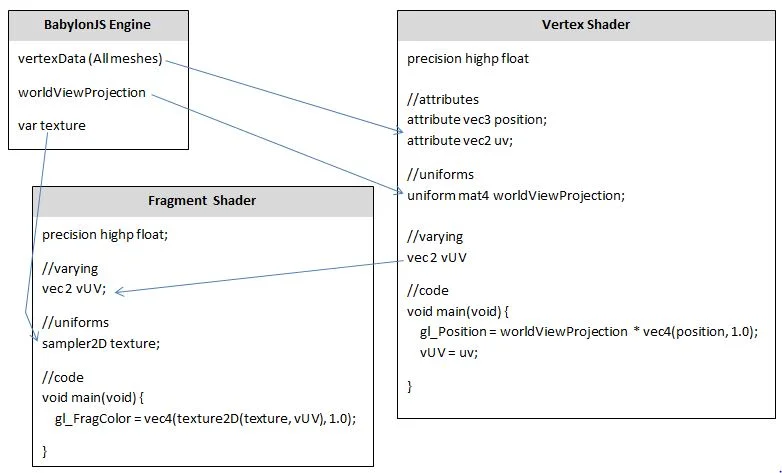
Putting Shader Code in Babylon.js
Here are four ways of putting shader code into your scene:
- Use BabylonJS Create Your Own Shader (CYOS) and download a zip file
- Write the Vertex and Fragment Shader Code into
<script>tags - Write, save and import a Vertex and Fragment Shader file of type .fx into your code
More details on this can be found below.