Putting Shader Code Into Babylon.js
Putting Shader Code in Babylon.js
Here are four ways of putting shader code into your scene:
- Use BabylonJS Create Your Own Shader (CYOS) and download a zip file;
- Write the Vertex and Fragment Shader Code into <script> tags
- Write, save and import a Vertex and Fragment Shader file of type .fx into your code;
- Use the shaderBuilder extension of Babylon.js.
Methods 1, 2 and 3 use BABYLON.ShaderMaterial to pass data to the shaders.
Shader preprocessing limitation
Babylon.js preprocesses vertex and fragment shader source before compilation and splits source lines at semicolons. Empty clauses can therefore be lost during preprocessing. For example, the valid GLSL and WGSL loop header for (;;) can be transformed into invalid shader code.
This is a limitation of Babylon.js shader processing, not of GLSL or WGSL themselves. Shader generators that emit empty semicolon clauses can be affected. Slang v2026.18.3 and earlier may emit for (;;) for unconditional WGSL loops; versions newer than v2026.18.3 emit WGSL's native loop construct instead and avoid this specific case.
Babylon.js CYOS Download
This site allows you to write code for a Vertex Shader and a Fragment Shader and see the results on a variety of meshes. Downloading a zip file produces a folder containing an index.html file and some image files for texture.
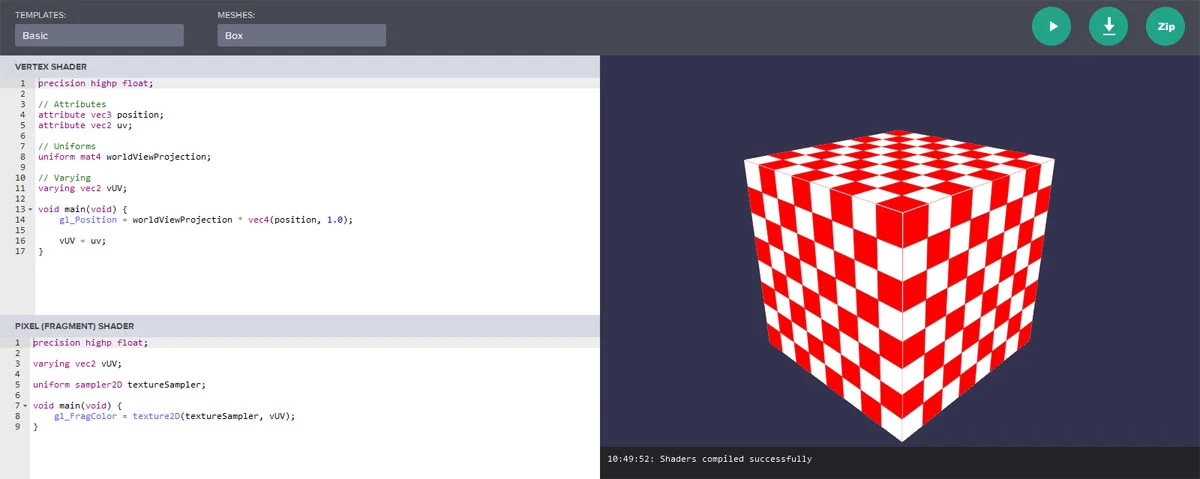
The index.html file contains the shader code in the correct format to apply as a material.
Within the HTML page, the shader code becomes this (in JavaScript):
import { Effect } from "@babylonjs/core/Materials/effect";Effect.ShadersStore["customVertexShader"] = "\r\n" + "precision highp float;\r\n" + "// Attributes\r\n" + "attribute vec3 position;\r\n" + "attribute vec2 uv;\r\n" + "// Uniforms\r\n" + "uniform mat4 worldViewProjection;\r\n" + "// Varying\r\n" + "varying vec2 vUV;\r\n" + "void main(void) {\r\n" + " gl_Position = worldViewProjection * vec4(position, 1.0);\r\n" + " vUV = uv;\r\n" + "}\r\n";Effect.ShadersStore["customFragmentShader"] = "\r\n" + "precision highp float;\r\n" + "varying vec2 vUV;\r\n" + "uniform sampler2D textureSampler;\r\n" + "void main(void) {\r\n" + " gl_FragColor = texture2D(textureSampler, vUV);\r\n" + "}\r\n";The JavaScript code to use the shader as a material is
import { ShaderMaterial } from "@babylonjs/core/Materials/shaderMaterial";const shaderMaterial = new ShaderMaterial("shader", scene, { vertex: "custom", fragment: "custom",}, { attributes: ["position", "normal", "uv"], uniforms: ["world", "worldView", "worldViewProjection", "view", "projection"],});and the JavaScript code to set a texture on the material is
import { Texture } from "@babylonjs/core/Materials/Textures/texture";const mainTexture = new Texture("amiga.jpg", scene);shaderMaterial.setTexture("textureSampler", mainTexture);and to use the material on a mesh is
mesh.material = shaderMaterial;Extracting the appropriate sections of Javascript code allows you to transfer them to your own scenes.
This method can easily be used in the Playground.
Playground Example From CYOSShader Code in <script> Tags
In the index.html file, the JavaScript code for the shaders is
<script type="application/vertexShader" id="vertexShaderCode">    #ifdef GL_ES        precision highp float;    #endif
    // Attributes    attribute vec3 position;    attribute vec2 uv;
    // Uniforms    uniform mat4 worldViewProjection;
    // Normal    varying vec2 vUV;
    void main(void) {        gl_Position = worldViewProjection * vec4(position, 1.0);            vUV = uv;    }</script>
<script type="application/fragmentShader" id="fragmentShaderCode">    #ifdef GL_ES        precision mediump float;    #endif
    varying vec2 vUV;
    uniform sampler2D textureSampler;
    void main(void) {        gl_FragColor = texture2D(textureSampler, vUV);    }</script>
The JavaScript code to use the shader as a material becomes
import { ShaderMaterial } from "@babylonjs/core/Materials/shaderMaterial";const shaderMaterial = new ShaderMaterial("shader", scene, { vertexElement: "vertexShaderCode", fragmentElement: "fragmentShaderCode",}, { attributes: ["position", "normal", "uv"], uniforms: ["world", "worldView", "worldViewProjection", "view", "projection"],});Shader Code in fx Files
Save your code in two files, one for the Vertex Shader and one for the Fragment Shader.
These files must be in the same folder as your index.html page and the names of the files must follow this format
COMMON_NAME.vertex.fx
COMMON_NAME.fragment.fx
The JavaScript code to use the shader as a material becomes
import { ShaderMaterial } from "@babylonjs/core/Materials/shaderMaterial";const shaderMaterial = new ShaderMaterial("shader", scene, "./COMMON_NAME", { attributes: ["position", "normal", "uv"], uniforms: ["world", "worldView", "worldViewProjection", "view", "projection"],});Note: ./ is necessary before the COMMON_NAME
It is also possible to access the fx files from a URL by giving the full URL, provided CORS is enabled for them.
Shader Includes
When building shaders, you sometimes have parts of your code that will be reused between multiple shaders. These are usually things like reused uniforms, functions, structs, and so on. A powerful way to handle this is:
import { Effect } from "@babylonjs/core/Materials/effect";Effect.IncludesShadersStore["includeName"] = "...";The includes already contain common shader elements for Babylon's StandardMaterial, PBR materials, ProceduralTextures, and more. See the Github https://github.com/BabylonJS/Babylon.js/tree/master/packages/dev/core/src/Shaders/ShadersInclude for a complete list of shader includes packaged with BJS.
Additionally, you can add anything you want to the IncludesShadersStore before or after scene compilation. To access these includes, simply call:
#include<includeName>Add this in the appropriate section of your shader code to have it injected into your shader when it is compiled see example.
Shader Builder
This is an extension to Babylon.js. Copy and save the source code for the extension and add it as
<script src="Babylonx.ShaderBuilder.js"></script>The Shader Builder engine needs to be initialised
BABYLONX.ShaderBuilder.InitializeEngine();The format for writing a ShaderBuilder is fluent coding, and it deals with attributes and Babylon.js uniforms automatically.
An example equivalent to the shader code used in methods 1 to 3 above would be
mesh.material = new BABYLONX.ShaderBuilder().Map({ path: "textures/amiga.jpg" }).BuildMaterial(scene);Guide Example using ShaderBuilder
This method can be used in the Playground. However, it does require loading the ShaderBuilder JavaScript file and an onLoad
function before it can be called.