Use an history texture to create an onion-skin renderer
Introduction
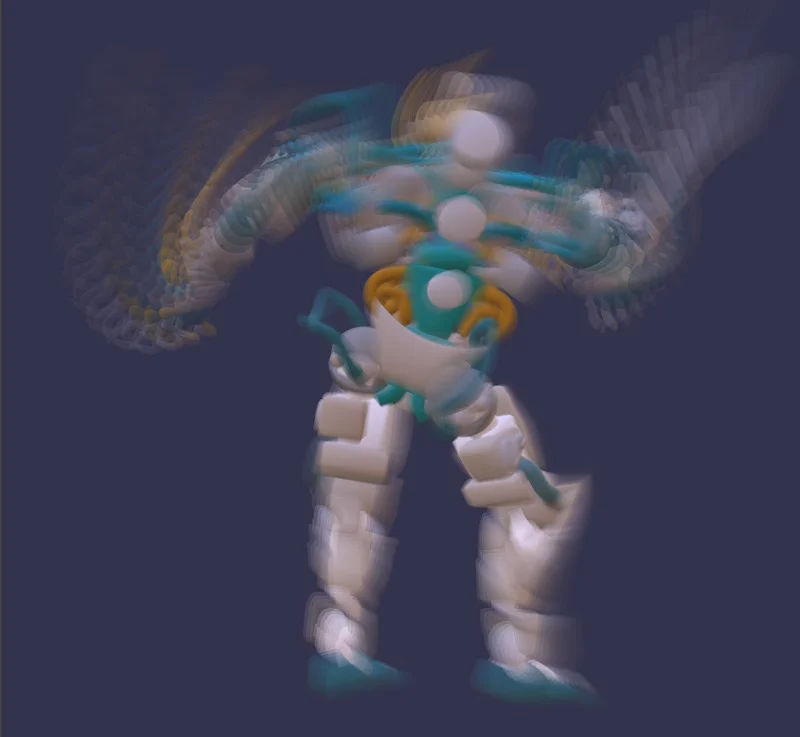
Babylon.js supports a simplified version of history textures: ping-pong textures.
For more information on this feature, see History textures.
We will use a ping-pong texture to implement onion-skin rendering, which leaves a trail for all moving objects. This effect is achieved by accumulating several renderings over time and blending them appropriately.
Implementing the FrameGraphOnionSkinObjectRendererTask class
To simplify the implementation, we will extend FrameGraphObjectRendererTask and implement our own record() method with the minimum amount of code needed to show the use of history textures. Notably, we will not reimplement OIT, camera rigs, or bounding-box rendering support: you can refer to the implementation of the FrameGraphObjectRendererTask.record() method if you want to add support for these features.
Initializing the full screen effect
We will apply post-processing to the rendering, which will blend the current output with that of the previous frame.
To do this, we need to create an effect to encapsulate this shader code:
import { Effect } from "@babylonjs/core/Materials/effect";Effect.ShadersStore["onionSkinPixelShader"] = `    uniform sampler2D lastFrame;    uniform sampler2D textureSampler;
    void main(void) {        vec4 curr = texelFetch(textureSampler, ivec2(gl_FragCoord.xy), 0);        vec4 last = texelFetch(lastFrame, ivec2(gl_FragCoord.xy), 0);
        curr.rgb = mix(curr.rgb, last.rgb, 0.8);
        gl_FragColor = curr;    }`;
The shader code is very simple: for each pixel, we blend the previous color with the current color. You can change the value 0.8 to strengthen or weaken the effect.
The effect can be easily created using the EffectWrapper class:
import { FrameGraphObjectRendererTask } from "@babylonjs/core/FrameGraph/Tasks/Rendering/objectRendererTask";import { EffectWrapper } from "@babylonjs/core/Materials/effectRenderer";import type { FrameGraph } from "@babylonjs/core/FrameGraph/frameGraph";import type { FrameGraphRenderPass } from "@babylonjs/core/FrameGraph/Passes/renderPass";import type { DrawWrapper } from "@babylonjs/core/Materials/drawWrapper";import type { ObjectRendererOptions } from "@babylonjs/core/Rendering/objectRenderer";import type { Scene } from "@babylonjs/core/scene";export class FrameGraphOnionSkinObjectRendererTask extends FrameGraphObjectRendererTask { protected readonly _effectWrapper: EffectWrapper; protected readonly _drawWrapper: DrawWrapper; constructor(name: string, frameGraph: FrameGraph, scene: Scene, options?: ObjectRendererOptions) { super(name, frameGraph, scene, options); this._effectWrapper = new EffectWrapper({ engine: engine, fragmentShader: "onionSkin", samplerNames: ["lastFrame", "textureSampler"], name: "effect wrapper", useShaderStore: true, }); this._drawWrapper = this._effectWrapper.drawWrapper; } public record(): FrameGraphRenderPass { // TODO: implement the method }}Implementing the record method
Let's implement the record() method.
Checking input parameters
First, we perform a number of checks on the input parameters to ensure that we will not generate any errors when running the graph:
if (this.targetTexture === undefined || this.objectList === undefined) {    throw new Error(`FrameGraphOnionSkinObjectRendererTask ${this.name}: targetTexture and objectList are required`);}
const textureManager = this._frameGraph.textureManager;const targetTextures = Array.isArray(this.targetTexture) ? this.targetTexture : [this.targetTexture];
if (textureManager.isBackbuffer(targetTextures[0]) || (this.depthTexture !== undefined && textureManager.isBackbuffer(this.depthTexture))) {    throw new Error(`FrameGraphOnionSkinObjectRendererTask ${this.name}: the back buffer color/depth textures are not allowed. Use regular textures instead.`);}
const outputTextureDescription = textureManager.getTextureDescription(targetTextures[0]);
let depthEnabled = false;
if (this.depthTexture !== undefined) {    const depthTextureDescription = textureManager.getTextureDescription(this.depthTexture);    if (depthTextureDescription.options.samples !== outputTextureDescription.options.samples) {        throw new Error(`FrameGraphOnionSkinObjectRendererTask ${this.name}: the depth texture and the output texture must have the same number of samples`);    }
    depthEnabled = true;}
this._textureWidth = outputTextureDescription.size.width;this._textureHeight = outputTextureDescription.size.height;
These checks are fairly basic. Note that we cannot allow the use of the back buffer texture for the targetTexture input, as we will be reading this texture during the blending process.
Creating the ping-pong texture
We can now create the ping-pong texture and set it as our output texture:
import { Constants } from "@babylonjs/core/Engines/constants";import type { FrameGraphTextureCreationOptions } from "@babylonjs/core/FrameGraph/frameGraphTypes";const textureCreationOptions: FrameGraphTextureCreationOptions = { size: outputTextureDescription.size, options: { createMipMaps: outputTextureDescription.options.createMipMaps, types: [Constants.TEXTURETYPE_HALF_FLOAT], formats: [Constants.TEXTUREFORMAT_RGBA], samples: 1, useSRGBBuffers: [false], creationFlags: [0], labels: [""], }, sizeIsPercentage: false, isHistoryTexture: true,};const pingPongHandle = textureManager.createRenderTargetTexture(`${this.name} history`, textureCreationOptions);textureManager.resolveDanglingHandle(this.outputTexture, pingPongHandle);if (this.depthTexture !== undefined) { textureManager.resolveDanglingHandle(this.outputDepthTexture, this.depthTexture);}We create the texture with the same dimensions as the target texture. Since this is an example, we hardcode the type TEXTURETYPE_HALF_FLOAT, but you can let the user choose it via an input parameter of the class. We also set the isHistoryTexture option to true, to make it a history texture.
It is important that we resolve the dangling handle outputTexture with pingPongHandle and not with targetTexture, because the result of the blending process will end up in the writable texture of the ping-pong texture! For more information on dangling handles, see Dangling Texture Handles.
Creating the render pass
We are now ready to create the pass that will be executed on each frame:
import type { FrameGraphRenderTarget } from "@babylonjs/core/FrameGraph/frameGraphRenderTarget";let pingPongRenderTargetWrapper: FrameGraphRenderTarget | undefined;const pass = this._frameGraph.addRenderPass(this.name);pass.setRenderTarget(this.targetTexture);pass.setRenderTargetDepth(this.depthTexture);pass.setExecuteFunc((context) => { // Sets the objects/particle systems to render this._renderer.renderList = this.objectList.meshes; this._renderer.particleSystemList = this.objectList.particleSystems; // Render the scene into targetTexture (the texture passed to pass.setRenderTarget above) context.setDepthStates(this.depthTest && depthEnabled, this.depthWrite && depthEnabled); context.render(this._renderer, this._textureWidth, this._textureHeight); // Merges the scene with the (readable) ping/pong texture and renders the result into the (writable) ping/pong texture pingPongRenderTargetWrapper = pingPongRenderTargetWrapper || context.createRenderTarget(`${this.name} ping/pong`, pingPongHandle); context.bindRenderTarget(pingPongRenderTargetWrapper); context.applyFullScreenEffect(this._drawWrapper, () => { context.bindTextureHandle(this._drawWrapper.effect!, "textureSampler", targetTextures[0]); context.bindTextureHandle(this._drawWrapper.effect!, "lastFrame", pingPongHandle); });});Note that we set the renderList and particleSystemList properties of the renderer on each frame to ensure that they are always synchronized with the settings defined by the user at the class level (we could use the objectList setter to update them, but that would not let us handle changes made to the objectList.meshes and objectList.particleSystems arrays).
Next, we render the objects to the current render target (by calling context.render()), which is targetTexture, defined by the call pass.setRenderTarget(this.targetTexture);.
The next step is to merge this render with the previous ping-pong texture we rendered.
First, we need a render target for the ping-pong texture, which we can create via a call to context.createRenderTarget(). Note that this render target must be created after the textures are allocated, because context.createRenderTarget() must access the real textures. To simplify implementation, we make the call in the execute function of the pass, but we could also do it in a FrameGraphTask.onTexturesAllocatedObservable observer.
Now that we have the render target, we bind it to be the texture we will render to (context.bindRenderTarget()), then call the context.applyFullScreenEffect() method, which allows us to apply a full-screen effect to the texture. The second parameter of this function is a callback that we can use to set the uniform values used by the shader. Note that we set the ping-pong handle for the lastFrame uniform: since we are also rendering to the ping-pong texture, the system knows to bind the read texture and not the write texture.
The last step is to create the pass used when the task is disabled, which is a simple copy from the input texture to the destination texture:
const passDisabled = this._frameGraph.addRenderPass(this.name + "_disabled", true);
passDisabled.setRenderTarget(this.outputTexture);passDisabled.setRenderTargetDepth(this.depthTexture);passDisabled.setExecuteFunc((context) => {    context.copyTexture(targetTextures[0]);});
Putting it all together
This PG uses the class described on this page to create a frame graph that renders objects with onion-skin effect:
Onion-skin effect