Fur Material
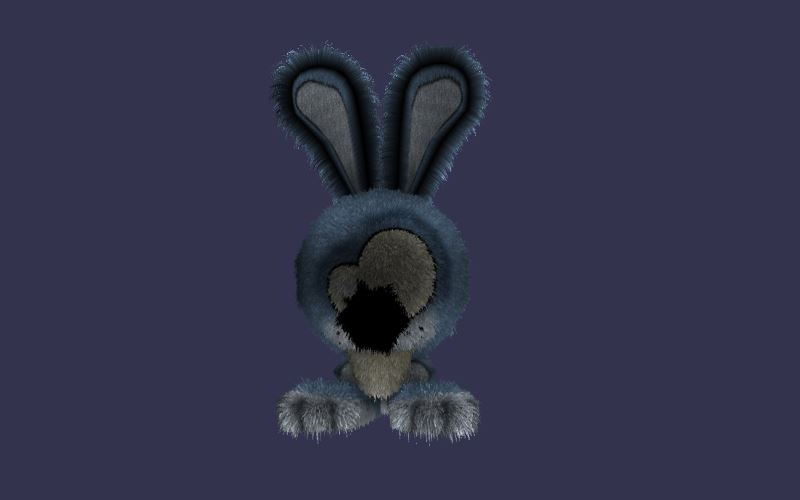
Fur material can be found here: https://cdn.babylonjs.com/materialsLibrary/babylon.furMaterial.js
Using the High Level mode
A demo can be found at: PG: Fur Material
Fur materials have long been the subject of many theories and conference talks, with multiple implementations made possible by different technologies. Here, with WebGL, we chose one of these implementations because it is easy to use and performs well with simple models.
First, activate High Level mode, which is enabled by default:
furMaterial.highLevelFur = true;That's all. The most difficult part is configuring the shells and the fur texture to create the fur effect. Indeed, you'll have to draw several times the same mesh with an offset (computed in the effect) to create the illusion of fur. Hopefully, there is a function that creates and returns the shells:
import { FurMaterial } from "@babylonjs/materials/fur/furMaterial";// Generate a fur texture (internally used), working like a noise texture, that will be shared between all the shellsvar furTexture = FurMaterial.GenerateTexture("furTexture", scene);furMaterial.furTexture = furTexture;myMesh.material = furMaterial;var quality = 30; // Average quality// Create shellsvar shells = FurMaterial.FurifyMesh(myMesh, quality);It now works! The function "BABYLON.FurMaterial.FurifyMesh" returns an array of "BABYLON.Mesh" that you can dispose later. The first element is the mesh you used as the source mesh (myMesh here):
for (let i = 0; i < shells.length; i++) { shells[i].material.dispose(); shells[i].dispose();}You can customize the high level fur rendering thanks to some properties:
allFurMaterials.furSpacing = 2; // Computes the space between shells. In others words, works as the fur heightallFurMaterials.furDensity = 20; // Computes the fur density. More the density is high, more you'll have to zoom on the modelallFurMaterials.furSpeed = 100; // Divides the animation of fur in time according to the gravityimport { Vector3 } from "@babylonjs/core/Maths/math.vector";// Compute the gravity followed by the furallFurMaterials.furGravity = new Vector3(0, -1, 0);Using the fur material without High Level Mode
First, deactivate High Level mode (it is enabled by default, so the following line must be included):
furMaterial.highLevelFur = false;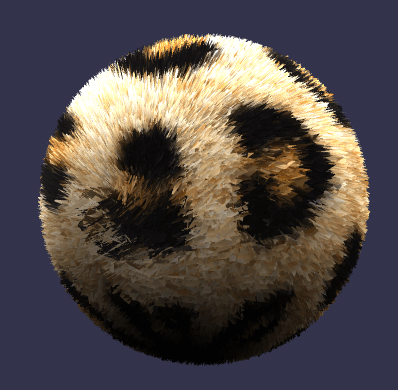
Demos can be found at:
PG: Fur Material
PG: Fur Material
The fur material needs a high number of triangular facets in the mesh to work well. The number of facets needed also depends on the size of the mesh. Examples that seem to work for the ground and sphere are:
import { MeshBuilder } from "@babylonjs/core/Meshes/meshBuilder";var ground = MeshBuilder.CreateGround("ground", { width: 8, height: 8, subdivisions: 200 }, scene);var sphere = MeshBuilder.CreateSphere("sphere", { segments: 500, diameter: 8 }, scene);The fur material is created using
import { FurMaterial } from "@babylonjs/materials/fur/furMaterial";var furMaterial = new FurMaterial("fur_material", scene);ground.material = furMaterial;Customize the fur material
You can customise three properties of the fur material:
import { Color3 } from "@babylonjs/core/Maths/math.color";furMaterial.furLength = 3; // Represents the maximum length of the fur, which is then adjusted randomly. Default value is 1.furMaterial.furAngle = Math.PI / 6; // Represents the angle the fur lies on the mesh from 0 to Math.PI/2. The default angle of 0 gives fur sticking straight up and PI/2 lies along the mesh.furMaterial.furColor = new Color3(0.44, 0.21, 0.02); // is the default color if furColor is not set.Using textures
heightTexture
A greyscale image can be used to set the fur length. A speckled greyscale image can produce fur like results. Any greyscale image will affect the fur length, producing a heightmap-type effect.
import { Texture } from "@babylonjs/core/Materials/Textures/texture";furMaterial.heightTexture = new Texture("speckles.jpg", scene); // Set the fur length with a texture.diffuseTexture
A texture can also be used to paint the mesh. The leopard fur texture used in the test is by Martin Wegmann from Wikimedia Commons under the license

import { Texture } from "@babylonjs/core/Materials/Textures/texture";furMaterial.diffuseTexture = new Texture("leopard_fur.jpg", scene); // Set the fur length with a texture.Meshes where the number of facets is not user-controlled at creation.
Demos can be found at:
PG: Fur Material
PG: Fur Material
Unlike the ground mesh, where you can supply the number of subdivisions, or the sphere mesh, where you can supply the number of segments, the majority of meshes are created using a minimum number of facets. To apply the fur material to these meshes, the number of facets per face needs to be increased.
The function increasedFacets will do this: When n is the number of points per side added to each side of a facet, the number of facets is increased by the square of (n + 1).
import { VertexBuffer } from "@babylonjs/core/Buffers/buffer";import { Mesh } from "@babylonjs/core/Meshes/mesh";import { VertexData } from "@babylonjs/core/Meshes/mesh.vertexData";function increasedFacets(mesh, pps) { //pps points per side var gaps = pps + 1; var n = gaps + 1; var fvs = []; for (let i = 0; i < n; i++) { fvs[i] = []; } var A, B; var d = { x: 0, y: 0, z: 0 }; var u = { x: 0, y: 0 }; var indices = []; var vertexIndex = []; var side = []; var uvs = mesh.getVerticesData(VertexBuffer.UVKind); var meshIndices = mesh.getIndices(); var positions = mesh.getVerticesData(VertexBuffer.PositionKind); var normals = []; for (let i = 0; i < meshIndices.length; i += 3) { vertexIndex[0] = meshIndices[i]; vertexIndex[1] = meshIndices[i + 1]; vertexIndex[2] = meshIndices[i + 2]; for (let j = 0; j < 3; j++) { A = vertexIndex[j]; B = vertexIndex[(j + 1) % 3]; if (side[A] === undefined && side[B] === undefined) { side[A] = []; side[B] = []; } else { if (side[A] === undefined) { side[A] = []; } if (side[B] === undefined) { side[B] = []; } } if (side[A][B] === undefined && side[B][A] === undefined) { side[A][B] = []; d.x = (positions[3 * B] - positions[3 * A]) / gaps; d.y = (positions[3 * B + 1] - positions[3 * A + 1]) / gaps; d.z = (positions[3 * B + 2] - positions[3 * A + 2]) / gaps; u.x = (uvs[2 * B] - uvs[2 * A]) / gaps; u.y = (uvs[2 * B + 1] - uvs[2 * A + 1]) / gaps; side[A][B].push(A); for (let k = 1; k < gaps; k++) { side[A][B].push(positions.length / 3); positions.push(positions[3 * A] + k * d.x, positions[3 * A + 1] + k * d.y, positions[3 * A + 2] + k * d.z); uvs.push(uvs[2 * A] + k * u.x, uvs[2 * A + 1] + k * u.y); } side[A][B].push(B); side[B][A] = []; l = side[A][B].length; for (let a = 0; a < l; a++) { side[B][A][a] = side[A][B][l - 1 - a]; } } else { if (side[A][B] === undefined) { side[A][B] = []; l = side[B][A].length; for (let a = 0; a < l; a++) { side[A][B][a] = side[B][A][l - 1 - a]; } } if (side[B][A] === undefined) { side[B][A] = []; l = side[A][B].length; for (let a = 0; a < l; a++) { side[B][A][a] = side[A][B][l - 1 - a]; } } } } fvs[0][0] = meshIndices[i]; fvs[1][0] = side[meshIndices[i]][meshIndices[i + 1]][1]; fvs[1][1] = side[meshIndices[i]][meshIndices[i + 2]][1]; for (let k = 2; k < gaps; k++) { fvs[k][0] = side[meshIndices[i]][meshIndices[i + 1]][k]; fvs[k][k] = side[meshIndices[i]][meshIndices[i + 2]][k]; d.x = (positions[3 * fvs[k][k]] - positions[3 * fvs[k][0]]) / k; d.y = (positions[3 * fvs[k][k] + 1] - positions[3 * fvs[k][0] + 1]) / k; d.z = (positions[3 * fvs[k][k] + 2] - positions[3 * fvs[k][0] + 2]) / k; u.x = (uvs[2 * fvs[k][k]] - uvs[2 * fvs[k][0]]) / k; u.y = (uvs[2 * fvs[k][k] + 1] - uvs[2 * fvs[k][0] + 1]) / k; for (let j = 1; j < k; j++) { fvs[k][j] = positions.length / 3; positions.push(positions[3 * fvs[k][0]] + j * d.x, positions[3 * fvs[k][0] + 1] + j * d.y, positions[3 * fvs[k][0] + 2] + j * d.z); uvs.push(uvs[2 * fvs[k][0]] + j * u.x, uvs[2 * fvs[k][0] + 1] + j * u.y); } } fvs[gaps] = side[meshIndices[i + 1]][meshIndices[i + 2]]; indices.push(fvs[0][0], fvs[1][0], fvs[1][1]); for (let k = 1; k < gaps; k++) { for (let j = 0; j < k; j++) { indices.push(fvs[k][j], fvs[k + 1][j], fvs[k + 1][j + 1]); indices.push(fvs[k][j], fvs[k + 1][j + 1], fvs[k][j + 1]); } indices.push(fvs[k][j], fvs[k + 1][j], fvs[k + 1][j + 1]); } } var vertexData = new VertexData(); vertexData.positions = positions; vertexData.indices = indices; vertexData.uvs = uvs; VertexData.ComputeNormals(positions, indices, normals); vertexData.normals = normals; mesh.dispose(); var newmesh = new Mesh("newmesh", scene); vertexData.applyToMesh(newmesh); return newmesh;}For sharp-edged meshes such as a box, the shader can separate the faces since the faces meeting at the corners have their own vertices and normals at those vertices. These meshes are flat shaded. If this separation of the edges is a problem then the function convertToSmoothShadedMesh() can be used. However, this can produce some artifacts at the edges.
import { VertexBuffer } from "@babylonjs/core/Buffers/buffer";import { VertexData } from "@babylonjs/core/Meshes/mesh.vertexData";function convertToSmoothShadedMesh(mesh) { var meshIndices = mesh.getIndices(); var meshPositions = mesh.getVerticesData(VertexBuffer.PositionKind); var mesh_uvs = mesh.getVerticesData(VertexBuffer.UVKind); var setPositions = []; var indices = []; var positions = []; var uvs = []; var normals = []; var p; var indexMap = []; for (let i = 0; i < meshPositions.length; i += 3) { var temp = []; temp.push(i / 3, meshPositions[i], meshPositions[i + 1], meshPositions[i + 2], mesh_uvs[(2 * i) / 3], mesh_uvs[(2 * i) / 3 + 1]); setPositions.push(temp); } var i = 0; while (setPositions.length > 0) { p = setPositions.shift(); positions.push(p[1], p[2], p[3]); uvs.push(p[4], p[5]); indexMap[p[0]] = i; var j = 0; while (j < setPositions.length) { if (Math.abs(p[1] - setPositions[j][1]) < Math.pow(0.1, 10) && Math.abs(p[2] - setPositions[j][2]) < Math.pow(0.1, 10) && Math.abs(p[3] - setPositions[j][3]) < Math.pow(0.1, 10)) { indexMap[setPositions[j][0]] = i; setPositions.splice(j, 1); } else { j++; } } i++; } for (let i = 0; i < meshIndices.length; i++) { indices.push(indexMap[meshIndices[i]]); } var vertexData = new VertexData(); vertexData.positions = positions; vertexData.indices = indices; vertexData.uvs = uvs; VertexData.ComputeNormals(positions, indices, normals); vertexData.normals = normals; vertexData.applyToMesh(mesh); return mesh;}