Code splitting and Chunks using known bundlers
This document is for you if you are using a bundler like webpack or rollup to build your Babylon.js project. It will help you understand how to control async loading of packages and chunks in Babylon.js.
If you do not mind how your app is built and simply trust that your bundler will provide the required files to deploy your Babylon experience, there is no need to read further. If you found too many different files in your dist folder and that sparked your curiosity, continue reading!
Introduction
Babylon.js recently introduced async loading to the framework. The main goal of this new architecture is to help you, the developer, provide your users with the smallest package possible. This is achieved by splitting the framework into multiple loadable assets and loading them only when needed.
The most heavily split feature we currently have in the framework is the separation of shader code between WebGL and WebGPU. When the framework determines which engine you are using, it also decides which files to load. From the shader processors to the shaders themselves, you only load what you need.
Async-loading is a standard JavaScript feature, defined in the ECMAScript standard (Import Calls), and is supported by all modern browsers. It allows you to load JavaScript files asynchronously, without blocking the main thread.
When using it in the browser, the files are simply loaded when needed. But when you use a bundler like webpack, you will notice that the final dist folder contains files you might not have expected to see. This is because the bundler tries to optimize file loading and splits the files into chunks.
This article explains how to control the generated chunks, how to configure your bundler to match your needs, and how to optimize your build for the best package size and loading time while still taking full advantage of Babylon's features.
Note that this feature is only available in Babylon 7.15 and up, and only if you use the ES6 packages. Our UMD package will always be a single file without chunks.
Example output
I will use webpack here, but the same ideas apply to other bundlers.
Let's say we are building a simple Babylon project using the default template found here: babylonjs-webpack-es6.
If we simply build the project, we will notice the following files in the dist folder:
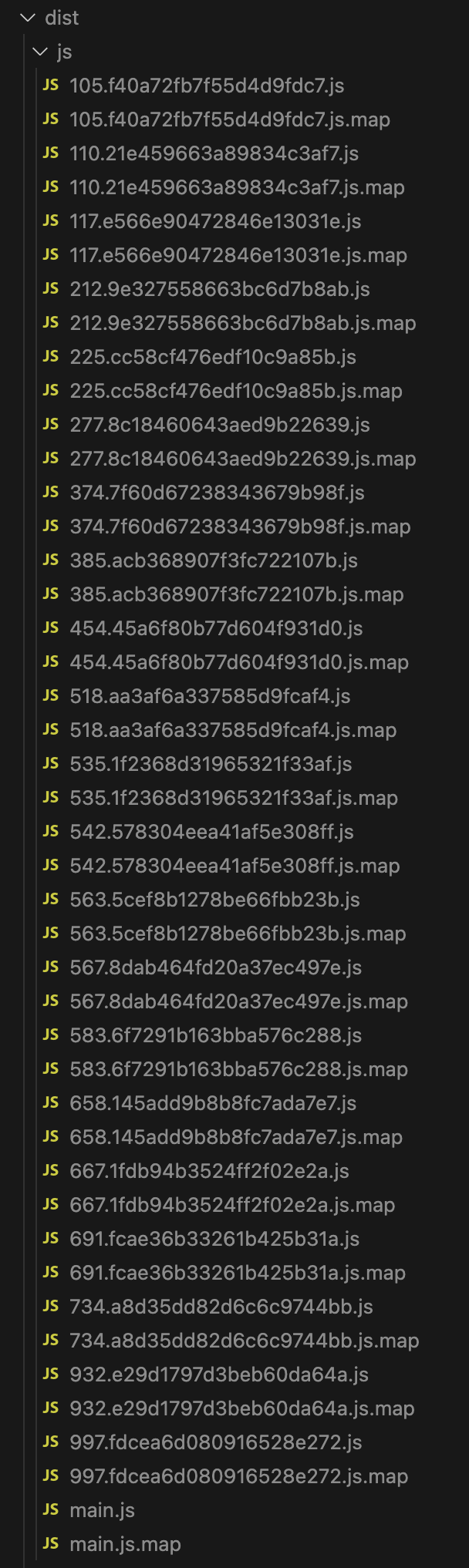
Each of these files represents an import() call in the framework. For example, this is a code snippet from our standard material:
let effect = scene.getEngine().createEffect( shaderName, { attributes: attribs, uniformsNames: uniforms, uniformBuffersNames: uniformBuffers, samplers: samplers, defines: join, fallbacks: fallbacks, onCompiled: this.onCompiled, onError: this.onError, indexParameters, processFinalCode: csnrOptions.processFinalCode, processCodeAfterIncludes: this._eventInfo.customCode, multiTarget: defines.PREPASS, shaderLanguage: this._shaderLanguage, extraInitializationsAsync: this._shadersLoaded ? undefined : async () => { if (this._shaderLanguage === ShaderLanguage.WGSL) { await Promise.all([import("../ShadersWGSL/default.vertex"), import("../ShadersWGSL/default.fragment")]); } else { await Promise.all([import("../Shaders/default.vertex"), import("../Shaders/default.fragment")]); } this._shadersLoaded = true; }, }, engine,);Notice the import() calls in the extraInitializationsAsync function. Each of these calls will be transformed by the bundler into separate files, and will be loaded only when needed.
The rest of the files are many other parts of the framework, each split into its own file.
But you might not want all of them. The example above generates four chunks: two for the vertex and fragment shaders, for both WebGL and WebGPU. If you want to control the number of generated files, you need to configure your bundler accordingly.
Configuring different bundlers
Webpack
Webpack lets you fully configure your chunks. You can control which files are added to a single chunk, how many chunks your project has, and even the names of the files. Full documentation for this feature is available in the SplitChunksPlugin, which is included by default in webpack 5.
Let's start with a simple webpack configuration that takes all WebGL shaders and packs them into a single file. First, let's slightly change the output configuration:
output: { filename: "js/[name].js", // ... further configuration },Now we just need to define the name of each chunk and which files go into it. We can do that with the optimization.splitChunks.cacheGroups configuration:
{// ... webpack configuration optimization: { splitChunks: { cacheGroups: { webgpuShaders: { name: "webgpu-shaders", chunks: "all", priority: 50, enforce: true, test: (module) => /\/ShadersWGSL\//.test(module.resource), }, webglShaders: { name: "webgl-shaders", chunks: "all", priority: 50, enforce: true, test: (module) => /\/Shaders\//.test(module.resource), }, webgpuExtensions: { name: "webgpu-extensions", chunks: "all", priority: 50, enforce: true, test: (module) => /\/WebGPU\//.test(module.resource), }, babylonBundle: { name: "babylonBundle", chunks: "all", priority: 30, reuseExistingChunk: true, test: (module) => /\/node_modules\/@babylonjs\//.test(module.resource), }, }, }, usedExports: true, minimize: true, },}Now we have the following files generated:

We now have WebGPU shaders, WebGL shaders, WebGPU extensions, and our Babylon bundle. The main.js file contains the actual project code.
Ignoring certain files
Let's say we don't want the webgpu shaders at all. We want to completely ignore them. To do that we can use a different webpack feature, the IgnorePlugin. We can add the following to our plugins array:
new webpack.IgnorePlugin({ resourceRegExp: /ShadersWGSL/, // optionally: contextRegExp: /@babylonjs/,}),Now the webgpu-shaders bundle will not be generated.
Preventing chunks altogether
If you want to prevent chunk generation altogether, you can use the included webpack LimitChunkCountPlugin. This plugin lets you limit the number of generated chunks. If you set it to 1, only a single file is generated:
{ plugins: [ // ... other plugins new webpack.optimize.LimitChunkCountPlugin({ maxChunks: 1, }), ],}Rollup
Note: this also applies to Vite, as it uses Rollup under the hood.
Rollup is a bit different from webpack, but it also allows you to control the generated chunks. The equivalent of the webpack configuration above would be:
export default { // ... output: { dir: "output", manualChunks: (id) => { if (id.includes("ShadersWGSL")) { return "webgpu-shaders"; } else if (id.includes("Shaders")) { return "webgl-shaders"; } else if (id.includes("WebGPU")) { return "webgpu-extensions"; } else if (id.includes("babylonjs")) { return "babylonjs"; } }, },};This will generate the same 5 chunks as the webpack configuration above.
Preventing chunks altogether in rollup
To do that, simply set the manual chunks for @babylonjs/core to a single file:
export default { // ... output: { dir: "output", manualChunks: (id) => { if (id.includes("babylonjs")) { return "babylonjs"; } }, },};or simpler:
export default { // ... output: { dir: "output", manualChunks: { babylonjs: ["@babylonjs/core"], }, },};