Lattice
What is a lattice to begin with?
A lattice is like a flexible grid of points used to modify or reshape objects in 3D. Imagine a net wrapped around an object, where you can pull or push the points of the net to change the shape of the object inside.
Instead of adjusting each small part of the object directly, you just move the points of the lattice. The object inside will stretch, bend, or twist based on how you move the lattice, and the changes happen smoothly. This makes it much easier to apply complex transformations to an object without dealing with every little detail.
An example of a 10x10x10 lattice over a sphere mesh:
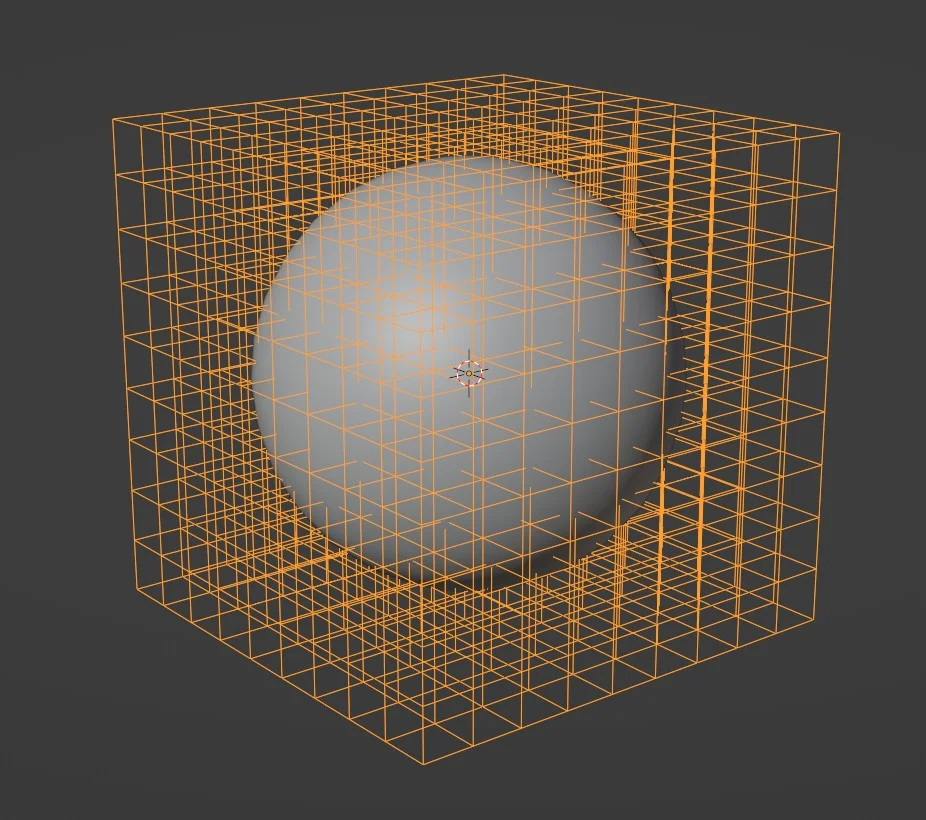
Creating a lattice
To create a lattice you simply need to instantiate it:
import { Lattice } from "@babylonjs/core/Meshes/lattice";var lattice = new Lattice();By default the lattice is created with the following properties:
- size: (1,1,1)
- position: (0,0,0)
- resolutionX: 3
- resolutionY: 3
- resolutionZ: 3
You can define each property at construction time:
import { Vector3 } from "@babylonjs/core/Maths/math.vector";import { Lattice } from "@babylonjs/core/Meshes/lattice";var lattice = new Lattice({ size: new Vector3(2, 2, 2), position: Vector3.Zero() });Object space
The lattice works in object space, meaning that the size you define for a lattice has to be relative to the deformed mesh's object space.
In other words, the mesh world matrix is not taken into account, as the lattice works at the geometry level (so before the world transform is applied).
For instance, assuming you have a scene with a sphere created with a diameter of 2, you will have to set the size of the lattice to (2,2,2) in order to fully encompass the sphere, no matter what position, scaling or rotation are set on the sphere.
The same applies to lattice.position, which is also in object space.
Please note that you can call your lattice constructor with the option autoAdaptToMesh set to a mesh and the system will automatically compute the correct lattice size:
import { Lattice } from "@babylonjs/core/Meshes/lattice";var lattice = new Lattice({ autoAdaptToMesh: mesh});Defining the lattice
By default a lattice will simply not change your mesh until you update its data:
// Make it pointy for (x = 0; x < lattice.resolutionX; x++) { for (z = 0; z < lattice.resolutionZ; z++) { const control = lattice.data[x][lattice.resolutionY - 1][z]; control.y += 1; } }By accessing the data property, you will have access to the three-dimensional arrays containing each control point. It is then up to you to update these points to apply the deformation you need.
Applying the lattice
To apply the lattice you can either call deform(vertexData) or deformMesh(mesh).
Here is an example with a vertex data:
import { VertexBuffer } from "@babylonjs/core/Buffers/buffer";import { MeshBuilder } from "@babylonjs/core/Meshes/meshBuilder";var sphere = MeshBuilder.CreateSphere("sphere", { diameter: 2, segments: 32 }, scene);const positions = sphere.getVerticesData(VertexBuffer.PositionKind);lattice.deform(positions);sphere.setVerticesData(VertexBuffer.PositionKind, positions, true);sphere.createNormals(true);Please note that it is your responsibility to then update the mesh and rebuild the normals.
This is then equivalent to:
import { MeshBuilder } from "@babylonjs/core/Meshes/meshBuilder";var sphere = MeshBuilder.CreateSphere("sphere", { diameter: 2, segments: 32 }, scene);lattice.deformMesh(sphere);sphere.createNormals(true);Updating the lattice
A lattice can be moved by updating its position value (so the lattice will move in object space). Here is a complete example of a moving lattice:
import { VertexBuffer } from "@babylonjs/core/Buffers/buffer";import { Vector3 } from "@babylonjs/core/Maths/math.vector";import { Lattice } from "@babylonjs/core/Meshes/lattice";import { MeshBuilder } from "@babylonjs/core/Meshes/meshBuilder";var sphere = MeshBuilder.CreateSphere("sphere", { diameter: 2, segments: 32 }, scene);const positions = sphere.getVerticesData(VertexBuffer.PositionKind);const updates = new Float32Array(positions.length);// latticevar lattice = new Lattice({ size: new Vector3(2, 2, 2), position: Vector3.Zero() });// Make it pointyfor (x = 0; x < lattice.resolutionX; x++) { for (z = 0; z < lattice.resolutionZ; z++) { const control = lattice.data[x][lattice.resolutionY - 1][z]; control.y += 1; }}// Shrink that belly!for (x = 0; x < lattice.resolutionX; x++) { for (z = 0; z < lattice.resolutionZ; z++) { const control = lattice.data[x][1][z]; control.x = 0; control.z = 0; }}let offset = -2;scene.onBeforeRenderObservable.add(() => { lattice.position.x = offset; offset += 0.01; lattice.deform(positions, updates); sphere.setVerticesData(VertexBuffer.PositionKind, updates, true); sphere.createNormals(true);});One important point here is that we use the deform function with a second parameter in order to not alter the original mesh data.
You can also update the lattice data:
import { VertexBuffer } from "@babylonjs/core/Buffers/buffer";import { ImportMeshAsync } from "@babylonjs/core/Loading/sceneLoader";import { Vector3 } from "@babylonjs/core/Maths/math.vector";import { Lattice } from "@babylonjs/core/Meshes/lattice";const loadedData = await ImportMeshAsync("scenes/skull.babylon", scene);const skull = loadedData.meshes[0];skull.position.set(0, 0, 0);const positions = skull.getVerticesData(VertexBuffer.PositionKind);const updatedPositions = new Float32Array(positions.length);// latticevar lattice = new Lattice({ resolutionY: 10, autoAdaptToMesh: skull, position: Vector3.Zero(),});scene.onBeforeRenderObservable.add(() => { // Twist!! for (x = 0; x < lattice.resolutionX; x++) { for (y = 0; y < lattice.resolutionY; y++) { for (z = 0; z < lattice.resolutionZ; z++) { const angle = (y / lattice.resolutionY) * 0.02; const control = lattice.data[x][y][z]; const cx = control.x; const cz = control.z; const cosAngle = Math.cos(angle); const sinAngle = Math.sin(angle); // Rotation control.x = cosAngle * cx - sinAngle * cz; control.z = sinAngle * cx + cosAngle * cz; } } } lattice.deform(positions, updatedPositions); skull.setVerticesData(VertexBuffer.PositionKind, updatedPositions); skull.createNormals(true);});