Creating A Tiled Plane
Tiled Plane
A tiled plane is only available with MeshBuilder. The tile size, pattern, and alignment can be set.
MeshBuilder
Usage :
import { MeshBuilder } from "@babylonjs/core/Meshes/meshBuilder";const tiledPlane = MeshBuilder.CreateTiledPlane("plane", options, scene); //scene is optional and defaults to the current scene| option | value | default value |
|---|---|---|
| size | (number) side size of the plane | 1 |
| width | (number) size of the width | size |
| height | (number) size of the height | size |
| tileSize | (number) size of each tile side | 1 |
| tileHeight | (number) tile height size, overwrites tileSize option | tileSize |
| tileWidth | (number) tile width size, overwrites tileSize option | tileSize |
| frontUVs | (Vector4) ONLY WHEN sideOrientation:BABYLON.Mesh.DOUBLESIDE set | Vector4(0,0, 1,1) |
| backUVs | (Vector4) ONLY WHEN sideOrientation:BABYLON.Mesh.DOUBLESIDE set | Vector4(0,0, 1,1) |
| pattern | (number) how tiles are reflected or rotated | NO_FLIP |
| alignVertical | (number) positions whole tiles at top, bottom or center of a face | CENTER |
| alignHorizontal | (number) positions whole tiles at left, right or center of a face | CENTER |
| updatable | (boolean) true if the mesh is updatable | false |
| sideOrientation | (number) side orientation | DEFAULTSIDE |
The values for the pattern option are the following constants:
import { Mesh } from "@babylonjs/core/Meshes/mesh";Mesh.NO_FLIP, defaultMesh.FLIP_TILE,Mesh.ROTATE_TILE,Mesh.FLIP_ROW,Mesh.ROTATE_ROW,Mesh.FLIP_N_ROTATE_TILE,Mesh.FLIP_N_ROTATE_ROWThe TILE ending means that every other tile across and up the plane is flipped or rotated.
The ROW ending means that the whole of alternate rows are flipped or rotated.
When the width or height of the plane is such that a whole number of tiles does not fit, tiles are "cut" and partial tiles are used to fill the plane. When this happens, you can arrange where the partial tiles are placed, either at one edge of the plane or uniformly on two opposite edges. You do this by setting alignVertical and alignHorizontal in the options to indicate where you want the whole tiles to be placed. For example, setting alignHorizontal to LEFT means that the leftmost column of tiles will be whole tiles and the rightmost column will contain partial tiles. The following constants are available for alignVertical and alignHorizontal:
import { Mesh } from "@babylonjs/core/Meshes/mesh";Mesh.CENTER, defaultMesh.TOP,Mesh.BOTTOMimport { Mesh } from "@babylonjs/core/Meshes/mesh";Mesh.CENTER, defaultMesh.LEFT,Mesh.RIGHTThere are 7 * 3 * 3 = 63 different arrangements for the tiles.
Using the frontUVs and backUVs properties in the options, the front and back of the plane can use different parts of an image.
import { Vector4 } from "@babylonjs/core/Maths/math.vector";import { Mesh } from "@babylonjs/core/Meshes/mesh";const f = new Vector4(0.5, 0, 1, 1); // front image = half the whole image along the width const b = new Vector4(0, 0, 0.5, 1); // back image = second half along the widthconst options = { frontUVs: f, backUVs: b, sideOrientation: Mesh.DOUBLESIDE};Examples
The following image is used to show the results before and after flipping alternate tiles.

Before tiles flipped: Create a Tiled Plane With Before Tiles Flipped After tiles flipped: Create a Tiled Plane With After Tiles Flipped
Alternating Patterns
This image
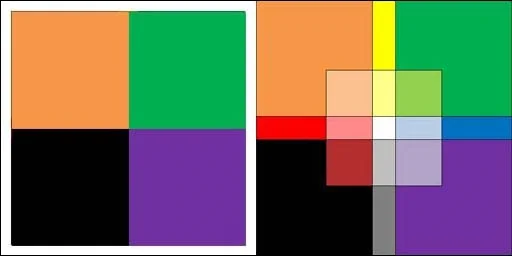
is used to show different alternating patterns using tiles with a width of 2 and a height of 1 by flipping either every other row or every other tile.
Row flipped: Create a Tiled Plane With Row Flipped Tile flipped: Create a Tiled Plane With Tile Filed
and also how tiling can be different front and back.
Create a Tiled Plane With Different Tiling Front And BackThe final example uses the same image to show all 63 permutations. To see the headings, view the full playground.
Create a Tiled Plane With 63 Different Permutations