Creating A Plane
Plane
The created plane is a flat surface parallel to the xy plane with its origin at the center of the plane.
MeshBuilder
Usage :
import { MeshBuilder } from "@babylonjs/core/Meshes/meshBuilder";const plane = MeshBuilder.CreatePlane("plane", options, scene); //scene is optional and defaults to the current scene| option | value | default value |
|---|---|---|
| size | (number) side size of the plane | 1 |
| width | (number) size of the width | size |
| height | (number) size of the height | size |
| updatable | (boolean) true if the mesh is updatable | false |
| sideOrientation | (number) side orientation | DEFAULTSIDE |
| sourcePlane | (Plane) source plane (math) the mesh will be transformed to | null |
| frontUVs | (Vector4) ONLY WHEN sideOrientation:BABYLON.Mesh.DOUBLESIDE set | Vector4(0,0, 1,1) |
| backUVs | (Vector4) ONLY WHEN sideOrientation:BABYLON.Mesh.DOUBLESIDE set | Vector4(0,0, 1,1) |
Examples
Single sided: Create a Single Sided Plane
Double sided: Create a Double Sided Plane
Using this image
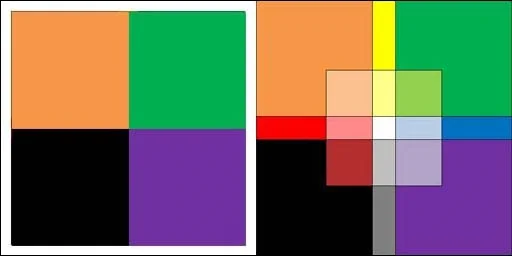
to texture the front and back:
front and back Front and Back Texture
We can also create a plane from an abstract mathematical plane.
Create a Plane From Math PathMesh
Usage :
import { Mesh } from "@babylonjs/core/Meshes/mesh";const plane = Mesh.CreatePlane("plane", size, scene);const plane = Mesh.CreatePlane("plane", size, scene, updatable, sideOrientation); //optional parameters after sceneIt is only possible to create a square with this method; for a rectangle, you need to use scaling.