Creating Custom Polyhedra
Custom Polyhedra
This is another range of polyhedra that you can create, although they require a few more steps. This is the reason for the custom option. All the other options, other than type, can be used with custom polyhedra.
From faces to triangles
In custom polyhedron data, vertex contains positions, and each entry in face lists indices into vertex around the perimeter of one face. List the corners in order, not as an unordered set: Babylon.js turns each face into triangles by using its first index as a shared corner. For a face with five corners:
face: [[0, 1, 2, 3, 4]]Babylon.js creates three triangles, with indices (0, 2, 1), (0, 3, 2), and (0, 4, 3). In general, a face [f0, f1, ..., fn] becomes (f0, f2, f1), (f0, f3, f2), and so on through (f0, fn, fn-1). The reversed order of the last two corners in each triangle is intentional.
The first corner also determines which diagonals are drawn. For example, [1, 2, 3, 4, 0] follows the same perimeter but produces (1, 3, 2), (1, 4, 3), and (1, 0, 4) instead. Both orders cover the same area if the face is flat and convex, but they produce different triangles; if its vertices are not coplanar, the resulting surface can look different. Reversing the perimeter order changes the triangle winding, which changes which side is the front and the direction of the computed normals. Keep the winding consistent across faces so their normals point outward. See custom mesh normals and direction for an illustrated explanation.
This first-corner triangle fan does not correctly triangulate every concave face. For a concave shape, split it into triangular face entries yourself rather than relying on the fan.
-
Visit Custom Polyhedra and minimize the code editor by unchecking the box labeled Editor under the Gear icon ⚙ (Options), then note the polyhedron names under the mouse pointer.
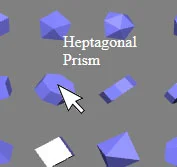 ;
; -
From the polyhedra.js file at https://github.com/BabylonJS/Extensions/tree/master/Polyhedron, find the required name.
HeptagonalPrism : {"name":"Heptagonal Prism","category":["Prism"],"vertex":[[0,0,1.090071],[0.796065,0,0.7446715],[-0.1498633,0.7818315,0.7446715],[-0.7396399,-0.2943675,0.7446715],[0.6462017,0.7818315,0.3992718],[1.049102,-0.2943675,-0.03143449],[-0.8895032,0.487464,0.3992718],[-0.8658909,-0.6614378,-0.03143449],[0.8992386,0.487464,-0.3768342],[0.5685687,-0.6614378,-0.6538232],[-1.015754,0.1203937,-0.3768342],[-0.2836832,-0.8247995,-0.6538232],[0.4187054,0.1203937,-0.9992228],[-0.4335465,-0.042968,-0.9992228]],"face":[[0,1,4,2],[0,2,6,3],[1,5,8,4],[3,6,10,7],[5,9,12,8],[7,10,13,11],[9,11,13,12],[0,3,7,11,9,5,1],[2,4,8,12,13,10,6]]},- Copy and paste the desired polyhedron object into your code like this:
import { Mesh } from "@babylonjs/core/Meshes/mesh";import { MeshBuilder } from "@babylonjs/core/Meshes/meshBuilder";const heptagonalPrism = { "name": "Heptagonal Prism", "category": ["Prism"], "vertex": [[0, 0, 1.090071], [0.796065, 0, 0.7446715], [-0.1498633, 0.7818315, 0.7446715], [-0.7396399, -0.2943675, 0.7446715], [0.6462017, 0.7818315, 0.3992718], [1.049102, -0.2943675, -0.03143449], [-0.8895032, 0.487464, 0.3992718], [-0.8658909, -0.6614378, -0.03143449], [0.8992386, 0.487464, -0.3768342], [0.5685687, -0.6614378, -0.6538232], [-1.015754, 0.1203937, -0.3768342], [-0.2836832, -0.8247995, -0.6538232], [0.4187054, 0.1203937, -0.9992228], [-0.4335465, -0.042968, -0.9992228]], "face": [[0, 1, 4, 2], [0, 2, 6, 3], [1, 5, 8, 4], [3, 6, 10, 7], [5, 9, 12, 8], [7, 10, 13, 11], [9, 11, 13, 12], [0, 3, 7, 11, 9, 5, 1], [2, 4, 8, 12, 13, 10, 6]] };const heptPrism = MeshBuilder.CreatePolyhedron("h", { custom: heptagonalPrism }, scene); //scene is optional and defaults to the current scene//also possibleconst heptPrism1 = Mesh.CreatePolyhedron("h", { custom: heptagonalPrism }, scene); //scene is optional and defaults to the current scene
HeptagonalPrism: HeptagonalPrism
Heptagonal Prism with changed sizes: HeptagonalPrism With Changed Sizes
Heptagonal Prism with face colors: HeptagonalPrism With Face Colors