Frame Graph Frequently Asked Questions and Best Practices
Best Practices
Set scene.frameGraph before calling FrameGraph.buildAsync
If your frame graph is to be used at the scene level, you must set it before calling FrameGraph.buildAsync(), because FrameGraph.whenReadyAsync() (which, by default, is called as part of the execution of buildAsync) may require that scene.frameGraph be set for correct processing.
Set isMainObjectRenderer on the appropriate object renderer
You should always have one and only one object renderer with its isMainObjectRenderer property set to true.
It will help to locate the main object renderer in the frame graph when multiple object renderers are used.
This is useful for the inspector to know which object renderer to use for additional rendering features like wireframe rendering or frustum light debugging.
It is also used to determine the main camera used by the frame graph: this is the camera used by the main object renderer.
Set the texture sampling mode in the correct location
When writing your own post-processing task that extends FrameGraphPostProcessTask, you may need to set the sampling mode of a texture: don't do it via the additionalBindings parameter of the FrameGraphPostProcessTask.record(skipCreationOfDisabledPasses, additionalExecute, additionalBindings) method, but via the additionalExecute parameter instead!
It is tempting to do something like:
const pass = super.record( skipCreationOfDisabledPasses, undefined, (context) => { context.setTextureSamplingMode(this.circleOfConfusionTexture, this.circleOfConfusionSamplingMode); context.bindTextureHandle(this._postProcessDrawWrapper.effect!, "circleOfConfusionSampler", this.circleOfConfusionTexture); });but the correct way to do it is as follows:
const pass = super.record( skipCreationOfDisabledPasses, (context) => { context.setTextureSamplingMode(this.circleOfConfusionTexture, this.circleOfConfusionSamplingMode); }, (context) => { context.bindTextureHandle(this._postProcessDrawWrapper.effect!, "circleOfConfusionSampler", this.circleOfConfusionTexture); });This is because additionalBindings is executed too late in the process, and setting the texture sampling mode at that point messes with the internal state of the engine (at least in WebGL).
Ensure that your FrameGraphTask.record() implementation handles multiple calls
The FrameGraphTask.record() method can be called multiple times during the lifetime of your frame graph (if the graph is being rebuilt, for example due to a window resize). You must ensure that the objects created by your implementation of record() are properly deleted before being recreated by a new call (such as observers, for example).
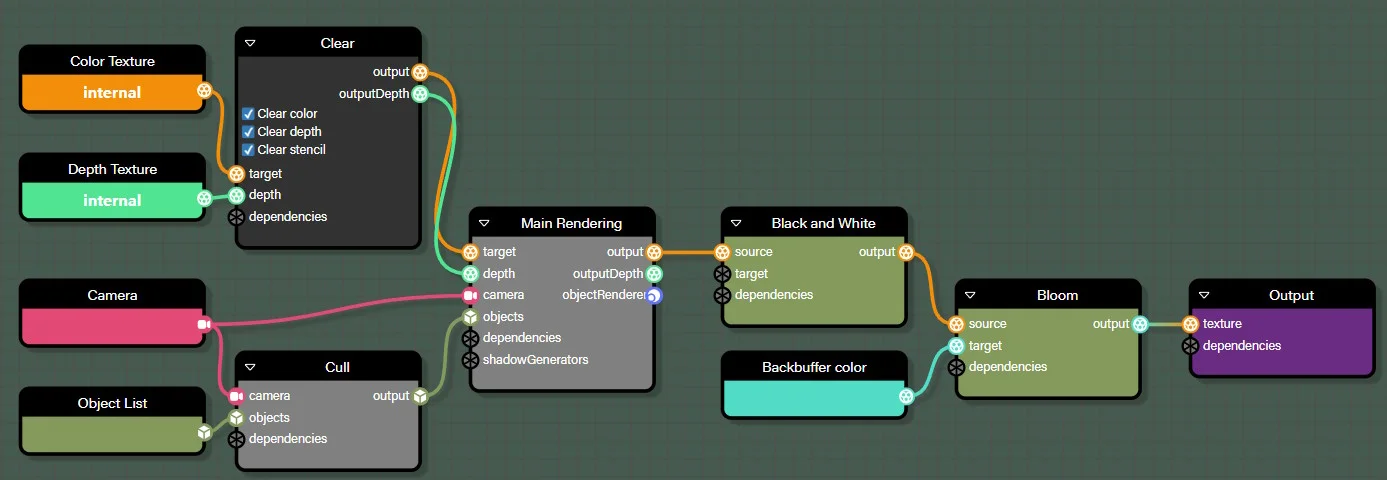
Avoid a texture copy if you are using at least one post-process in your graph.
If you use at least one post-process in your graph, you can avoid copying a texture by connecting the back buffer color texture to the target input of your last post-process.
Do:
Don't:
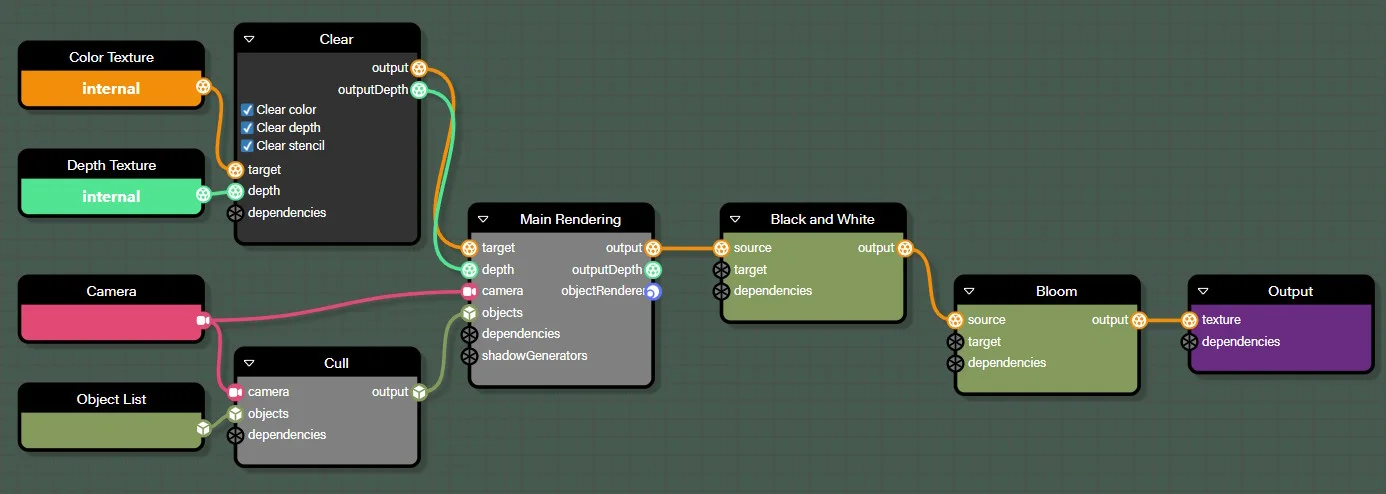
In fact, the Output block (or FrameGraphCopyToBackbufferColorTask if you create a graph manually) is optimized so that it does not copy the texture connected to its texture input if that texture is already the back buffer color texture.
Furthermore, the final post-processing does not need to allocate a new texture, as it will render directly into the color texture of the back buffer.
Use NodeRenderGraph.onBeforeBuildObservable to update the graph before building it
Often, you will need to update one or more blocks of a node render graph before building it. The best place to do this is inside an onBeforeBuildObservable observer, as this observable is notified just before the graph is built.
This can help you better structure your code, instead of having all the code at the global level.
For example (taken from this PG):
nrg.onBeforeBuildObservable.add(() => {    const customRenderingTask = nrg.getBlockByName("CustomRendering").task;
    customRenderingTask.objectRenderer.setMaterialForRendering(ground, groundMatForCustomRendering);
    const cameraBlock = nrg.getBlockByName("Camera");    cameraBlock.value = camera;
    const camera2Block = nrg.getBlockByName("Camera2");    camera2Block.value = camera2;
    const objectListBlock = nrg.getBlockByName("ObjectList");    objectListBlock.value = { meshes: scene.meshes, particleSystems: [] };
    const objectList2Block = nrg.getBlockByName("ObjectList2");    objectList2Block.value = { meshes: scene.meshes.slice(), particleSystems: scene.particleSystems };});
FAQ
Why am I getting the error message "Trying to bind a null texture/sampler"?
You will get this error (in the browser console log) with WebGPU if you render to the default back-buffer color texture and use at least one post-process.
This is because post-processing reads from the texture connected to its source input, which is impossible if the texture is the back buffer color texture (at least in WebGL, so also prohibited in WebGPU).
Reproduction: Using the backbuffer color texture with a post-process
Note that in WebGL, you will not get any error messages, but the preview window will remain black.
Why am I getting the error message "Uncaught (in promise) Error: FrameGraph._computeTextureLifespan: Texture handle "XX" not found in the texture manager."?
You probably forgot to add a task to the frame graph!
When you create a task programmatically (i.e., without using a node render graph), don't forget to add it to the frame graph:
import { FrameGraphObjectRendererTask } from "@babylonjs/core/FrameGraph/Tasks/Rendering/objectRendererTask";const renderTask = new FrameGraphObjectRendererTask("renderObjects", frameGraph, scene);renderTask.targetTexture = clearTask.outputTexture;renderTask.depthTexture = clearTask.outputDepthTexture;renderTask.objectList = rlist;renderTask.camera = camera;frameGraph.addTask(renderTask); // <-- Don't forget!Why isn't my skybox showing up?
You must set camera.ignoreCameraMaxZ to true for skyboxes to work as expected with frame graphs. See the comment in FrameGraph: adding a new task + several fixes for more details.
Reproduction: Skybox not showing up
Replace false with true on line 15 to fix the issue.
Note that the problem does not stem from the skybox itself, but from the Mesh.ignoreCameraMaxZ property when set to true (which is the case for the skybox).
How to visualize textures generated by my frame graph?
For debugging purposes, it may be useful to be able to see all the textures generated by your frame graph in the inspector.
To enable this feature, pass true as the second parameter of the FrameGraph constructor:
import { FrameGraph } from "@babylonjs/core/FrameGraph/frameGraph";const frameGraph = new FrameGraph(scene, true);With a node render graph, set the debugTextures option to true when loading the snippet:
import { NodeRenderGraph } from "@babylonjs/core/FrameGraph/Node/nodeRenderGraph";const nrg = await NodeRenderGraph.ParseFromSnippetAsync("PSA9PS#150", scene, { debugTextures: true });or;const nrg = NodeRenderGraph.Parse(frameGraphJSONData, scene, { debugTextures: true });await nrg.whenReadyAsync();Note that due to texture reuse, it is possible that a texture may be used by multiple tasks!
For this reason, when debugging a frame graph, you can disable texture reuse by setting frameGraph.optimizeTextureAllocation = false.
Why isn't the environment helper working?
In order for the environment helper to work correctly with frame graphs (such as the mirror effect, for example), you must define the frame graph in the scene before creating the environment helper:
...scene.frameGraph = <your_frame_graph>;...const helper = scene.createDefaultEnvironment(options);Example: Environment helper with frame graphs
Why don't MirrorTexture, RefractionTexture or ReflectionProbe work?
In order for MirrorTexture, RefractionTexture and ProbeTexture to work as expected with frame graphs, you must add them to the scene.customRenderTargets array after creating them. If the texture is to be rendered with a specific camera, set activeCamera correctly.
MirrorTexture example: Mirror texture with frame graphs
RefractionTexture example: Refraction texture with frame graphs