Rendering transmissive materials with frame graphs
Introduction
Transmissive materials are materials that allow you to see through them and use a refraction texture to display what is behind the mesh with that material.
This texture is created by rendering the non-transmissive meshes and is defined as a refraction texture for transmissive materials, with a specific coordinate mode so that we get the illusion of seeing through the mesh, when in reality we are simply rendering the mesh with a special refraction texture.
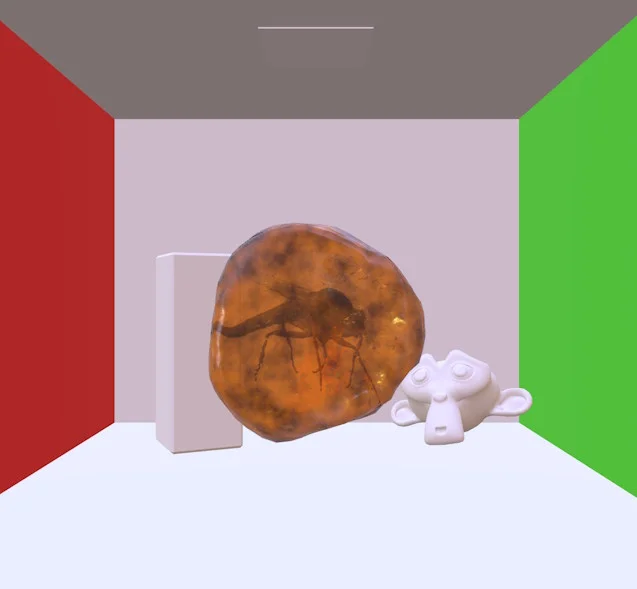
For example, in the scene below, we have a single transmissive material/mesh (the amber block):
The amber mesh is rendered like this:
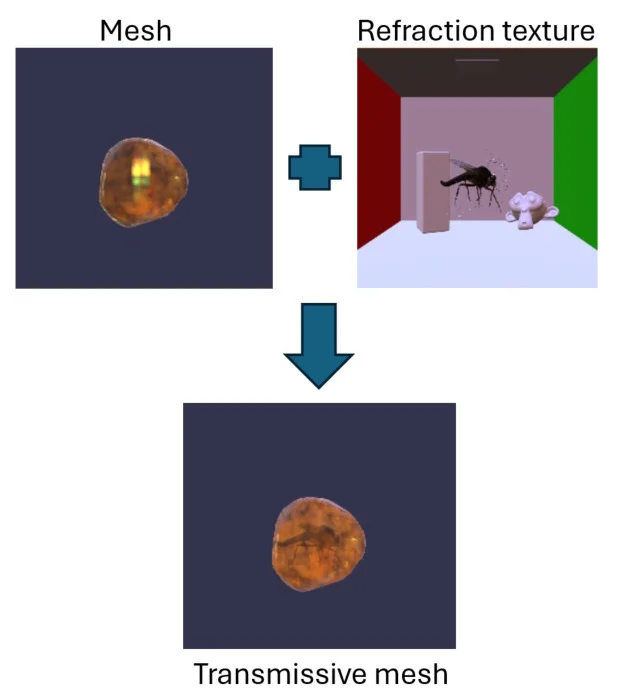
In each frame, the refraction texture is regenerated to account for changes in the scene (camera or mesh movements, etc.).
Support in Babylon.js
Transmissive materials/meshes are currently supported via the glTF extension KHR_materials_transmission.
This means that you cannot directly define transmissive materials via code; you must load a .glb/.gltf file containing transmissive materials (the extension uses a TransmissionHelper class internally, but this is not accessible to the end user).
The implementation is as follows:
- The refraction texture is generated in a separate
RenderTargetTextureby rendering all non-transmissive meshes.- This texture is defined as the refraction texture for all transmissive materials.
- The entire scene (non-transmissive + transmissive meshes) is rendered to the screen.
The TransmissionHelper class is responsible for rendering the refraction texture and assigning it to transmissive materials. Two separate renders are required to produce a frame:
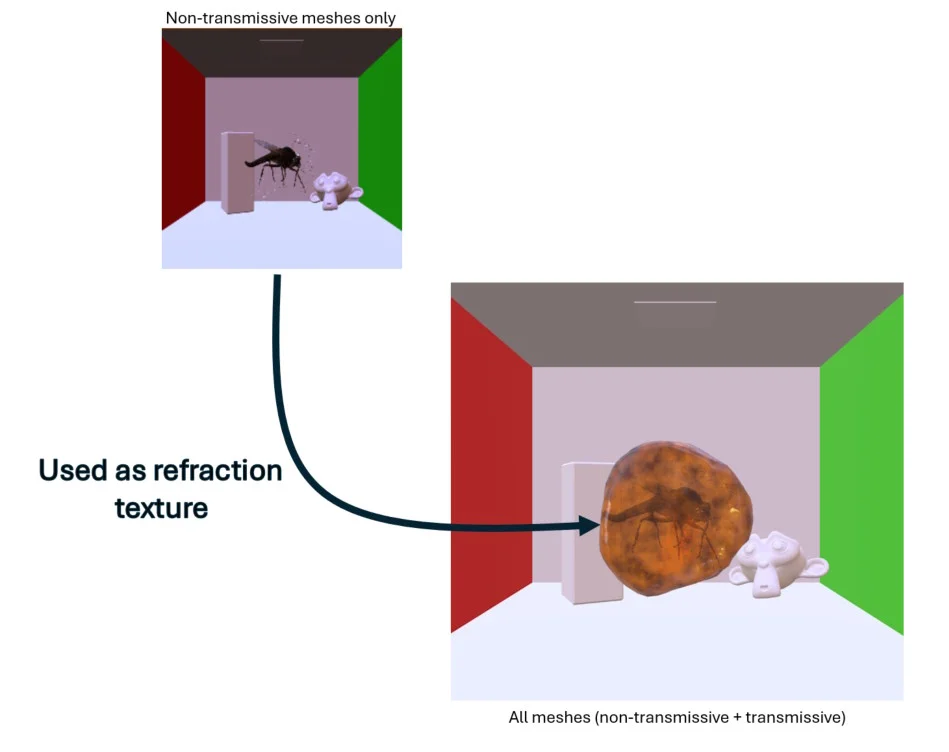
By using a frame graph (actually a node render graph), we are free to create transmissive materials without resorting to external .glb/.gltf files.
You may also have noticed in the description above that non-transmissive meshes are rendered twice: once to generate the refraction texture, and again when the entire scene is rendered.
Thanks to the flexibility of the node render graph, we can do better and render non-transmissive meshes only once!
Flow of operations with the node render graph
Here are the details of the operations we will perform in the node render graph:
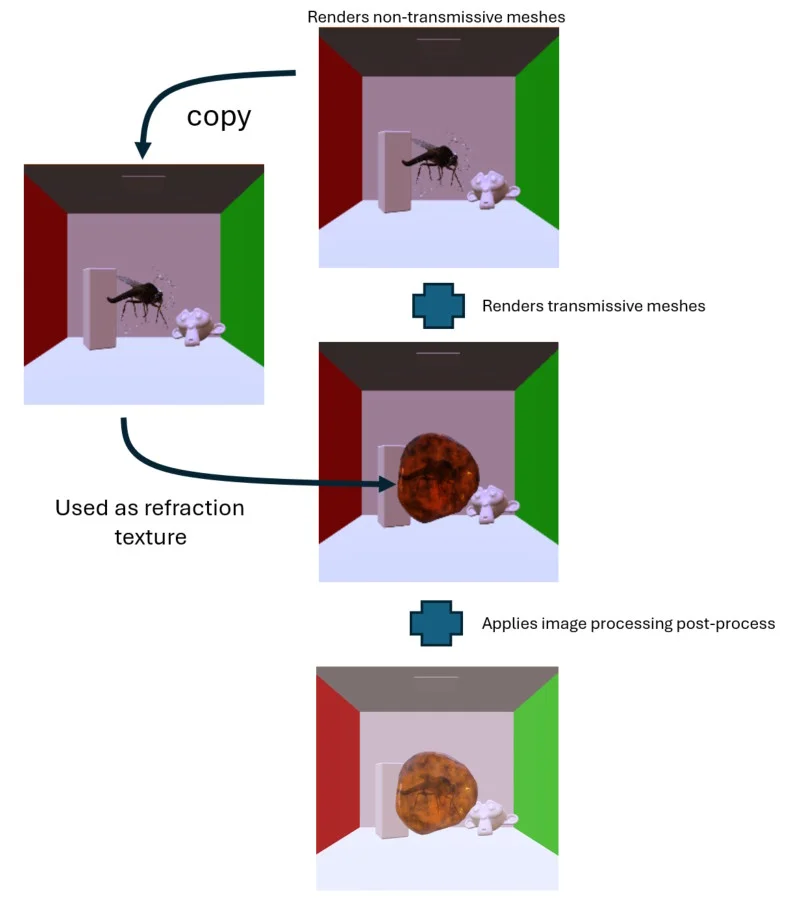
As you can see, two additional operations are required compared to using TransmissionHelper: a texture copy and image post-processing.
However, in all but the simplest scenes, these operations will be faster than rendering the non-transmissive meshes twice (which in practice means rendering the scene twice, since there are usually only a few transmissive meshes in a scene).
Note that we need to generate all renders in linear space (hence the darker tones in the image above) to avoid unnecessary gamma <-> linear space conversions: we only apply a conversion from linear space to gamma space once at the end, using an image processing post-process.
You may be wondering why we need to copy the current texture (let's call it T) to use it as a refraction texture for transmissive materials, rather than just using T. This is because it is impossible to read from and write to the same texture during a render pass. Since we render to T when rendering transmissive meshes, we cannot use it as a refraction texture. A texture copy is not too bad for performance, and you may even decide to use a smaller texture when copying, as you probably don't need the full final resolution for the refraction texture.
Node render graph implementation
Here is the node render graph corresponding to the description in the previous section:
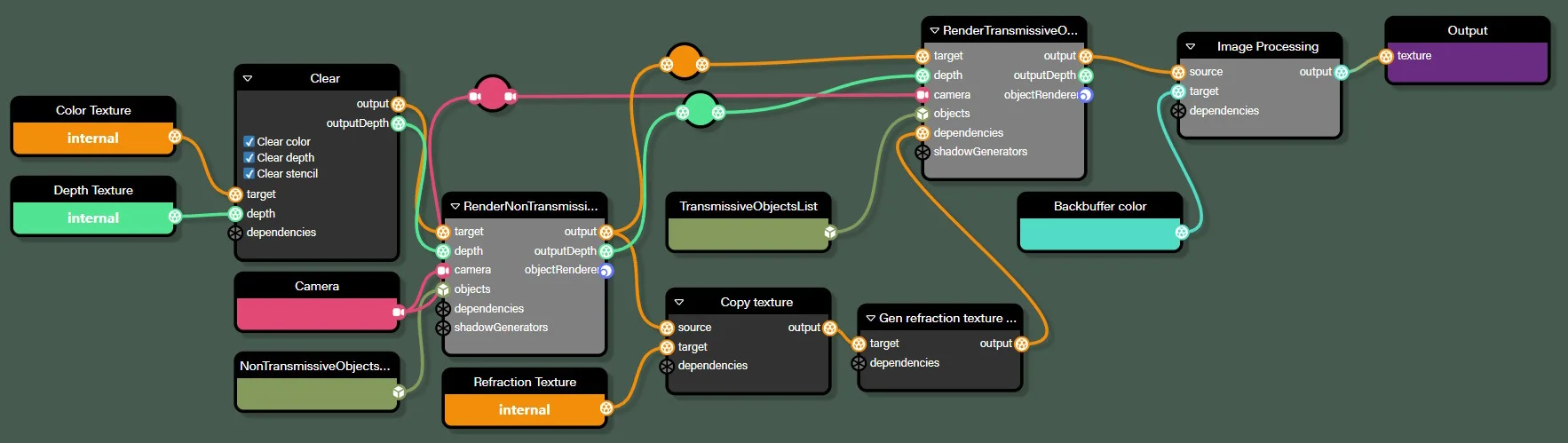
It closely follows the operations described above:
RenderNonTransmissiveObjectsrenders the objects from the NonTransmissiveObjectsList list in the Color Texture textureCopy texturecopies Color Texture to Refraction TextureRenderTransmissiveObjectsrenders the objects from the TransmissiveObjectsList list in the Color Texture textureImage Processingapplies a linear to gamma space conversion to Color Texture and generates the result in the color backbuffer
An additional task that has not yet been described is the Gen refraction texture mipmaps block. This block simply generates the mipmaps for the Refraction texture, which are necessary to simulate the glossiness of the refracted part of the scene.
Key points to highlight from this graph:
- Both the
RenderNonTransmissiveObjectsandRenderTransmissiveObjectsrendering tasks have the Disable image processing option checked to render in linear space: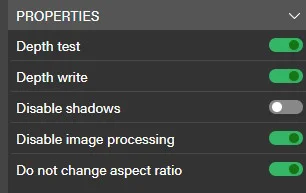
- The same applies to the clear color of the
Clearblock: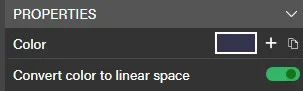
- The Create mipmaps option is checked in the
Refraction Textureblock so that the texture is created with mipmaps. Note that this does not mean that mipmaps are generated, but only that additional GPU memory will be allocated for mipmaps! Mipmaps are generated using theGenerateMipmapsblock. We have also defined specific dimensions for this texture (1024x1024), as we do not need the full final screen resolution. Also, we don't need MSAA for this texture, so Samples is set to 1: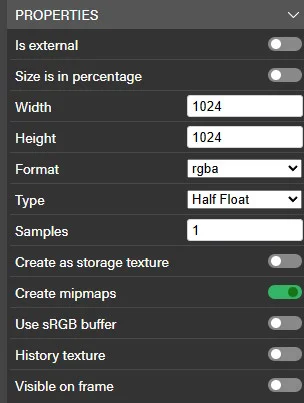
- The output of the
Gen refraction texture mipmapsblock is connected to the dependencies input of theRenderTransmissiveObjectsblock: this ensures that the texture is copied and the mipmaps are generated before this block is processed, as we will need the refraction texture during rendering.
Playground implementation
Here is a playground that uses the node render graph described above to render a scene with transmissive materials:
Node render graph for rendering transmissive materialsWe have created a separate class RenderWithTransmission, which takes care of loading and configuring the graph for you. This should make it easier to reuse the code in your own projects, but feel free to use it as a starting point for your own experiments!
Note that we disable the use/creation of the TransmissionHelper class by setting the dontUseTransmissionHelper option to true, as we do not need it when using frame graphs.
Here is the same scene using the unmodified asset:
TransmissionHelper for rendering transmissive materialsIf you open both playgrounds in two different tabs and switch between them, you will see that the renders are identical. However, if you check a frame with Spector, you will see that we are performing fewer render passes in the node render graph version.