Getting components
Introduction
Getting references to components in a scene can be done directly by decorating properties. The API provided by the editor
resolves the references automatically. This allows you to get component references directly when declaring properties
and avoids using functions such as scene.getMeshByName(...), etc.
Available decorators
From Children
To get a reference to a child of the current node that has the script attached, properties in a script class can
be decorated using the @fromChildren decorator. The parameter of the decorator is the name of the child to get.
@fromChildren("light")private _light: PointLight;This parameter is optional. If it is undefined, the name of the property is used. For example:
@fromChildren()private _light: PointLight; // the name of the child must be named "_light" in the Editor.From Scene
Compared to @fromChildren, component references can be retrieved by traversing the entire scene using the
@fromScene decorator. This decorator works like @fromChildren, where the parameter is the name of the
node to retrieve. The parameter is also optional.
import { Mesh } from "@babylonjs/core/Meshes/mesh";import { DirectionalLight } from "@babylonjs/core/Lights/directionalLight";
import { fromScene } from "../decorators";
export default class MyMeshComponent extends Mesh {    @fromScene("sun")    private _sun: DirectionalLight;
    public onStart(): void {        this._sun.intensity = 10;    }}
From Particle Systems
In Babylon.JS, particle systems are not nodes. To retrieve particle systems, neither @fromChildren nor @fromScene
decorators can be used. To retrieve particle systems, there is a specialized decorator named @fromParticleSystems.
As with other @from{X} decorators, the parameter of this decorator is the name of the particle system. If not provided,
the name of the property is used.
import { Mesh } from "@babylonjs/core/Meshes/mesh";import { ParticleSystem } from "@babylonjs/core/Particles/particleSystem";
import { fromParticleSystems } from "../decorators";
export default class MyMeshComponent extends Mesh {    @fromParticleSystems("rain")    private _rain: ParticleSystem;
    public onStart(): void {        this._rain.start();    }}
From Animation Groups
As with particle systems, animation groups are not nodes. To retrieve a reference to an animation group, simply decorate
the property with the @fromAnimationGroups decorator.
The parameter of this decorator is the name of the animation group. If not provided, the name of the property is used.
import { Mesh } from "@babylonjs/core/Meshes/mesh";import { AnimationGroup } from "@babylonjs/core/Animations/animationGroup";
import { fromAnimationGroups } from "../decorators";
export default class MyMeshComponent extends Mesh {    @fromAnimationGroups("walk")    private _walk: AnimationGroup;
    public onStart(): void {        this._walk.play(true);    }}
From Sounds
As for animation groups, sounds are not nodes. To retrieve a reference to a sound, simply decorate the property using
the @fromSounds decorator.
To retrieve the reference, the sound must be loaded in the project, either attached to a node (spatialized) or loaded as a 2D sound.
The parameter of this decorator is the name of the sound. In Babylon.JS, the name of a sound is the path provided
when the sound is loaded. For example assets/sounds/mySound.mp3.
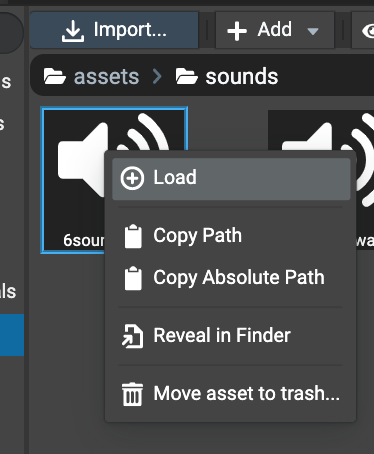
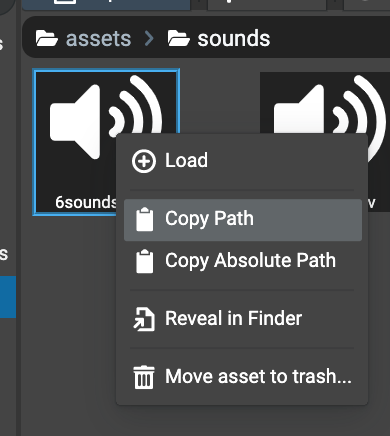
To get the name of a sound, the Assets Browser panel provides a helper when right-clicking the sound file. Simply
click Copy Path in the context menu so the name of the sound is added to the clipboard, then paste it
into the code editor as the parameter.
Example:
import { Mesh } from "@babylonjs/core/Meshes/mesh";import { Sound } from "@babylonjs/core/Audio/sound";
import { fromSounds } from "../decorators";
export default class MyMeshComponent extends Mesh {    @fromSounds("sounds/6sounds.mp3")    private _sound: Sound;
    public onStart(): void {        this._sound.play();    }}