LinearCloner
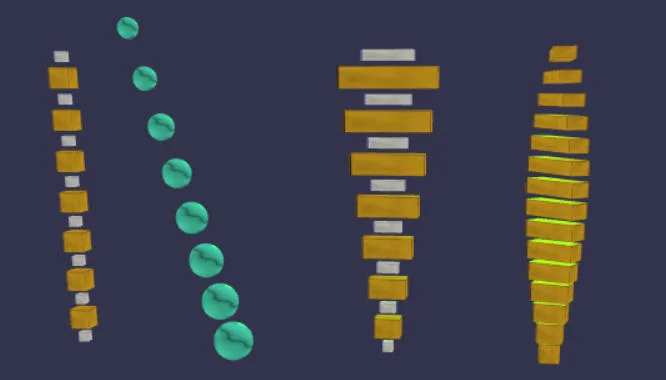
The LinearCloner clones and distributes the given meshes in a linear manner. If more than one mesh is provided, the corresponding clones are placed one after another. The LinearCloner can instantiate in two different interpolation modes: absolute and relative. In the first mode, the values of the input parameters (scale/rotation/position) can be seen as the difference from the first to the last clone, whereas in the relative mode those values are the difference from clone to clone.
The LinearCloner returns an object with an important property: root. It is an invisible mesh that acts as the anchor and parent of all generated clones, and its position is the position of the first clone. Transforming this root affects all underlying clones (children) at once, independently of the interpolation mode. Most of the input parameters are also available as properties and are very suitable for animation (tweening). The given input meshes are made inactive during construction, so after construction there will be only one of two possible mesh types: BABYLON clones or instances.
Note: Input meshes can be BABYLON meshes but other Cloners as well!
Example
Example of a LinearCloner with a count of 10 clones (5 x cube1, 5 x cube2) and an increment vector of {x:2,y:0,z:-1}:
const lc = new BABYLONX.LinearCloner([cube1, cube2], demo.scene, { iModeRelative:true,count:10,P:{x:2,y:0,z:-1} });
Transforming all clones can be done as you would with a single mesh:
lc.root.scaling.y = 2;
lc.root.rotation.x = Math.PI / 4;
Animation can be done via properties:
BABYLON.Animation.CreateAndStartAnimation('ani', lc, 'offset', 30, 120, 0, 10);
Parameters
BABYLONX.LinearCloner( meshes, scene[, {optional parameters}])
| Mandatory Parameter | Description |
|---|---|
| meshes | array of meshes/cloners to be cloned, meshes will be made inactive after construction |
| scene | BABYLON scene |
| Optional Parameter | Description | Default Value |
|---|---|---|
| count | the number of clones | 3 |
| offset | offset in world units in the direction of the transform position vector | 0 |
| growth | weight factor for all transform parameters in percent/100 | 1 |
| P | transform position vector | { x: 0, y: 2, z: 0 } |
| S | scale transformation | { x: 1, y: 1, z: 1} |
| R | rotation values in degrees | { x: 0, y: 0, z: 0 } |
| iModeRelative | interpolation mode, | false (absolute) |
| useInstances | flag if clones should be technical "clones" or "instances" | true |
| Properties | Description |
|---|---|
| count | @see Optional Parameter |
| offset | @see Optional Parameter |
| growth | @see Optional Parameter |
| position | @see Optional Parameter P |
| scale | @see Optional Parameter S |
| rotation | @see Optional Parameter R |
| rotation3 | rotation values in radians {x,y,z} |
| offset | @see Optional Parameter |
| root | READONLY, gets an invisible mesh representing the anchor of the cloner (root node) |
| effectors | READONLY, gets a list of Effectors assigned to this Cloner |
| Methods | Description |
|---|---|
| addEffector(effector, sensitivity) | adds an effector to this Cloner and sets the sensitivity (1 = full sensitivity, 0 = no sensitivity, which ignores the effector) |
| setEnabled(flag) | sets the cloner's root node to the state of the flag (true = enabled) |