Make your own Snippet Server
What is the Snippet Server?
The Snippet Server is the content server used by the Babylon library. Whenever you save a Playground, an animation, or a node material and get a unique URL pointing to your content, HTTP requests are sent to the Snippet Server. However, the default server we use does not have authentication, which means anyone with this unique URL can access your content. It is also closed source, so it is not possible to run a local copy. If you want to run your own private server, you will have to implement it yourself. This page explains one example implementation.
Making your own Snippet Server
To see the minimum expected from a Snippet Server, take a look at this reference implementation. It was written in Node.js and Express, which are JavaScript-based like Babylon itself, but you could implement your server in any language you prefer, such as Python or Go. You only need to implement two API calls. It also uses the file system to store snippet files, which is simple to implement but not the safest option. Feel free to modify it to suit your needs.
In this reference implementation, the snippets are stored in a directory called data, while another directory, called metadata, stores the latest version of each snippet ID. What are a "snippet ID" and a "version"? If you look at any URL that is saved in our tools, you can see that it has two parts:
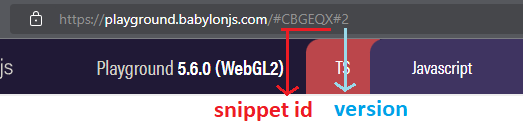
In the example https://playground.babylonjs.com/#CBGEQX#2, the section CBGEQX#2 is the snippet URL. Everything before the # is the snippet ID, and the number after it is the snippet version. The first version of a snippet may not have an explicit version number. We use a 5-character string for our snippet IDs, but that is not a requirement. You do need to have the #<version> section, though.
Saving a snippet
When saving a snippet, such as when you click the "Save" button in the Playground, a HTTP POST request is sent to the server. It may not contain an ID, in which case a new ID will be created and it will be the first version, or it may contain an ID, in which case a new version is created for that ID. You can see this in action here:
app.post("/:id?", (req, res) => {    let id = req.params.id;    let version;
    if (!id) {        // Generate "random" 5 character string        const genRndChar = () => {            const idx = Math.floor(Math.random() * chars.length);            return chars[idx];        };
        id = "";        for (let i = 0; i < ID_LEN; i++) {            id += genRndChar();        }    }
    const metadataPath = METADATA_DIR + id + METADATA_EXT;    // Look for the latest version in the metadata directory. If there is no metadata file, then it is the first version.    if (fs.existsSync(metadataPath)) {        version = fs.readFileSync(metadataPath, {encoding: 'utf-8'});        // Increment the version and convert back to string        version = Number.parseInt(version) + 1;        version = version + "";    } else {        version = "1";    }
    const newLocalToken = id + LOCAL_SEPARATOR + version;        fs.writeFileSync(metadataPath, version);
    const filePath = DATA_DIR + newLocalToken + FILE_EXT;    const stringBody = JSON.stringify(req.body);    fs.writeFileSync(filePath, stringBody);        res.status(200).json({        id,        version    });});
The request body itself is JSON containing the following attributes:
- payload: That's the content itself in the form of a string, which may be a JavaScript/TypeScript code string in the case of the Playground, or a JSON string in the case of Animations.
- name
- description
- tags
The response body is also a JSON, and should contain the snippet ID and snippet version as attributes.
Retrieving a snippet
When retrieving a snippet, a HTTP GET request is sent to the Snippet Server, containing at least the ID of the snippet and possibly its version. You can see this in action here:
app.get("/:id/:version?", (req, res) => { const id = req.params.id; const version = req.params.version || "1"; const localToken = id + LOCAL_SEPARATOR + version; const path = DATA_DIR + localToken + FILE_EXT; if (fs.existsSync(path)) { const rawData = fs.readFileSync(path); const parsedData = JSON.parse(rawData); res.status(200).json({ name: parsedData.name, description: parsedData.description, tags: parsedData.tags, jsonPayload: parsedData.payload }); } else { res.status(404).send(); }});The response returned to the Babylon tools is JSON in almost the same format as the POST body, with only one difference: the "payload" attribute is named "jsonPayload".
And that is all you need for your own Snippet Server. You can also add more features, such as deletion, authentication, and search.
Using your server on Babylon
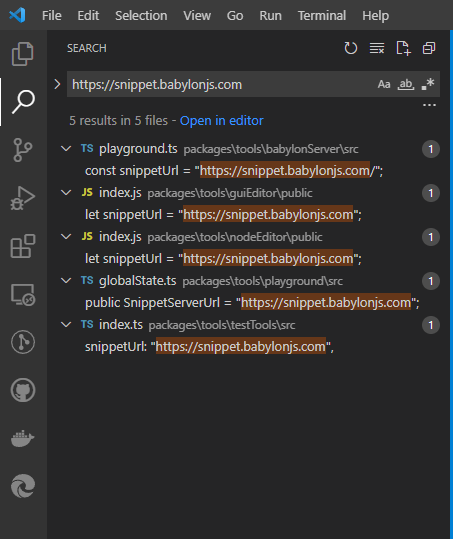
Now that you have a server up and running, you will want to point your Babylon library and tools to it. You can do this by making a copy of the Babylon repository locally and changing instances of the URL "https://snippet.babylonjs.com" to your own Snippet Server URL. You can use the same server instance for every case, or you can use separate instances with separate URLs for different purposes, such as Node Material or Animation. To make these URLs easier to find, you can use the "CTRL+SHIFT+F" shortcut in Visual Studio Code (if that is your IDE of choice):
A Note About CORS
Depending on your browser of choice, your calls to the Snippet Server may be blocked by CORS policy, so you'll need to add the Access-Control-Allow-Origin header to your responses. The easiest way to do that in Express is using the CORS Middleware.