Terrain Material
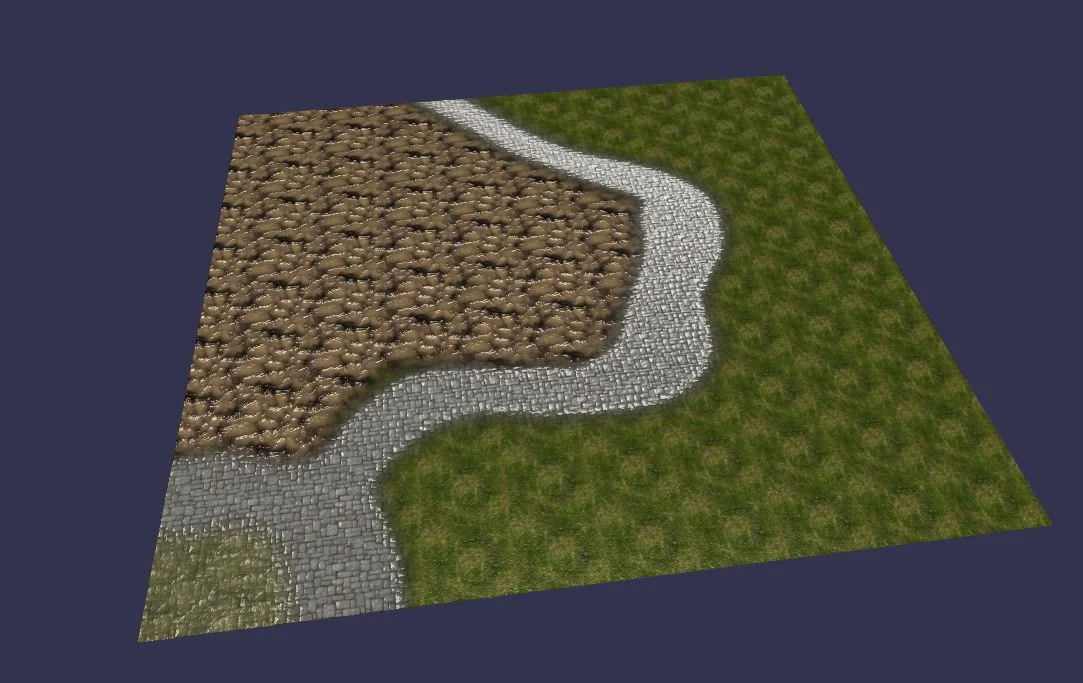
Playground example
Using the terrain material
The terrain material works with at least 4 textures:
- 3 Diffuse textures. (required)
- 3 Bump textures. (not required)
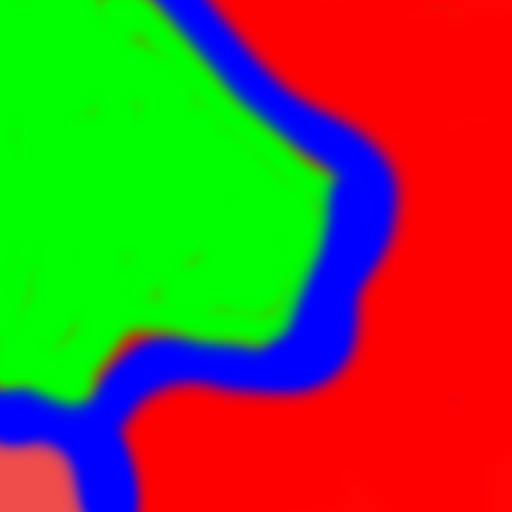
- 1 Mixmap texture: represents the intensity of each diffuse texture according to the channels R (red), G (green), and B (blue). (required)
In other words, the Mixmap texture mixes the 3 diffuse textures using the RGB color channels.
A Mixmap texture looks like this (the result is shown in the screenshot above):
The method applied by the terrain material is also called "texture splatting".
import { Texture } from "@babylonjs/core/Materials/Textures/texture";import { MeshBuilder } from "@babylonjs/core/Meshes/meshBuilder";import { TerrainMaterial } from "@babylonjs/materials/terrain/terrainMaterial";var terrain = MeshBuilder.CreateGroundFromHeightMap("terrain", "heightMap.png", { width: 100, height: 100, subdivisions: 100, minHeight: 0, maxHeight: 10 }, scene);var terrainMaterial = new TerrainMaterial("terrainMaterial", scene);terrainMaterial.mixTexture = new Texture("mixMap.png", scene);terrainMaterial.diffuseTexture1 = new Texture("grass.png", scene);terrainMaterial.diffuseTexture2 = new Texture("rock.png", scene);terrainMaterial.diffuseTexture3 = new Texture("floor.png", scene);terrainMaterial.bumpTexture1 = new Texture("grassn.png", scene);terrainMaterial.bumpTexture2 = new Texture("rockn.png", scene);terrainMaterial.bumpTexture3 = new Texture("floor_bump.png", scene);terrain.material = terrainMaterial;That's all.