ShadowOnly Material
General
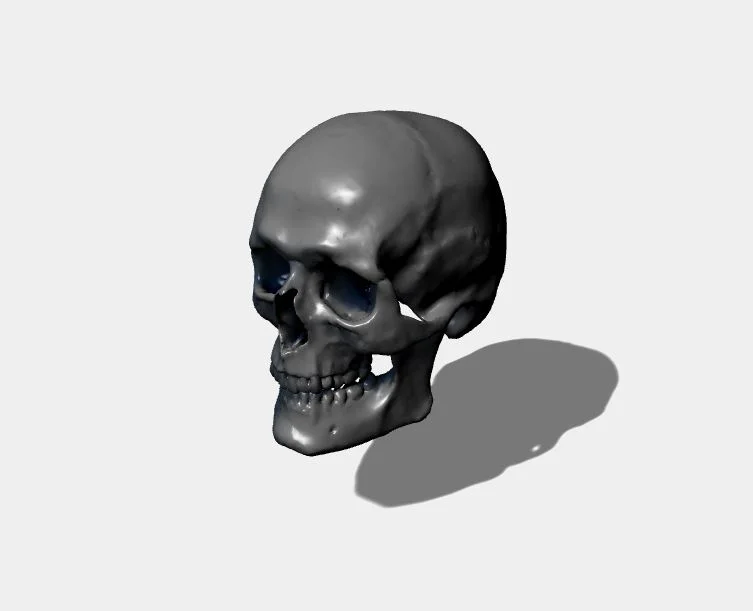
The goal of the ShadowOnlyMaterial is to display only shadows cast by a light on a receiving object. It is mostly useful when you want to display shadows on a transparent canvas (on top of your existing DOM).
The ShadowOnly material can be found here: https://cdn.babylonjs.com/materialsLibrary/babylon.shadowOnlyMaterial.js
A demo can be found here: PG: Shadow Only Material
Using the ShadowOnly material
ShadowOnly material is very simple to use. Just apply it as a material to any mesh where you want to display only shadows:
import { MeshBuilder } from "@babylonjs/core/Meshes/meshBuilder";import { ShadowOnlyMaterial } from "@babylonjs/materials/shadowOnly/shadowOnlyMaterial";var ground = MeshBuilder.CreatePlane('ground', { size: 1000 }, scene);ground.rotation.x = Math.PI / 2;ground.material = new ShadowOnlyMaterial('shadowOnly', scene);ground.receiveShadows = true;By default, the shadow color is black, but you can force an artificial color with material.shadowColor = BABYLON.Color3.Red().
Demo here: PG: Shadow Only Material
Limitation: Please note that only the first light that can reach the mesh will be used.
So if you have multiple lights in your scene, you may need to use light.includedOnlyMeshes or light.excludedMeshes or light.includeOnlyWithLayerMask or light.excludeWithLayerMask.
You can also force the material to pick a specific light with material.activeLight = light.