# Starter HTML Template

> Get started with the workflow, from a simple webpage to a complete app with an IDE and development frameworks.

Source: https://doc.babylonjs.com/setup/starterHTML

## Minimal HTML Template

> [!WARNING]
> **Warning**
>
> The CDN should not be used in production environments. The purpose of our CDN is to serve Babylon packages to users learning how to use the platform or running small experiments. Once you've built an application and are ready to share it with the world at large, you should serve all packages from your own CDN.

```html
<!DOCTYPE html>
<html xmlns="http://www.w3.org/1999/xhtml">

    <head>
        <meta http-equiv="Content-Type" content="text/html; charset=utf-8"/>
        <title>Babylon Template</title>

        <style>
            html, body {
                overflow: hidden;
                width: 100%;
                height: 100%;
                margin: 0;
                padding: 0;
            }
            #renderCanvas {
                width: 100%;
                height: 100%;
                touch-action: none;
            }
        </style>

        <script src="https://cdn.babylonjs.com/babylon.js"></script>

    </head>

   <body>

	<canvas id="renderCanvas"></canvas>

	<script>
        const canvas = document.getElementById("renderCanvas"); // Get the canvas element
        const engine = new BABYLON.Engine(canvas, true); // Generate the BABYLON 3D engine
        const createScene = function () {
            // Creates a basic Babylon Scene object
            const scene = new BABYLON.Scene(engine);
            // Creates and positions a free camera
            const camera = new BABYLON.FreeCamera("camera1", 
                new BABYLON.Vector3(0, 5, -10), scene);
            // Targets the camera to scene origin
            camera.setTarget(BABYLON.Vector3.Zero());
            // This attaches the camera to the canvas
            camera.attachControl(canvas, true);
            // Creates a light, aiming 0,1,0 - to the sky
            const light = new BABYLON.HemisphericLight("light", 
                new BABYLON.Vector3(0, 1, 0), scene);
            // Dim the light a small amount - 0 to 1
            light.intensity = 0.7;
            // Built-in 'sphere' shape.
            const sphere = BABYLON.MeshBuilder.CreateSphere("sphere", 
                {diameter: 2, segments: 32}, scene);
            // Move the sphere upward 1/2 its height
            sphere.position.y = 1;
            // Built-in 'ground' shape.
            const ground = BABYLON.MeshBuilder.CreateGround("ground", 
                {width: 6, height: 6}, scene);
            return scene;
        };
        const scene = createScene(); //Call the createScene function
        // Register a render loop to repeatedly render the scene
        engine.runRenderLoop(function () {
                scene.render();
        });
        // Watch for browser/canvas resize events
        window.addEventListener("resize", function () {
                engine.resize();
        });
	</script>

   </body>

</html>
```

<a href="https://raw.githubusercontent.com/BabylonJSGuide/Tiled/master/basic1/index.zip" download="index.zip">Download</a> the template file that uses Babylon.js from the CDN.   
<br />
<a href="https://raw.githubusercontent.com/BabylonJSGuide/Tiled/master/basic2.zip" download="basic template">Download</a> the template file containing a local version of Babylon.max.js

## Description

**Color Key to Babylon.js Sections**
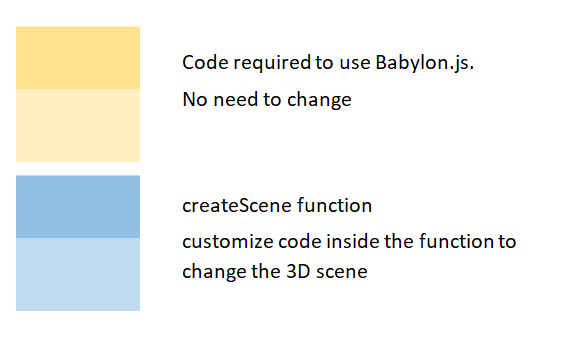

![Webpage Key](https://doc.babylonjs.com/img/quickstart/htmlkey.webp)

**HTML with Babylon.js Sections in Color**
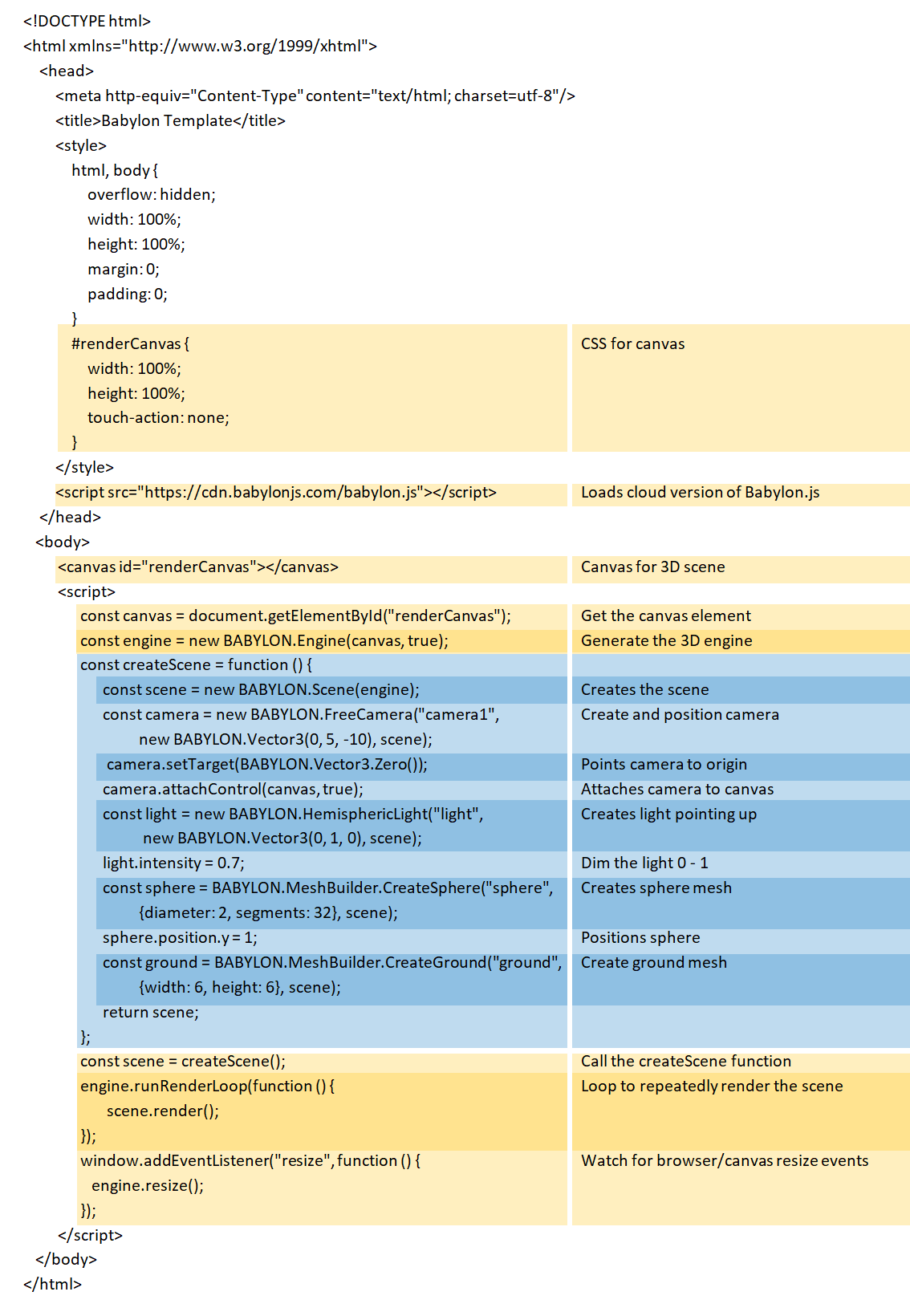

![Basic Webpage](https://doc.babylonjs.com/img/quickstart/htmlbjs.webp)

## Playground to Download From
Use the &#x2913; button to download the template from the Playground.

- [Playground: Basic Playground](https://playground.babylonjs.com/#WJXQP0) - CreateScene Playground Template.
