Soft Bodies
In terms of physics engines, a soft body is a body whose shape can be deformed by interactions with other bodies or forces within the physics world. Of the three plugins available with Babylon.js, soft bodies are available only with Ammo.js. There are three soft bodies you can create: the three-dimensional softbody, the two-dimensional cloth, and the one-dimensional rope. First, a number of limitations need to be considered, followed by some aspects particular to soft bodies and then some examples.
See How to Use The Physics' Engines for an overall view of setting up and using the three plugins.
Limitations
A deformation of a body can only be shown if there are enough vertices to produce the deformation. The number of vertices used, along with the need to check their positions and velocities at each time step, means that the number of soft bodies may be limited to one, two, or possibly three.
Any triangular facet belonging to a mesh used as the basis for a soft body must share its vertices with any adjacent facet. If not, the soft body will rip apart along unshared vertices. As an example, look at the triangular facets in the diagram below.
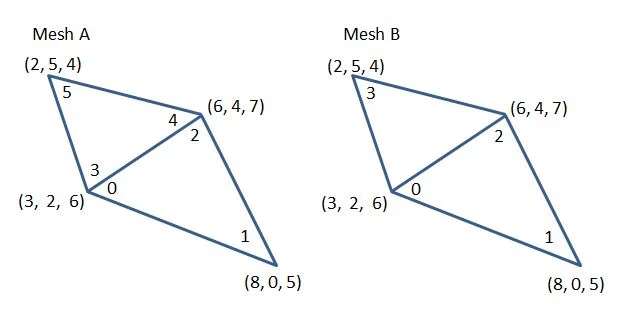
In Mesh A the positions have new indices for each of the facets 0, 1, 2 and 3, 4, 5. This happens, for instance, in a sphere and also when a mesh is converted to a flat shaded mesh. In this case a soft body would tear along the lines 0,2 and 3,4.
In Mesh B the positions share indices for each of the facets 0, 1, 2 and 0, 2, 3. The soft body will then hold together.
To force a mesh to share vertices use
mesh.forceSharedVertices();One benefit of this is that it reduces the number of vertices in the mesh. Of course, there may still not be enough vertices in the mesh to make a properly functioning soft body. In that case, use
mesh.increaseVertices(n);where n is the number of extra vertices to add to each side of a triangular facet. The number of facets is increased by a factor of (n + 1)2. This method forces repeated vertex positions to share indices. The order for using the two methods above is always share first, then increase.
mesh.forceSharedVertices();mesh.increaseVertices(4);Note
- The position and rotation of the mesh must be set before its soft impostor is created.
- A mesh used for a soft body cannot be a parent or child of another mesh.
- Soft bodies cannot have forces and impulses applied to them.
Options for Soft Bodies
As well as the usual optional parameters of mass, friction, and restitution that can be set when creating a physics impostor, there are a number of parameters specific to soft bodies. These come in two sets.
Those that can be set during or after impostor creation:
- velocityIterations, positive integer, the maximum iterations used when solving for vertex velocities, default 20;
- positionIterations, positive integer, the maximum iterations used when solving for vertex positions, default 20;
- stiffness, a float from 0 to 1: 0 is very elastic, so the distance between vertices is not constrained; 1 is inelastic, so the distance between vertices is invariant; default 1;
- pressure, softbody only, a positive number; the higher it is the less likely the softbody will collapse onto itself, default 200; cloth and rope pressure is maintained at 0;
And those that can only be set during creation:
- margin, the collision margin around the soft body; when needed, set it to around 1/100 of the body's size. It is particularly useful for stopping a cloth from passing through a body; default 0;
- damping, slows down the changes in vertex positions, useful if it looks like parts of the body are vibrating, start from around 0.01;
- fixedPoints, cloth only, can be 0, 1, 2, 4, 8 or sums of these; 0 no fixed points, 1 back left corner fixed, 2, back right corner, 4 front left corner, 8 front right corner and sum to fix more than one corner, default 0.
You may have to use trial and error with the above parameters to get the effect you want.
The Softbody Soft Body
A softbody is a 3D soft body. To ensure that the body is not pulled apart, the mesh used has to have shared vertices. This is achieved using
mesh.forceSharedVertices();It also has to have enough vertices to simulate the body. When the mesh used cannot increase the number of vertices during its construction, a box for example, you use
mesh.increaseVertices(n);where n is the extra number of vertices to add to one side of a triangular facet. The number of facets is increased by a factor of (n + 1)2.
A softbody is constructed using
import { PhysicsImpostor } from "@babylonjs/core/Physics/v1/physicsImpostor";var options = {    mass: 15,    friction: 0.2,    restitution: 0.3,    pressure: 3500,    velocityIterations: 10,    positionIterations: 10,    stiffness: 1,    margin: 0.1;    damping: 0.05}
new PhysicsImpostor(mesh, PhysicsImpostor.SoftbodyImpostor, options, scene);
or possibly
import { PhysicsImpostor } from "@babylonjs/core/Physics/v1/physicsImpostor";mesh.physicsImpostor = new PhysicsImpostor(mesh, PhysicsImpostor.SoftbodyImpostor, { mass: 1, friction: 0.1 }, scene);mesh.physicsImpostor.velocityIterations = 10;mesh.physicsImpostor.positionIterations = 10;mesh.physicsImpostor.stiffness = 0.9;Examples
Softbody Example Softbody and Rigid SphereThe Cloth Soft Body
A 2D soft body. All cloth soft bodies are created from a ground mesh, as this is already two-dimensional, has shared vertices, and can have its number of vertices increased by changing the subdivisions used. The usual options are available.
The clothImpostor is created by, for example,
import { PhysicsImpostor } from "@babylonjs/core/Physics/v1/physicsImpostor";cloth.physicsImpostor = new PhysicsImpostor(ground, PhysicsImpostor.ClothImpostor, { margin: 0.25, damping: 0.01 }, scene);cloth.physicsImpostor.velocityIterations = 10;cloth.physicsImpostor.positionIterations = 10;cloth.physicsImpostor.stiffness = 1;Note Using the increaseVertices method on a plane mesh will not provide a suitable mesh for a clothImpostor as the algorithm used to increase the vertices does not place them in the correct row by row order.
To see both sides of a cloth set backFaceCulling = false on the material to be applied to the ground mesh.
Examples
Cloth Over a Softbody Cloth Over a Rigid Box Cloth Over Rigid Box With Fixed CornersFixed Points
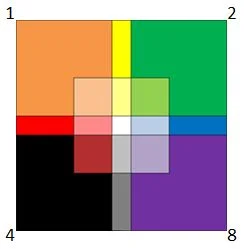
To fix corner points of the cloth so that those points do not move use the numbers (or their sum) as shown in the diagram above.
Set the fixedPoints parameter during the construction of the cloth.
import { PhysicsImpostor } from "@babylonjs/core/Physics/v1/physicsImpostor";cloth.physicsImpostor = new PhysicsImpostor(ground, PhysicsImpostor.ClothImpostor, {margin, 0.2, fixedPoints: 3}, scene);cloth.physicsImpostor.velocityIterations = 10;cloth.physicsImpostor.positionIterations = 10;cloth.physicsImpostor.stiffness = 1;Anchors
As well as being able to fix the corners of a cloth in space it is also possible to anchor points on a cloth to a rigid body.
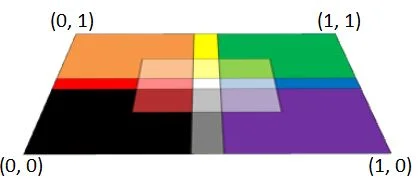
Anchor points are given as a fraction across the width and height of the ground forming the cloth as shown in the diagram above.
Rotating the cloth mesh to a vertical position using
cloth.rotate.x = -Math.PI / 2;will place (0, 0) as the bottom left corner and (1, 1) as the top right corner.
Using
cloth.rotate.x = Math.PI / 2;will place (0, 1) as the bottom left corner and (1, 0) as the top right corner.
Setting an anchor requires three parameters plus two optional ones, as in
clothImpostor.addAnchor(rigidImpostor, fraction of width, fraction of height, influence, noCollisionBetweenLinkedBodies);- rigidImpostor, to which the anchor points are attached. The attachments are calculated automatically by Ammo.js and depend on the position of the softImpostor and the anchor points used.
- fraction of width, from 0 to 1, the fraction across the width of the ground mesh
- fraction of height, from 0 to 1, the fraction up the height of the ground mesh
- influence, from 0 to 1, defaults to 1. A value of 1 fixes the distance of the anchor from the rigid body; the closer it is to 0, the more elastic the distance
- noCollisionBetweenLinkedBodies, default false. When true, the soft body and the rigid body to which it is attached will not detect collisions with each other.
The width and height fraction coordinates are used to determine the closest vertex within the ground mesh to those fractional coordinates.
You are able to add multiple anchors, for example
cloth.physicsImpostor.addAnchor(box.physicsImpostor, 0, 1);cloth.physicsImpostor.addAnchor(box.physicsImpostor, 1, 1, 0.8);The Rope Soft Body
A rope is a 1D soft body. It can be constructed using a lines mesh or an extruded shape mesh. The usual options are available for both; however, using an extruded shape requires extra parameters in the options.
Using Lines
A lines mesh should be constructed in a straight line, and an impostor should be constructed in the same way as for a softbody or a cloth.
import { Color3 } from "@babylonjs/core/Maths/math.color";import { MeshBuilder } from "@babylonjs/core/Meshes/meshBuilder";import { PhysicsImpostor } from "@babylonjs/core/Physics/v1/physicsImpostor";var rope = MeshBuilder.CreateLines("lines", { points: myPoints }, scene);rope.color = Color3.Black();rope.physicsImpostor = new PhysicsImpostor(rope, PhysicsImpostor.RopeImpostor, { mass: 2 }, scene);rope.physicsImpostor.velocityIterations = 20;rope.physicsImpostor.positionIterations = 20;rope.physicsImpostor.stiffness = 0.8;In the following playground note the use of the margin for the rope impostor to prevent the rope cutting into the soft box.
Rope With Fixed Ends Over Soft BoxUsing an Extruded Shape
The path for the extruded shape should be in a straight line and the shape and path parameters used in constructing the shape should be copied and pasted into the options for the impostor. Currently shape and path are the only two parameters that can be used when an extruded shape is used to construct a rope.
import { MeshBuilder } from "@babylonjs/core/Meshes/meshBuilder";import { PhysicsImpostor } from "@babylonjs/core/Physics/v1/physicsImpostor";var rope = MeshBuilder.ExtrudeShape("ext", { shape: myShape, path: myPoints }, scene);rope.material = ropeMat;rope.physicsImpostor = new PhysicsImpostor(rope, PhysicsImpostor.RopeImpostor, { mass: 2, shape: myShape, path: myPoints }, scene);rope.physicsImpostor.velocityIterations = 20;rope.physicsImpostor.positionIterations = 20;rope.physicsImpostor.stiffness = 1;In the following Playground, remember that the extruded shape does not have an impostor. It lies on the surface of the box because the margin for the rope is set to the radius of the extruded shape.
Extruded Rope With Fixed Ends Over Soft BoxFixed Points
Fixing the end points for a rope is the same whichever of the two meshes are used and must be set during construction. A 1 fixes the starting point of the rope, a 2 fixes the end point of the rope and 3 fixes both.
Hooks
A hook can be added anywhere along the length of the rope using a number from 0 (start) to 1 (end) and attached to a rigid body using
ropeImpostor.addHook(rigidImpostor, fraction of length, influence, noCollisionBetweenLinkedBodies);where
- rigidImpostor, to which the hook is attached. The attachments are calculated automatically by Ammo.js and depend on the position of the ropeImpostor and the hook used.
- fraction of length, from 0 to 1, the fraction across the length of the rope
- influence, from 0 to 1, defaults to 1. A value of 1 fixes the distance of the hook from the rigid body; the closer it is to 0, the more elastic the distance
- noCollisionBetweenLinkedBodies, default false. When true, the rope and the rigid body to which it is attached will not detect collisions with each other.
For example, you can attach a ball to the end of a rope and a crossbar to the start of a rope with influence 1:
rope.physicsImpostor.addHook(crossbar.physicsImpostor, 0, 1);rope.physicsImpostor.addHook(ball.physicsImpostor, 1, 1);Further reading
Using A Physics Engine
Learn how to use one of the available physics engines in Babylon.js.
Forces
Learn all about applying physical forces in Babylon.js.
Joints
Learn all about using joints in physics engines within Babylon.js.
Pivots and Axes
Learn all about physics pivots and axes in Babylon.js.
Compound Bodies
Learn all about physics compound bodies in Babylon.js.
Advanced Physics Features
Unlock the full potential of physics with advanced physics features in Babylon.js.