Vertical Wave with Vertex Shader
Vertical Wave with Vertex Shader
As with any code, it is important to have a firm idea of what you want to achieve, what is possible to code, and the design.
Requirements
The requirements are for a row of many boxes that move vertically in a wave motion. The motion will be achieved by changing the apparent positions of all vertices within a Vertex Shader. To be clear, the positions of the boxes within the scene model will not be altered. What will be changed through the Vertex Shader is their projection onto the screen.
First Stage Design
The boxes will be generated using the Solid Particle System, as this deals with a multitude of repeated boxes efficiently. The vertical height of a box at any time will depend on the time and its position along the x axis using the sin function.
First Challenge
Generally, coding this project in JavaScript, for example, would give access to the position of a box, and so
box.position.y = Math.sin(box.position.x + time)could be used.
However, the data passed to Vertex Shader code are the attributes of the vertices of a mesh or values provided through uniforms. Also, the Vertex Shader code applies to a single vertex with no access to any other vertices. Since the x coordinate of vertices on the left-hand side of the box will differ from those on the right-hand side by the size of the box, sin(xLeft + time) will differ from sin(xRight + time), distorting the box.
What is needed is a method of obtaining the same number h from the numbers xLeft and xRight.
Second Stage Design
The boxes are equally spaced cubes with the following parameters: size of box, gap between boxes, and spacing = size + gap.
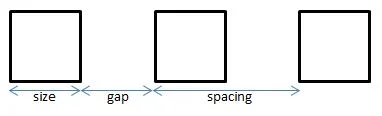
The number of boxes n will be odd, numbered from the left starting with 0.
The box i will be at position (i - floor(n/2)) * spacing + size/2
For example, when n = 5, floor(n/2) = 2 and the left-hand edges of boxes 0 to 4 will have positions
-2 * spacing, -1 * spacing, 0, 1 * spacing, 2 * spacing respectively. Adding size to these gives their right-hand edges.
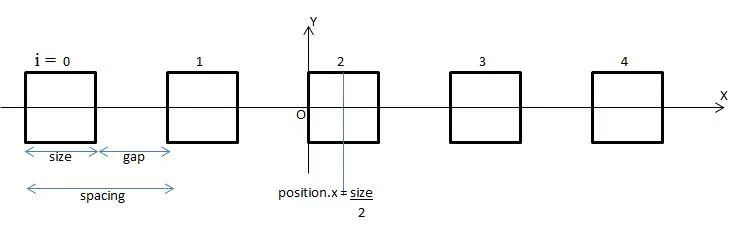
Dividing these left and right hand edge positions by spacing gives a pair of numbers for each box of
-2, -2 + (size/spacing), -1, -1 + (size/spacing), 0, (size/spacing), 1, 1 + (size/spacing), 2, 2 + (size/spacing).
Since spacing = size + gap spacing > size and so (size/spacing) < 1 and it follows that applying the function floor to each of these numbers gives
-2, -2, -1, -1, 0, 0, 1, 1, 2,2.
Hence, we obtain a number h that is the same from the numbers xLeft and xRight.
For a box, the x coordinate of any vertex will either be on a left-hand or a right-hand edge, and so for each box x/spacing
will give a unique number.
Third Stage Design
Within the Vertex Shader main function,
vec3 p = position;float bn = floor(position.x / box_spacing);p.y = p.y + sin(time + bn/4.0);gl_Position = worldViewProjection * vec4(p, 1.0);where time and box_spacing are uniforms.
SPS Code
import { MeshBuilder } from "@babylonjs/core/Meshes/meshBuilder";import { SolidParticleSystem } from "@babylonjs/core/Particles/solidParticleSystem";//Create SPS of Boxesvar boxes = 101; //odd numbervar box_size = 0.25; // must be floatvar box_gap = box_size / 2;var box_spacing = box_size + box_gap;var box = MeshBuilder.CreateBox("box", { size: box_size }, scene);var boxes_SPS = new SolidParticleSystem("boxesSPS", scene, { updatable: false });//function to position boxesvar set_boxes = function (particle, i, s) { var mid_point = Math.floor(boxes / 2); particle.position.x = (i - mid_point) * box_spacing + box_size / 2;};boxes_SPS.addShape(box, boxes, { positionFunction: set_boxes });var boxes = boxes_SPS.buildMesh(); // mesh of leavesbox.dispose();Shader Material Code
Vertex Shader
// Attributesattribute vec3 position;attribute vec3 normal;attribute vec2 uv;
// Uniformsuniform mat4 worldViewProjection;uniform float box_spacing;uniform float time;
// Normalvarying vec2 vUV;
void main(void) {    vec3 p = position;    float bn = floor(position.x / box_spacing);    p.y = p.y + sin(time + bn/4.0);    gl_Position = worldViewProjection * vec4(p, 1.0);
    vUV = uv;}
Fragment Shader
varying vec2 vUV;
uniform sampler2D textureSampler;
void main(void) {  gl_FragColor = texture2D(textureSampler, vUV);}
Set Material
import { ShaderMaterial } from "@babylonjs/core/Materials/shaderMaterial";import { Texture } from "@babylonjs/core/Materials/Textures/texture";var shaderMaterial = new ShaderMaterial("shader", scene, { vertexElement: "vertexShaderCode", fragmentElement: "fragmentShaderCode",}, { attributes: ["position", "normal", "uv"], uniforms: ["world", "worldView", "worldViewProjection", "view", "projection"]});var mainTexture = new Texture("amiga.jpg", scene);shaderMaterial.setTexture("textureSampler", mainTexture);Animation Loop
var time = 0;scene.registerBeforeRender(function() { boxes.material.setFloat("time", time); time +=0.1;});Shader Builder Code
Shader Code
BABYLONX.ShaderBuilder.InitializeEngine(); var shaderMaterial = new BABYLONX.ShaderBuilder() .Solid({ b: 1 }) .SetUniform('box_spacing', 'float') .Map({path:'amiga.jpg' }) .VertexShader( ' float bn = pos.x/box_spacing;\ result = vec4( pos.x, pos.y + sin(time + bn/4.0), pos.z ,1.);') .BuildMaterial(scene);Set Material
boxes.material = shaderMaterial;boxes.material.setFloat("box_spacing", box_spacing)Animation Loop
var time = 0;scene.registerBeforeRender(function () {
	time += 0.1;
    new BABYLONX.ShaderMaterialHelper().SetUniforms(        scene.meshes,        camera.position,        camera.target,        { x: 0, y: 0 },        { x: 100, y: 100 },        time);	            });
Vertical Wave
External Example - Shader Material