Making a Simple Car
This is to show the practical use of rotate.
The Design
The car will consist of a trapezoid for the body and four cylinders for wheels. The car will be animated to follow a path and will remain parallel to it. The wheels will rotate and be given a texture to show that they are rotating. For simplicity, all wheels will remain parallel to the car and their rotation will not be matched to the forward speed of the car. The car will move forward by following a sequence of points on the path. The path will be a curved line with large turning radius and will be shown in the scene.
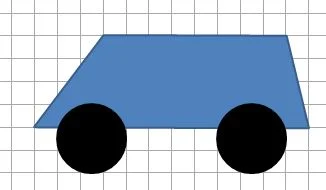
Car body
The car body will be an extrusion of the trapezium formed by the points (-4, 2), (4, 2), (5, -2), (-7, -2) in the direction of the positive x axis from (0, 0, 0) to (0, 0, 4).
import { StandardMaterial } from "@babylonjs/core/Materials/standardMaterial";import { Color3 } from "@babylonjs/core/Maths/math.color";import { Vector3 } from "@babylonjs/core/Maths/math.vector";import { Mesh } from "@babylonjs/core/Meshes/mesh";import { MeshBuilder } from "@babylonjs/core/Meshes/meshBuilder";var bodyMaterial = new StandardMaterial("body_mat", scene);bodyMaterial.diffuseColor = new Color3(1.0, 0.25, 0.25);bodyMaterial.backFaceCulling = false;var side = [new Vector3(-4, 2, -2), new Vector3(4, 2, -2), new Vector3(5, -2, -2), new Vector3(-7, -2, -2)];side.push(side[0]); //close trapeziumvar extrudePath = [new Vector3(0, 0, 0), new Vector3(0, 0, 4)];var carBody = MeshBuilder.ExtrudeShape("body", { shape: side, path: extrudePath, cap: Mesh.CAP_ALL }, scene);carBody.material = bodyMaterial;Wheel
The wheel is made from a cylinder using MeshBuilder as this allows different textures and colors to be applied to the flat and curved surfaces of the cylinder.
import { StandardMaterial } from "@babylonjs/core/Materials/standardMaterial";import { Texture } from "@babylonjs/core/Materials/Textures/texture";import { Color3 } from "@babylonjs/core/Maths/math.color";import { Vector4 } from "@babylonjs/core/Maths/math.vector";import { MeshBuilder } from "@babylonjs/core/Meshes/meshBuilder";var wheelMaterial = new StandardMaterial("wheel_mat", scene);var wheelTexture = new Texture("https://i.imgur.com/ZUWbT6L.png", scene);wheelMaterial.diffuseTexture = wheelTexture;//Set color for wheel tread as blackvar faceColors = [];faceColors[1] = new Color3(0, 0, 0);//set texture for flat face of wheelvar faceUV = [];faceUV[0] = new Vector4(0, 0, 1, 1);faceUV[2] = new Vector4(0, 0, 1, 1);var wheel = MeshBuilder.CreateCylinder("wheel", { diameter: 3, height: 1, tessellation: 24, faceColors: faceColors, faceUV: faceUV }, scene);wheel.material = wheelMaterial;//rotate wheel so tread in xz planewheel.rotation.x = Math.PI / 2;Attaching the Wheels to the Car
As the car moves forward, so will the wheels. This can be achieved by making the car the parent of the wheels.
As the wheels first need to rotate around the x axis to orient the cylinder correctly and then rotate about another axis, the rotate method will be used instead of rotation.
import { Axis, Space } from "@babylonjs/core/Maths/math.axis";import { Vector3 } from "@babylonjs/core/Maths/math.vector";import { MeshBuilder } from "@babylonjs/core/Meshes/meshBuilder";var wheelFI = MeshBuilder.CreateCylinder("wheelFI", { diameter: 3, height: 1, tessellation: 24, faceColors: faceColors, faceUV: faceUV }, scene);wheelFI.material = wheelMaterial;wheelFI.rotate(Axis.X, Math.PI / 2, Space.WORLD);wheelFI.parent = carBody;var wheelFO = wheelFI.createInstance("FO");wheelFO.parent = carBody;wheelFO.position = new Vector3(-4.5, -2, 2.8);var wheelRI = wheelFI.createInstance("RI");wheelRI.parent = carBody;wheelRI.position = new Vector3(2.5, -2, -2.8);var wheelRO = wheelFI.createInstance("RO");wheelRO.parent = carBody;wheelRO.position = new Vector3(2.5, -2, 2.8);wheelFI.position = new Vector3(-4.5, -2, -2.8);Rotate Wheels
The animation is achieved using scene.registerAfterRender and small rotations within the render loop.
Note: when using rotate and translate, scene.registerAfterRender is preferable to scene.registerBeforeRender as the calculations will take place after the world matrix has been computed for each mesh.
import { Axis, Space } from "@babylonjs/core/Maths/math.axis";scene.registerAfterRender(function () { wheelFI.rotate(Axis.Z, Math.PI / 64, Space.WORLD); wheelFO.rotate(Axis.Z, Math.PI / 64, Space.WORLD); wheelRI.rotate(Axis.Z, Math.PI / 64, Space.WORLD); wheelRO.rotate(Axis.Z, Math.PI / 64, Space.WORLD);});Path
To draw a path, a sequence of points is needed. Starting with a circle of radius r in the xz plane with centre (0, 0, 0), calculate points around the circle and vary r slightly and smoothly on the way round to give a less regular path. This is achieved by adding to the radius, at each angle, a fraction of r times the sine of a multiple of the angle turned. In addition a ground is added.
Since on creation the side of the car is perpendicular to the z axis, the base circle will start with theta = 0 and x = r _ sin(theta) and z = r _ cos(theta). This means that the car can be positioned tangential to the circle by setting z = r.
Since the circle has been given a perturbation some small rotation of the car will be necessary for it to be truly tangential.
import { Color3 } from "@babylonjs/core/Maths/math.color";import { Vector3 } from "@babylonjs/core/Maths/math.vector";import { MeshBuilder } from "@babylonjs/core/Meshes/meshBuilder";var points = [];var n = 50; // number of points - more points the slower the carvar r = 50; //radiusfor (let i = 0; i < n + 1; i++) { points.push(new Vector3((r + (r / 5) * Math.sin((8 * i * Math.PI) / n)) * Math.cos((2 * i * Math.PI) / n), 0, (r + (r / 10) * Math.sin((6 * i * Math.PI) / n)) * Math.sin((2 * i * Math.PI) / n)));}var track = MeshBuilder.CreateLines("track", { points: points }, scene);track.color = new Color3(0, 0, 0);var ground = MeshBuilder.CreateGround("ground", { width: 3 * r, height: 3 * r }, scene);Following the Path
The car will be moved forward using the sequence of points calculated for the path. As it moves round the path, the car side should remain tangential to the path and the wheels should rotate about an axis that is normal to the path. Since the normals to the path need to be calculated for the wheel axes, it will be the normals that are used to rotate the car. The angle to be rotated at any point can be found from the angle between the previous normal and the current one. This angle can be found by using the dot product of the two normal vectors. However the dot product only gives the amount of rotation not the direction.
Determining the normals at any point is achieved by forming the Path3D object from the array of points defining the path and extracting the normals, which are unit vectors.
import { Path3D } from "@babylonjs/core/Maths/math.path";var path3d = new Path3D(points);var normals = path3d.getNormals();As can be seen from the diagram below, the direction in which the normal changes varies from clockwise to anti-clockwise depending on whether the path is a convex or concave curve.
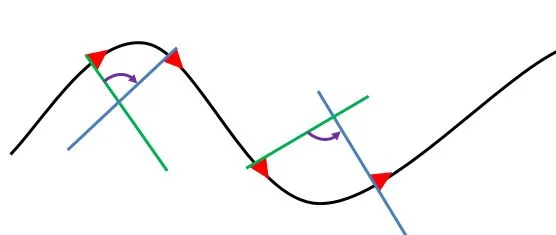
Both normals lie in the xz plane, so the cross product of the two normals will lie on the y axis, and the direction of turn can therefore be determined from the sign of the y component of the cross product.
import { Axis, Space } from "@babylonjs/core/Maths/math.axis";import { Vector3 } from "@babylonjs/core/Maths/math.vector";theta = Math.acos(Vector3.Dot(normals[i], normals[i + 1])); //amount of turnvar dir = Vector3.Cross(normals[i], normals[i + 1]).y; //enables direction of turn to be found depending if +ve or -vevar dir = dir / Math.abs(dir); //dir takes value 1 or -1carBody.rotate(Axis.Y, dir * theta, Space.WORLD);Placing the Car
To stand on the ground, the car will need to be lifted. To set it on the path, it will be moved to the point (0, r, 4). Its current normal is along the z axis so determine the turn necessary from
import { Axis, Space } from "@babylonjs/core/Maths/math.axis";import { Vector3 } from "@babylonjs/core/Maths/math.vector";var theta = Math.acos(Vector3.Dot(Axis.Z, normals[0]));carBody.rotate(Axis.Y, theta, Space.WORLD);Animating the Car
The animation is achieved using scene.registerAfterRender. Within this render loop: the car is moved forward from point to point; it is rotated so that it remains tangential to the path at the current point; the wheels are rotated a small amount about the normal at the current point.
import { Axis, Space } from "@babylonjs/core/Maths/math.axis";import { Vector3 } from "@babylonjs/core/Maths/math.vector";var i = 0;scene.registerAfterRender(function () { carBody.position.x = points[i].x; carBody.position.z = points[i].z; wheelFI.rotate(normals[i], Math.PI / 32, Space.WORLD); wheelFO.rotate(normals[i], Math.PI / 32, Space.WORLD); wheelRI.rotate(normals[i], Math.PI / 32, Space.WORLD); wheelRO.rotate(normals[i], Math.PI / 32, Space.WORLD); theta = Math.acos(Vector3.Dot(normals[i], normals[i + 1])); var dir = Vector3.Cross(normals[i], normals[i + 1]).y; var dir = dir / Math.abs(dir); carBody.rotate(Axis.Y, dir * theta, Space.WORLD); i = (i + 1) % (n - 1); //continuous looping});Correction
After allowing the finalised playground of the car to run for a while, it can be seen that the rotation of the car becomes askew. This is due to rounding errors in the floating point (probably).
The initial rotation quaternion is stored in startRotation and is now applied to the car whenever it starts a new loop.
if (i == 0) { carBody.rotationQuaternion = startRotation;}