Design Process
Summary
This is just a little bonus content if you're curious about how I went about designing the game assets and what resources I used!
References
Before I began any of the art asset creation, I used Pinterest to collect all of the resources I'd need. I had a bunch of different boards and made sure to save anything I thought could give me inspiration.
I made some really rough sketches of how I wanted the character and environment to look. The environment was the most vague as I wasn't sure in the beginning how I wanted the feel of the game to be. I went back in with more detail for the character reference to help with modeling.
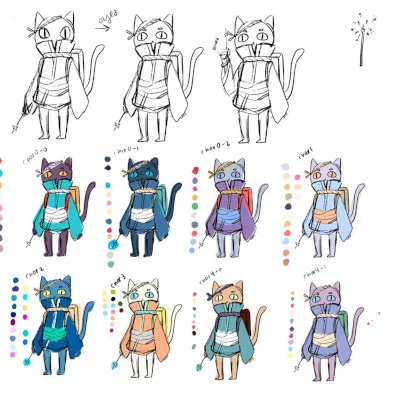
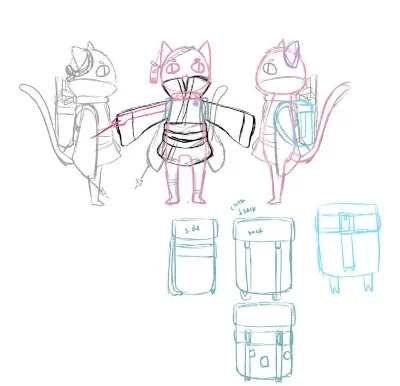
This is also where I started thinking about what color palette I wanted to use. Similar to the pixel-art games I usually make, I wanted to use a limited color palette to keep it consistent and bring everything together. Colors aren't usually my strength, so I just try to keep a set of colors that I think work well together and go from there. This is where looking for color palettes on Pinterest is really helpful.
3D Modeling with Blender
Character
This area was the newest to me, so I spent a lot of time learning by studying YouTube tutorials and speed-modeling videos. The most challenging part was the character modeling and rigging process. I modeled and rigged it several times until I was satisfied with the final outcome.
The first time was to get a player model done for animation and movement testing. The main problem I had was with clipping.
- When animated, the mesh had a lot of clipping since I made the body and clothes separately. The weight painting was a difficult process to try and minimize clipping as much as possible.
- This model also uses emissive materials rather than PBR (which means it would be self-lit), so in the final version I changed these to PBR since we needed the scene to be dark and lit by the lanterns and player's light only.
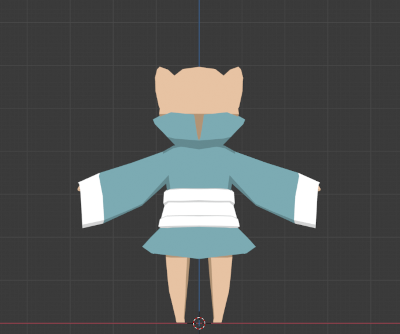
With the second one, I had trouble with the animations after rigging, so I decided to restart the whole process since my model must have been messed up somewhere. I referenced a ton of different rigging videos. Here are some of the videos that were particularly helpful:
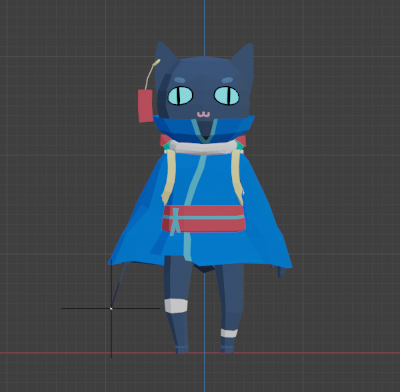
The third one is the one that's in the game right now! In order to fix the clipping problem I had with the other models, I joined all of the separate meshes. This made coloring the model really difficult, and I had to go back and clean up the areas where they were joined to make sure there weren't too many extra vertices. The weight painting process took a while, but at this point I was starting to get familiar with the process.
These are some of the tutorials I watched for the animation process:
Environment
Here are some of the YouTubers I watched for inspiration on 3D modeling environments!
2D Art
I initially started out planning on using pixel art for all of the 2D assets, but I recently got this app called Procreate, so I wanted to try and see what I could do with it.
For the pixel art UI elements in the game, I used Aseprite with my Wacom Intuos drawing tablet, and for all the other 2D art I used Procreate on my iPad Air.
Both of these programs are amazing and have a bunch of different features that are really helpful. Both of them support animation, but Aseprite can export your animation as a spritesheet, which was really helpful when bringing it into Babylon. Procreate can't create spritesheets, so I had to bring them into PiskelApp as a GIF and then export them as a spritesheet.
Procreate is really awesome to use, but I found that I had a lot of limitations when making the animations since I was limited to 25 layers which means I can only have a maximum of 25 frames if all of the lineart + coloring for each frame was done on one layer. Ultimately, I could only get to a max of about 12 frames for 1 animation. I use a lot of layers to keep things separate in case I need to change or move them later, especially since I had a few different elements that were going to be animated.
Both of these are paid programs; however, there are free alternatives for each that I have used before:
- Pixel art
- Digital art
Resources
This is the pixel font I used for the dialogue. I always use this one for 2D games!
Pixel font: m5x7 by Daniel Linssen
Sounds
I wasn't able to get into sound development, but I have a list of different resources that include some free sound resources as well as some sites that let you experiment with music!
If you're curious as to what songs and sound effects I used in the game:
- Start/credits song: copycat by syncopika
- Game: Christmas Synths
- Pause: Snowland Town by Matthew Pablo
- Lose: Eye of the Storm
- SFX: