Getting Started - Chapter 8 - Have a Look Around
Have a Look Around
Currently, we are using the ArcRotateCamera, which has us orbiting the village world from a distance. How about a view from inside the village? Let's parent the camera to the character walking around the village and, with a few adjustments to the values, look around from over his shoulder. The creation of the ArcRotateCamera takes this form:
import { ArcRotateCamera } from "@babylonjs/core/Cameras/arcRotateCamera";const camera = new ArcRotateCamera("name", alpha_angle, beta_angle, radius, target_position);As with all cameras, in order to move it in response to user input, we need to attach it to the canvas.
camera.attachControl(canvas, true);Think of this camera as one orbiting its target position, or more imaginatively as a spy satellite orbiting the Earth. Its position relative to the target (Earth) can be set by three parameters: alpha (radians), the longitudinal rotation; beta (radians), the latitudinal rotation; and radius, the distance from the target position.
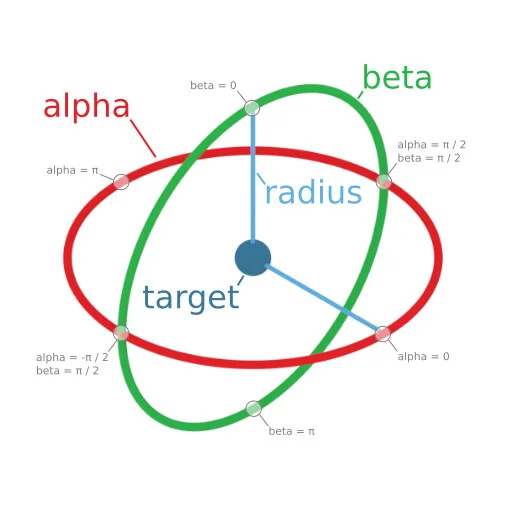
In our case, we want to have the camera parented to the character.
camera.parent = dude;And because the dude is scaled in size, we use a large radius, which, when parented to the dude, will be scaled down. To track him, we use
import { ArcRotateCamera } from "@babylonjs/core/Cameras/arcRotateCamera";import { Vector3 } from "@babylonjs/core/Maths/math.vector";const camera = new ArcRotateCamera("camera", Math.PI / 2, Math.PI / 2.5, 150, new Vector3(0, 60, 0));Since the character makes instant turns, the camera also does. To make the viewing smoother, a smoother track for the character to follow would be needed.
Over The ShoulderWe can also use a different type of camera to follow the character another way.