Getting Started - Chapter 2 - Basic House
A Basic House
Adding a roof would make our box more house-like. We need a prism-like shape. Luckily, we can do that using CreateCylinder. The name might imply a cylinder rather than a prism; however, when using it, you need to state how many points there are around the circumference of the cylinder, and for a prism we can use three points.
import { MeshBuilder } from "@babylonjs/core/Meshes/meshBuilder";const roof = MeshBuilder.CreateCylinder("roof", { diameter: 1.3, height: 1.2, tessellation: 3 });roof.scaling.x = 0.75;roof.rotation.z = Math.PI / 2;roof.position.y = 1.22;Since the cylinder is created vertically, we need to rotate it to a horizontal position and scale it down in one direction so that the height of the roof is less than its width.
Adding a Prism Roof Using 'CreateCylinder'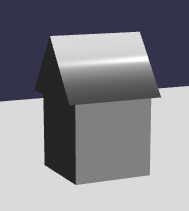
The world will be improved with a little color and texture.
