Getting Started - Chapter 2 - Texture
Add Texture
In order to add color and texture to our meshes, we apply a material to them. The basic material is the standard material, created like this:
import { StandardMaterial } from "@babylonjs/core/Materials/standardMaterial";const material = new StandardMaterial("name", scene);Let's make the ground green to represent grass.
import { StandardMaterial } from "@babylonjs/core/Materials/standardMaterial";import { Color3 } from "@babylonjs/core/Maths/math.color";const groundMat = new StandardMaterial("groundMat");groundMat.diffuseColor = new Color3(0, 1, 0);ground.material = groundMat; //Place the material property of the groundSince there is only one scene we can drop that parameter and let it default to the current scene.
Setting a color requires three parameters: red, green, and blue (r, g, b), each from 0 to 1 inclusive. (0, 0, 0) is black, and (1, 1, 1) is white.
For these colors you can use
import { Color3 } from "@babylonjs/core/Maths/math.color";Color3.Red();Color3.Green();Color3.Blue();Color3.Black();Color3.White();Color3.Purple();Color3.Magenta();Color3.Yellow();Color3.Gray();Color3.Teal();Now add some texture to the box and roof:
import { StandardMaterial } from "@babylonjs/core/Materials/standardMaterial";import { Texture } from "@babylonjs/core/Materials/Textures/texture";const roofMat = new StandardMaterial("roofMat");roofMat.diffuseTexture = new Texture("https://assets.babylonjs.com/environments/roof.jpg", scene);const boxMat = new StandardMaterial("boxMat");boxMat.diffuseTexture = new Texture("https://www.babylonjs-playground.com/textures/floor.png");The first parameter for a texture is a relative or absolute URL for the image to use. As usual, the scene parameter is optional and defaults to the current scene.
Finally, of course, set their material properties:
roof.material = roofMat;box.material = boxMat;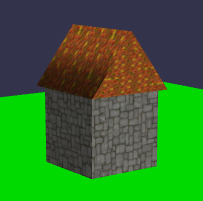
Having stone walls with no doors or windows is not a very interesting look for a house. Also, when you look closely, you can see that each side uses the same image, and on some sides it is rotated.
