Getting Started - Chapter 2 - Making Copies
Copying Meshes
The two main ways to copy a mesh are to clone it or create an instance of it. Cloning gives you an independent copy of a mesh, whereas an instance is still linked to the original for its material. You cannot change the material of an instance of a mesh. There are also advanced ways of creating copies, which are available in the meshes feature deep dive.
To clone the house, use:
clonedHouse = house.clone("clonedHouse")And for an instance, it is:
instanceHouse = house.createInstance("instanceHouse")Since all the houses in our world will use the same material at this point, we will go with createInstance.
Before we do that, we combine the building functions to produce a house of width 1 or 2, a detached or semi-detached house respectively.
Expanding the House Building FunctionWe now enlarge the ground and increase the camera radius a little so it can fit several houses and still let us view them. To begin, we build one house of each type and position them. Afterwards, we will create instances of these for the remaining houses. After deciding on the type, position, and orientation for the other houses, we will use a loop to create them.
const houses = [];
for (let i = 0; i < places.length; i++) {    if (places[i][0] === 1) {        houses[i] = detached_house.createInstance("house" + i);    }    else {        houses[i] = semi_house.createInstance("house" + i);    }    houses[i].rotation.y = places[i][1];    houses[i].position.x = places[i][2];    houses[i].position.z = places[i][3];}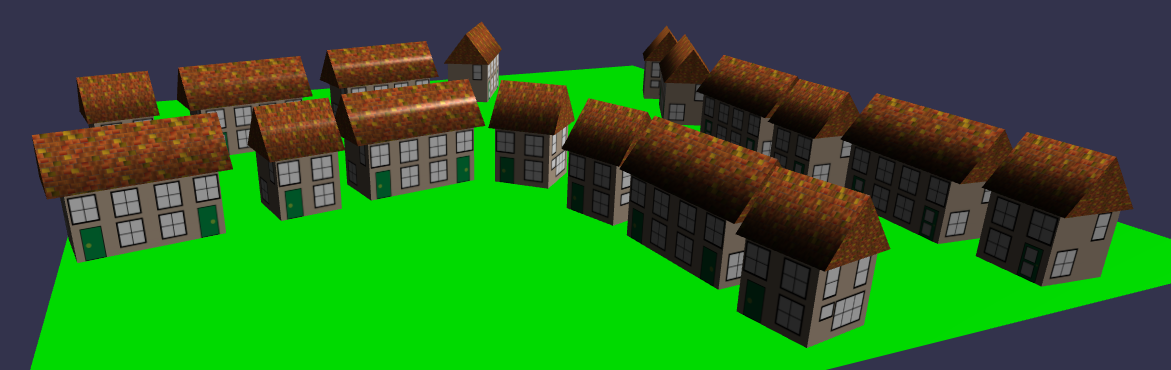
As before, to keep the upper parts of the Playground editor available for newer code, we will put the building of these houses into a function.
Wrapping Instances Into a FunctionNow that the world we are building is a little more complex, let's take a file of the village and revisit viewing it as part of a website we want to enhance.
Importing the Village as a .glb File