Sprite Map
Sprite Map
Available from BJS version 4.1
A sprite map allows you to display layers of sprites on a grid and can render thousands (dare I say millions?) of animated sprites on screen. A major use case, as shown in this section, is 2D and 2.5D games, but other applications can also benefit. The only current limitation of this system is that the positions of the sprites are static within the grid and are dictated by the sprite map's initialization parameters.
A sprite map is displayed on a standard plane mesh in 3D space and can be transformed in 3D space. The rendering speed is based on the use of texture buffers, and each map requires only one draw call.
Since the plane is split into a grid of tiles of the same size, the cells of the packed spritesheet should also be the same size.
It uses the Babylon.js (JSON Array for SpriteMap) format from TexturePacker and benefits from the rotation, extrude, and padding properties. Soon, trim support will be functional as well.
Note: SpritePackedManager uses the JSON Hash format for packed spritesheets. JSON files are not interchangeable between SpritePackedManager and SpriteMap.
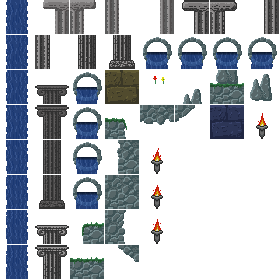
The beginning of the JSON file format for the packed spritesheet above is shown below.
{    "frames": [        {	        "filename": "blank.png",	        "frame": {"x":221,"y":221,"w":1,"h":1},	        "rotated": false,	        "trimmed": false,	        "spriteSourceSize": {"x":0,"y":0,"w":32,"h":32},	        "sourceSize": {"w":32,"h":32}        },        {	        "filename": "Falling-Water-0.png",	        "frame": {"x":1,"y":1,"w":32,"h":32},	        "rotated": false,	        "trimmed": false,	        "spriteSourceSize": {"x":0,"y":0,"w":32,"h":32},	        "sourceSize": {"w":32,"h":32}        },        {	        "filename": "Falling-Water-1.png",	        "frame": {"x":1,"y":36,"w":32,"h":32},	        "rotated": false,	        "trimmed": false,	        "spriteSourceSize": {"x":0,"y":0,"w":32,"h":32},	        "sourceSize": {"w":32,"h":32}        },        . . . . . .         . . . . . .
        {	        "filename": "Torch-A-3.png",	        "frame": {"x":141,"y":211,"w":32,"h":32},	        "rotated": false,	        "trimmed": false,	        "spriteSourceSize": {"x":0,"y":0,"w":32,"h":32},	        "sourceSize": {"w":32,"h":32}        }    ]}
The complete JSON file can be found on the GitHub Babylon.js repository.
First we will start with a background that uses a 2 x 2 grid of tiles and just 4 sprites.
import { Vector2 } from "@babylonjs/core/Maths/math.vector";let backgroundSize = new Vector2(2, 2); //set the size of the sprite map stageOnce the atlas JSON and the spritesheet texture have been loaded, we can create the sprite map, setting two of the option parameter properties.
import { SpriteMap } from "@babylonjs/core/Sprites/spriteMap";let background = new SpriteMap('background', atlasJSON, spriteSheet, { stageSize: backgroundSize, flipU: true //, //Sometimes you need to flip, depending on the sprite format.}, scene);Once the sprite map is created, sprites are assigned to the tiles in the grid by their frameID, which is their index in the frames array.
For simplicity and variation, we choose indices 9, 18, 27, and 26 for the frameIDs.
import { Vector2 } from "@babylonjs/core/Maths/math.vector";for (let i = 0; i < 4; i++) { background.changeTiles(0, new Vector2(i % 2, Math.floor(i / 2)), 9 * i + 9);}The parameters are
- layerID - (number) the index of sprite map layer
- tileID - (Vector2 | Vector2[]) Vector2 identifies tile by its x position across and y position up
- frameID - (number) the index number in the frames array
A 2 x 2 single layer sprite map, JSON loaded from file: Single Layer Sprite Map From A File
Once created, you can export the sprite map to save it and then load it into another sprite map with the same structure.
Saving a Sprite Map
After you have created a sprite map, you can export this composition for later use with:
mySpriteMap.saveTileMaps()This creates a .tilemaps file.
When importing it, you must make sure that the sprite map you are importing it into has the same tile layout and number of layers as the one it was exported from. You import it with:
spriteMap.loadTileMaps(url); //url is the location of the .tilemaps file