Floating Origin (Huge Scenes Support)
Since this page was written, we have introduced floatingOriginMode to the scene (and useLargeWorldRendering to the engine). See Large World Rendering / Floating Origin.
How floating-origin works
In traditional 3D rendering, objects pass through three stages before they are displayed on screen:
- World matrix: places, scales and rotates the object on the world;
- View matrix: will translate and rotate relative to camera;
- Projection matrix: will project vertices to screen.
This is well known and works perfectly.
The only problem is that our GPUs are still limited to 32-bit floating point, so when we have large coordinates—objects and/or cameras very far from the world's origin, for example at (10000000, 0, 10000000)—we will notice jittering because the large numbers inside matrices cause 32-bit floating-point imprecision on the GPU.
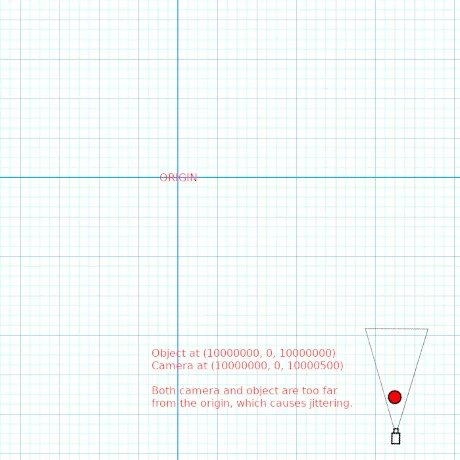
But there is a trick that helps mitigate that problem: floating origin, first described by Chris Thorne 1.
The idea of floating origin is very simple: keep the camera fixed at the world's origin (0, 0, 0) and move the objects instead.
This does not mean that the camera cannot move, though. It "moves," but not directly. Here is where the trick lies: instead of changing the real camera position, we use a separate, double-precision 2 Vector3 that stores the camera position. The real camera position is always kept at the origin (0, 0, 0).
We do the same for the objects: all of them get a separate, double-precision Vector3 to store their coordinates. We don't set their real positions directly; instead, we set their separate coordinates.
Then, in a loop that runs every frame just before rendering, we subtract the camera's double-precision position from each object's double-precision position, and that difference is copied to the object's real position.
The result is that the camera is always kept at the origin, and the objects float around it, removing huge coordinates from the objects that are close to the camera. In other words, imprecision only happens very far from the camera, and because those objects are already far away, we cannot see the jittering.
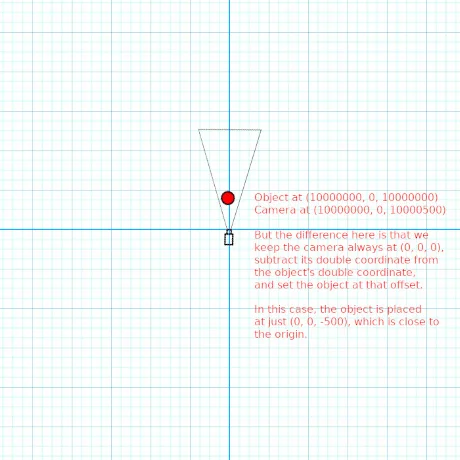
Let's use an example:
In a solar system, we have an asteroid located at (10000000, 0, 10000000). Our camera is close to the asteroid, at (10000000, 0, 10000500).
Normally, that would certainly cause jittering, because both objects are very far from the world's origin. But with our trick, the jittering does not happen—remember, we subtract the camera's double-precision position from the object's double-precision position and then set the object's real position to that offset, keeping the camera always at (0, 0, 0):
Object Position: (10000000, 0, 10000000)
Camera Position: (10000000, 0, 10000500)
Offset: (0, 0, -500)
The offset is small enough to be absolutely precise even with only 32-bit floating point. The GPU is very happy with that, and we don't see any jittering.
We just need to set the object at (0, 0, -500) and it will have the same visual effect as if we used its real coordinates, but with no jittering.
Floating-origin examples
You can find a working playground example with OriginCamera and Entity classes here:
Floating-OriginIf you decide to use floating origin, all your objects will have to use the same trick, or your game won't work properly. You will need to create one instance of OriginCamera and at least one instance of Entity.
OriginCamera is a special camera that has a separate position control stored as doublepos (and its target as doubletgt). You must stop using position and target from the camera, and use their double-precision counterparts, doublepos and doubletgt.
All objects in the scene must then be parented to an Entity instance. Entity also has a doublepos property, which is a double-precision coordinate. You must use its doublepos to set an object's position instead of using position directly.
So, let's say that we want a sphere with double precision:
import { Vector3 } from "@babylonjs/core/Maths/math.vector";import { CreateSphere } from "@babylonjs/core/Meshes/Builders/sphereBuilder";// Create the OriginCameralet camera = new OriginCamera("camera", new Vector3(10000000, 0, 10000500), scene);camera.doubletgt = new Vector3(10000000, 0, 10000000);camera.touchAngularSensibility = 10000;camera.inertia = 0;camera.speed = 1;camera.keysUp.push(87); // Wcamera.keysDown.push(83); // Dcamera.keysLeft.push(65); // Acamera.keysRight.push(68); // Scamera.keysUpward.push(69); // Ecamera.keysDownward.push(81); // Qcamera.minZ = 0.5;camera.maxZ = 50000000;camera.fov = 1;camera.attachControl(canvas, true);// Create an Entity for the spherelet entSphere = new Entity("entSphere", scene);camera.add(entSphere);// Create the sphere and parent it to its Entitylet sphere = CreateSphere("sphere", { diameter: 256 });sphere.parent = entSphere;// Position the EntityentSphere.doublepos = new Vector3(10000000, 0, 10000000);The OriginCamera extends UniversalCamera, so you can use the same features as that camera.
Finally, even in huge scenes, you will commonly have objects spread across separate regions, so you most likely would not need one Entity instance for each object. If you plan carefully, you can have one Entity instance for each region of your scene, as long as a region does not extend for more than, say, 10,000 units, to avoid imprecision again. Then, you can add many objects that are always in that region to a single Entity. By doing that, you can even move those objects by using their positions directly, as you normally would. Even then, no visible imprecision will remain.
Article and code written by Vander R. N. Dias