How To Use A Post Process Render Pipeline
Post process render pipelines allow you to create a chain of post processes and attach it to a camera. A render pipeline can be managed by enabling and disabling some effects and displaying a specific pass for debugging.
Base Render Pipeline
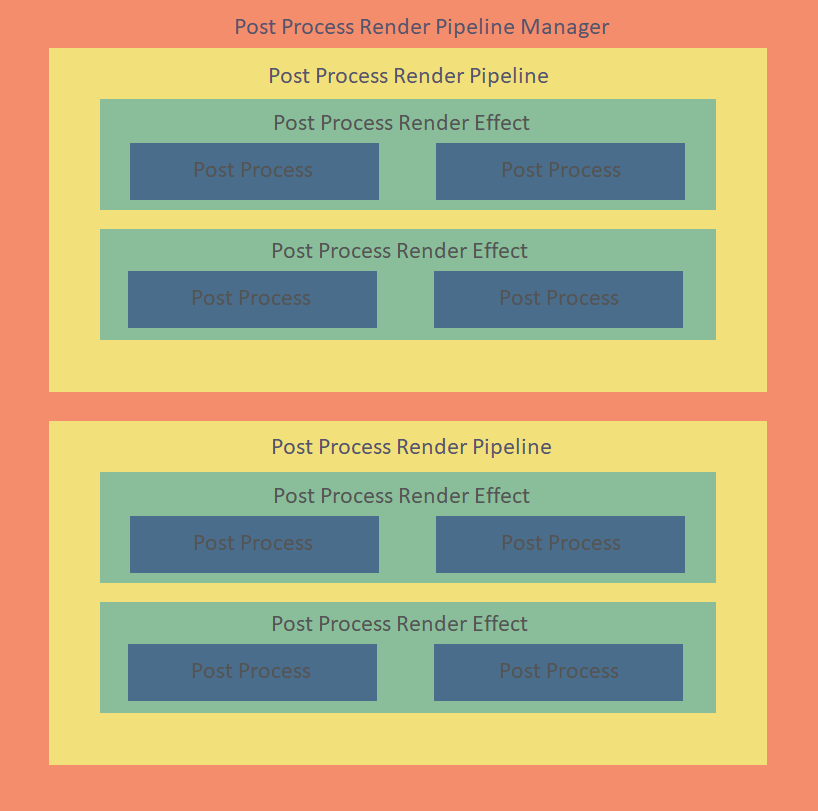
Render pipelines are composed of several classes.
| Class | Description |
|---|---|
BABYLON.PostProcessRenderPipelineManager | Manages all pipelines and allows you to enable or disable an effect, or display a post-process pass for debugging. |
BABYLON.PostProcessRenderPipeline | Set of effects that can be ordered. |
BABYLON.PostProcessRenderEffect | A render effect contains one or more post processes. |
BABYLON.PostProcess | A render pass that applies a shader. |
Let's Work with a Render Pipeline
Simple Pipeline
Create a pipeline:
import { PostProcessRenderPipeline } from "@babylonjs/core/PostProcesses/RenderPipeline/postProcessRenderPipeline";var standardPipeline = new PostProcessRenderPipeline(engine, "standardPipeline");Create post processes. Note: the camera parameter is set to null when using a pipeline, and the post process will be enabled when the pipeline is added to the camera.
import { Vector2 } from "@babylonjs/core/Maths/math.vector";import { BlackAndWhitePostProcess } from "@babylonjs/core/PostProcesses/blackAndWhitePostProcess";import { BlurPostProcess } from "@babylonjs/core/PostProcesses/blurPostProcess";var blackAndWhite = new BlackAndWhitePostProcess("bw", 1.0, null, null, engine, false);var horizontalBlur = new BlurPostProcess("hb", new Vector2(1.0, 0), 20, 1.0, null, null, engine, false);Create an effect with multiple post processes:
import { PostProcessRenderEffect } from "@babylonjs/core/PostProcesses/RenderPipeline/postProcessRenderEffect";var blackAndWhiteThenBlur = new PostProcessRenderEffect(engine, "blackAndWhiteThenBlur", function () { return [blackAndWhite, horizontalBlur]; });standardPipeline.addEffect(blackAndWhiteThenBlur);Add the pipeline to the scene's manager and attach it to the camera:
scene.postProcessRenderPipelineManager.addPipeline(standardPipeline);scene.postProcessRenderPipelineManager.attachCamerasToRenderPipeline("standardPipeline", camera);