Physics V2 Shapes
What are they
Physics Shapes represent the geometry that a body will have when interacting with the world. Depending on the chosen shape, the body will react differently to colliding with other objects. Even if the visual mesh of an object is composed of many triangles, if it has a simple enough physics shape, its collisions can be computed quickly.
In general, the convex hull gives the best performance while closely matching the visual geometry. However, if you have highly concave meshes, which would be unsuitable for a convex shape, it's still possible to use a container with multiple simpler shapes.
Available shapes and parameters
This section demonstrates how to create the available Physics Shapes and their parameters. Note that the shape parameters are determined in a LOCAL coordinate system. In other words, they don't depend on the body or mesh's position, rotation, or scaling in the world:
import { Vector3 } from "@babylonjs/core/Maths/math.vector";import { PhysicsShapeSphere } from "@babylonjs/core/Physics/v2/physicsShape";const shape = new PhysicsShapeSphere(new Vector3(0, 0, 0), // center of the sphere1, // radius of the spherescene // scene of the shape);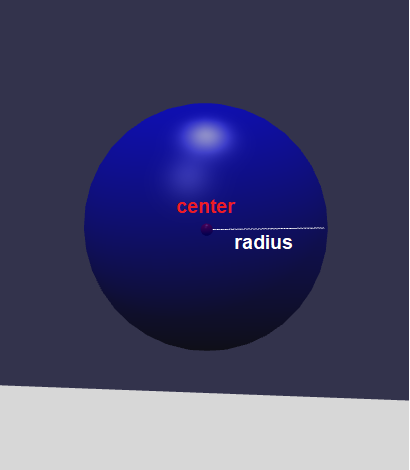
A sphere is probably the simplest shape that can be simulated. The sphere is described by a single point for the center and a radius.
import { Vector3 } from "@babylonjs/core/Maths/math.vector";import { PhysicsShapeCylinder } from "@babylonjs/core/Physics/v2/physicsShape";const shape = new PhysicsShapeCylinder(new Vector3(0, -0.5, 0), // starting point of the cylinder segmentnew Vector3(0, 0.5, 0), // ending point of the cylinder segment1, // radius of the cylinderscene // scene of the shape);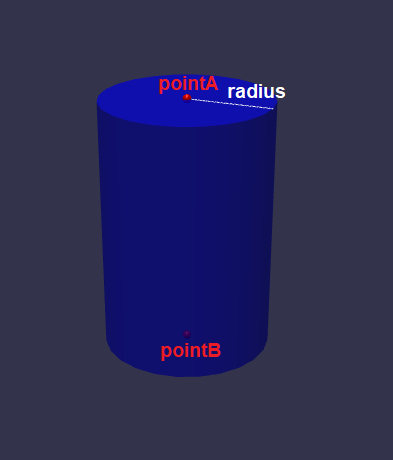
A cylinder shape is described by two points and a radius. It's a great choice for barrels, wheels, and glasses.
import { Vector3 } from "@babylonjs/core/Maths/math.vector";import { PhysicsShapeCapsule } from "@babylonjs/core/Physics/v2/physicsShape";const shape = new PhysicsShapeCapsule(new Vector3(0, -0.5, 0), // starting point of the capsule segmentnew Vector3(0, 0.5, 0), // ending point of the capsule segment1, // radius of the capsulescene // scene of the shape);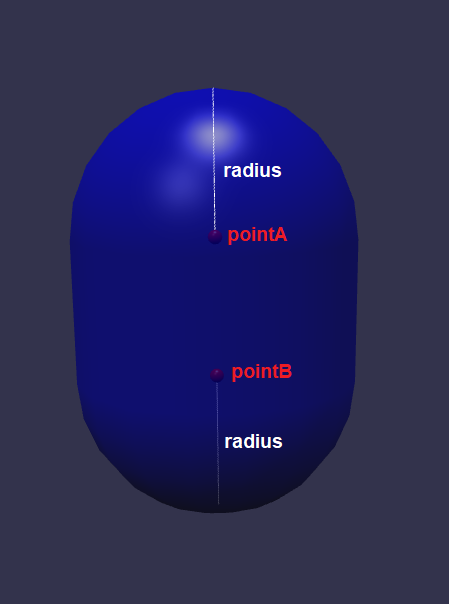 Capsules are similar to cylinders, but they have two half-spheres, one on each end. They are a great choice for character limbs (sometimes called ragdolls).
import { Quaternion, Vector3 } from "@babylonjs/core/Maths/math.vector";import { PhysicsShapeBox } from "@babylonjs/core/Physics/v2/physicsShape";const shape = new PhysicsShapeBox(new Vector3(0, 0, 0), // center of the boxnew Quaternion(0, 0, 0, 1), // rotation of the boxnew Vector3(1, 1, 1), // dimensions of the boxscene // scene of the shape);A box is exactly what it sounds like—a box. It has a size, a center, and an orientation. This is a great choice for boxes, books, walls, or anything that needs to be flat.
import { PhysicsShapeConvexHull } from "@babylonjs/core/Physics/v2/physicsShape";const shape = new PhysicsShapeConvexHull(mesh, // mesh from which to produce the convex hullscene // scene of the shape);A convex hull is the most versatile of the physics shapes. A convex object is one where you can draw a line between any two vertices without leaving the shape. While most real-world objects are not convex, for the purposes of physics simulation this is a great approximation for most objects. The input mesh can be concave—the physics engine will calculate the convex part of the geometry.
import { PhysicsShapeMesh } from "@babylonjs/core/Physics/v2/physicsShape";const shape = new PhysicsShapeMesh(mesh, // mesh from which to calculate the collisionsscene // scene of the shape);A mesh shape is simply a collection of triangles. All the triangles in the input mesh will become triangles in the physics engine. This is a great choice for static bodies, which often represent highly concave objects, because it gives the closest match to your render geometry. Be aware that when two complex mesh shapes collide with each other, the physics engine may need to calculate collisions between a huge number of triangles, which can slow down the simulation.
import { PhysicsShapeContainer } from "@babylonjs/core/Physics/v2/physicsShape";const shape = new PhysicsShapeContainer(scene // scene of the shape);A container shape doesn't have any geometry by itself. However, it does allow any other shape to be added as a child with an additional transform. If none of the other shape types are suitable for matching your render geometry, you can use a container and add a number of simpler shapes to approximate your visual mesh.
The Container has its own page for more information.
A height field is essentially a grid of height values (often stored in a 2D array) that define the elevation of a surface at each point on a regular grid. This creates a 3D surface that can be used for collision detection and physics simulations more efficiently than using a high-resolution mesh of individual polygons. The example below constructs a height field from the heightBuffer returned by CreateGroundFromHeightMap:
import { MeshBuilder } from "@babylonjs/core/Meshes/meshBuilder";import { PhysicsShapeHeightField } from "@babylonjs/core/Physics/v2/physicsShape";var ground = MeshBuilder.CreateGroundFromHeightMap("g", "https://image.jpeg", { subdivisions, width: size, height: size, maxHeight: 5, passHeightBufferInCallback: true, onReady: (mesh, heightBuffer) => { var shape = new PhysicsShapeHeightField(size, // size of the heightfield on the X axis size, // size of the heightfield on the Y axis subdivisions + 1, // number of samples along the X axis subdivisions + 1, // number of samples along the Y axis heightBuffer, // data for the heightfield scene); }});If you want to construct a height field for a mesh that represents your "ground", but the mesh's vertices aren't evenly spaced, you could construct a height field with 10 subdivisions using x and z coordinates from (-50, -50) to (50, 50) in your scene as follows:
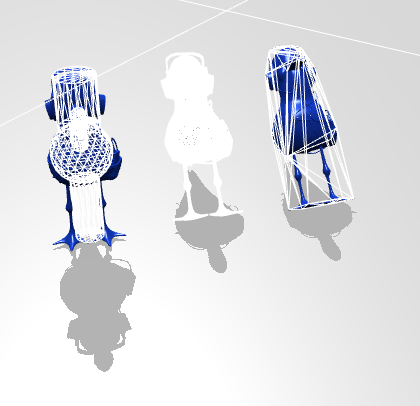
import { PhysicsShapeHeightField } from "@babylonjs/core/Physics/v2/physicsShape";const planeSize = 100;const subdivisions = 10;const stepSize = planeSize / subdivisions;const midPlane = Math.floor((planeSize / 2));var heightField = new Float32Array((subdivisions + 1) * (subdivisions + 1));for (var x = 0; x <= subdivisions; x++) { for (var z = 0; z <= subdivisions; z++) { var xCoord = (x * stepSize) - midPlane; var zCoord = -1 * ((z * stepSize) - midPlane); // getHeightAtCoordinates, which is not implemented here, would need // to get the height of the mesh at x, z coordinates. var height = getHeightAtCoordinates(xCoord, zCoord); var index = z * (subdivisions + 1) + x; heightField[index] = height; }}var shape = new PhysicsShapeHeightField(planeSize, planeSize, subdivisions + 1, subdivisions + 1, heightField, scene);The following image shows a comparison of the Container, Mesh and Convex Hull shapes, from left to right: