Basic Particle Properties
There is a wide range of properties to tune the behavior of particles, including their lifetime, size, color, emission rate, speed, direction of travel, orientation, and gravity.
This page covers setting initial property values when creating a particle system. The next page shows how to animate these properties over time.
Size
The size of the particles can be varied randomly within a given range:
particleSystem.minSize = 0.1;particleSystem.maxSize = 0.5;Size range: Particle Size Range Example
Scale
When you want to change the particle base shape from square to rectangular, scale the x and y values:
particleSystem.minScaleX = 0.1;particleSystem.maxScaleX = 0.5;
particleSystem.minScaleY = 0.2;particleSystem.maxScaleY = 0.4;
Scale range: Particle Scale Range Example
Color
There are three colors that can be set for a particle system. Two of them (color1 and color2) are blended during the particle's lifetime, and a third (colorDead) is applied just before the particle expires.
import { Color4 } from "@babylonjs/core/Maths/math.color";particleSystem.color1 = new Color4(0.7, 0.8, 1.0, 1.0);particleSystem.color2 = new Color4(0.2, 0.5, 1.0, 1.0);particleSystem.colorDead = new Color4(0, 0, 0.2, 0.0);Speed
The speed of a particle is determined by the amount of power applied when it is emitted. Higher power means faster movement. The emission power can be varied randomly within a given range:
particleSystem.minEmitPower = 1;particleSystem.maxEmitPower = 3;Power range: Particle Power Range Example
Rotation
You can define a range of angular speeds in radians per second:
particleSystem.minAngularSpeed = 0;particleSystem.maxAngularSpeed = Math.PI;You can also define a particle's initial rotation angle:
particleSystem.minInitialRotation = 0;particleSystem.maxInitialRotation = Math.PI / 2;Rotating: Rotating Particles
Rotating with set initial angle: Rotating Particles With Initial Angle
Translation Pivot
By default, a particle's transformation center is at the middle of its plane. You can move it to a different point relative to the center:
import { Vector2 } from "@babylonjs/core/Maths/math.vector";particleSystem.translationPivot = new Vector2(2, 2); // across and up the containing planeRotation with translation pivot: Changing Particle Pivot Points
Direction
Two directions can be specified. If you specify just direction1, the particles will travel randomly in the general direction given. When both directions are given, the particles will travel in a random direction between the two.
Note that these vectors also affect speed — their magnitude acts as a multiplier. For example, particles with direction (10, -10, 10) will travel 10 times faster than those with direction (1, -1, 1).
import { Vector3 } from "@babylonjs/core/Maths/math.vector";particleSystem.direction1 = new Vector3(-7, 8, 3);particleSystem.direction2 = new Vector3(7, 8, -3);Direction range: Particle Direction Range Example
Gravity
Gravity can be applied as a Vector3 in any direction. For example, a negative Y value pulls particles downward.
import { Vector3 } from "@babylonjs/core/Maths/math.vector";particleSystem.gravity = new Vector3(0, -9.81, 0);Direction and gravity: Direction And Gravity
Emit Rate
The emit rate determines the number of particles emitted per second. The larger the number, the denser the particle cloud. As particles die, they are recycled to be emitted again. If their lifetime is long enough and the emission rate is fast enough, there may be a visible gap in the emission of particles.
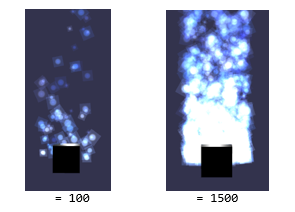
particleSystem.emitRate = 1000;You can stop the continuous emission of particles by setting a manual emit count.
particleSystem.manualEmitCount = 300;In this case, the specified number of particles are emitted once, and there are no further emissions.
Slow emit rate: Slow Emission Rate
Fast emit rate: Fast Emission Rate
Emit just 10: Emission Limits
Lifetime
The time it takes for a particle to die after being emitted can be varied within a chosen range. Each particle's lifetime is set as a random value between a minimum and maximum.
particleSystem.minLifeTime = 0.3;particleSystem.maxLifeTime = 1.5;Short lifetime: Short Particle Lifetimes
Long lifetime: Long Particle Lifetimes
Adjustable Examples
The following examples allow you to modify the properties of the particle system in real time and see the effects they produce.
Adjust Min & Max of EmitBox: Adjust Min And Max of EmitBox
Adjust Emit Life Time, Rate, Power and Update Speed: Adjust Various Particle Properties