Using the Fluid Renderer
The fluid renderer has been implemented as a scene component (like the depth renderer, for example), so you can enable it with scene.enableFluidRenderer() (or use fluidRenderer = scene.enableFluidRenderer() to get a reference to the renderer) and disable it with scene.disableFluidRenderer().
Main classes
The fluid renderer handles two entities: FluidRenderingObject and FluidRenderingTargetRenderer:
FluidRenderingObjectis an object you want to render as a fluid: either a particle system (FluidRenderingObjectParticleSystem) or a raw list of particles (vertex coordinates -FluidRenderingObjectCustomParticles).FluidRenderingTargetRendereris the class that generates the depth, thickness and diffuse textures and renders the object(s) as a fluid.
You can associate multiple fluid rendering objects with a single FluidRenderingTargetRenderer, or have multiple instances of FluidRenderingTargetRenderer and distribute your fluid objects among those target renderers. For performance reasons, it is better to use a single target renderer for multiple objects rather than creating a new target renderer instance for each object. However, if the target renderer settings need to differ depending on the object being rendered, you will need to create additional target renderers.
Rendering objects as a fluid
For particle systems (ParticleSystem and GPUParticleSystem), you can enable fluid rendering by doing:
const fluidRenderer = scene.enableFluidRenderer();const renderObject = fluidRenderer.addParticleSystem(particleSystem);
const fluidObject = renderObject.object;const targetRenderer = renderObject.targetRenderer;
Then you can use fluidObject and targetRenderer to customize the display of the particle system.
To create a fluid object for a list of custom particles, use fluidRenderer.addCustomParticles():
public addCustomParticles( buffers: { [key: string]: FloatArray }, numParticles: number, generateDiffuseTexture?: boolean, targetRenderer?: FluidRenderingTargetRenderer, camera?: Camera): IFluidRenderingRenderObjectNote that the buffers object must contain at least one position buffer! If you choose to generate a diffuse texture, you must also provide a color buffer.
Per-particle size
By default, all the particles of a fluid object have the same size, set by fluidObject.particleSize. Since Babylon.js v9.25, you can use the size of each particle instead:
import { FluidRenderingObject } from "@babylonjs/core/Rendering/fluidRenderer/fluidRenderingObject";FluidRenderingObject.UsePerParticleSizeAttribute = true;The flag is static and is read when the effects of a fluid object are created, so set it before you add the objects to the fluid renderer. It is false by default, so existing scenes are not affected.
The size of a particle comes from:
ParticleSystem: the size of the particle, with its scale (minSize/maxSize, size gradients,minScaleX/maxScaleX,minScaleY/maxScaleY).GPUParticleSystem: same asParticleSystem, since Babylon.js v9.26.1.- Custom particles: a size buffer with two floats (width and height) per particle:
import { FluidRenderingObject } from "@babylonjs/core/Rendering/fluidRenderer/fluidRenderingObject";const sizes = new Float32Array(numParticles * 2);// fill sizes[i * 2] (width) and sizes[i * 2 + 1] (height)FluidRenderingObject.UsePerParticleSizeAttribute = true;const renderObject = fluidRenderer.addCustomParticles({ position: positions, color: colors, size: sizes }, numParticles, true);If a custom particle object has no size buffer, it keeps using particleSize. You can add the buffer later with fluidObject.addBuffers({ size: sizes }), the effects are recreated for you. To animate the sizes, update the buffer every frame with fluidObject.vertexBuffers["size"].update(sizes).
Custom particles with their own size: Per-particle size with custom particles
A GPU particle system with a size gradient: Per-particle size with a GPU particle system
Particle texture and the diffuse texture
When a particle system is added with generateDiffuseTexture set to true, the fluid object renders the particle system in the diffuse texture with alpha blending (useTrueRenderingForDiffuseTexture is false by default). Textures made for additive blending, like flare.png, are black outside of the glow, so the diffuse texture shows dark squares around the particles. To fix that, set fluidObject.useTrueRenderingForDiffuseTexture = true so that the blend mode of the particle system is used, or use a texture with an alpha channel.
Custom shading
The fluid renderer is made for transparent liquids, but you can change the shading of the final pass without changing Babylon.js. The fluid rendering shaders are processed like post processes, so PostProcess.RegisterShaderCodeProcessing with the "FluidRendering" name lets you rewrite the shader code (processFinalCode), add uniforms (defineCustomBindings) and set them every frame (bindCustomBindings).
This example replaces the transparent shading by an opaque, foam-like shading, with a foamBrightness uniform you can animate (GLSL, for WebGL):
import { PostProcess } from "@babylonjs/core/PostProcesses/postProcess";let foamBrightness = 0.8;PostProcess.RegisterShaderCodeProcessing("FluidRendering", { defineCustomBindings: (name, defines, uniforms) => { if (uniforms.indexOf("foamBrightness") === -1) { uniforms.push("foamBrightness"); } return defines; }, bindCustomBindings: (name, effect) => { effect.setFloat("foamBrightness", foamBrightness); }, processFinalCode: (name, type, code) => { const cut = code.indexOf("vec3 refractionDir="); if (cut < 0) { return code; } const mainStart = code.indexOf("void main"); return (code.slice(0, mainStart) + "uniform float foamBrightness;\n" + code.slice(mainStart, cut) + "float foamNdotL = max(0.0, dot(lightDir, normal));\n" + "vec3 finalColor = diffuseColor * (foamBrightness + 0.6 * foamNdotL) + vec3(specular) * 0.28;\n" + "glFragColor = vec4(finalColor, 1.0);\n}"); },});Note: the callbacks are called for all the fluid rendering shaders (depth, thickness, blur, final pass), so only change the one you want. Here the final fragment shader is found by its refractionDir variable. On WebGPU the shaders are written in WGSL, so the patch must be adapted to that language.
Opaque foam with an animated brightness: Opaque foam shading
Debugging
The FluidRendererGUI class allows you to see the fluid objects and target renderers registered with the fluid renderer, and to modify their properties easily:
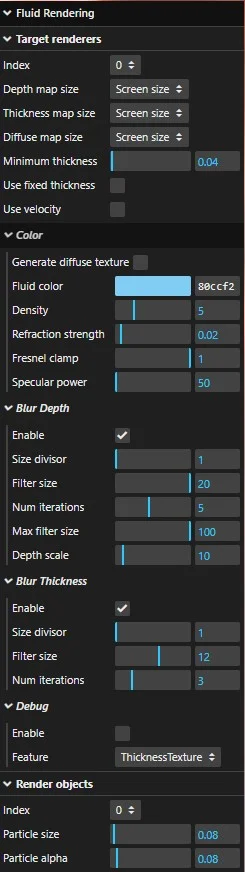
This class is not integrated into Babylon.js because the inspector will be updated instead, so in the meantime you can find it here.