Pivots
A Pivot
A pivot in Babylon.js is an alternative to using a parent to set the center of transformation for a mesh; that is, the point used as the center of rotation or the center of enlargement. Using setPivotPoint produces behavior that differs from setting a pivot point in tools such as 3DS Max and Maya, so a parent should be used instead to produce a closer match to the behavior of those applications.
On this page the demonstration mesh is a cube with side length 1. When a mesh is created the pivot (red sphere) is always at the local origin (yellow sphere); the local origin and created origin are at the world space origin of (0, 0, 0). When the pivot and local origin are coincident they are shown as a red and yellow striped sphere, as in Fig 1.
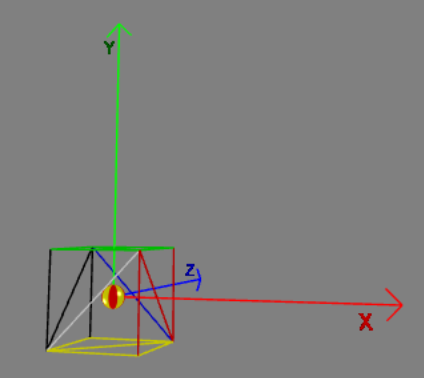
Fig 1 Cube with side length 2
To rotate or scale a mesh about a pivot point you apply the rotation or scaling vectors to the mesh. This is different to using a parent to rotate or scale a mesh.
The most straightforward way to set a pivot is to do it directly with the setPivotPoint method. A pivot can also be set with a translation matrix.
Set and Get a Pivot Point Directly
There are three useful functions to aid setting and getting a pivot point. These are
mesh.setPivotPoint(Vector3);mesh.getPivotPoint(); // returns Vector3mesh.getAbsolutePivotPoint(); // returns Vector3Set Pivot Point
Using setPivotPoint, you simply pass a Vector3 object that is the relative position of the pivot with respect to the local origin of the mesh. To set a pivot at (x, y, z) relative to the local origin of a mesh, use
import { Vector3 } from "@babylonjs/core/Maths/math.vector";mesh.setPivotPoint(new Vector3(x, y, z));For the cube of side 2 to set the pivot at the front, left, bottom corner use
import { Vector3 } from "@babylonjs/core/Maths/math.vector";box.setPivotPoint(new Vector3(-1, -1, -1));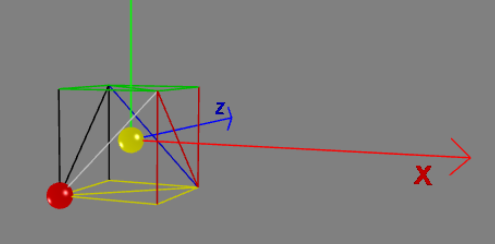
Fig 2 Cube with side length 2 pivot at (-1, -1, -1)
Set Pivot Point To A World Space Position
To set the pivot at a point given in world space, it is necessary to find the relative position of this point with respect to the mesh local origin. When a mesh is at position (xc, yc, zc) and you want to set a pivot at world space point (xp, yp, zp), the relative position is (xp - xc, yp - yc, zp - z), so use
import { Vector3 } from "@babylonjs/core/Maths/math.vector";mesh.setPivotPoint(Vector3(xp - xc, yp - yc, zp - z));To set the pivot of the cube at world space point (1, 1, 1):
import { Vector3 } from "@babylonjs/core/Maths/math.vector";const pivotAt = new Vector3(1, 1, 1);const relativePosition = pivotAt.subtract(box.position);box.setPivotPoint(relativePosition);Set Pivoted Mesh To A World Space Position
After rotating or scaling a mesh with a pivot set, the world space position of the mesh will not be the same as its position stored in mesh.position.
The blue sphere is at (5, 0, 0). When the yellow sphere (local origin) and the blue sphere coincide, a yellow-and-blue sphere is shown.
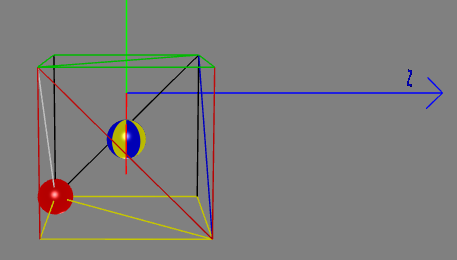
Fig 3 Pivoted Cube at (5, 0, 0)
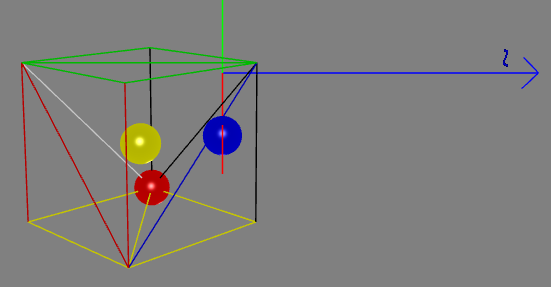
Fig 4 Pivoted Cube Rotated
In Fig 3 and Fig 4 the value for box.position will be (5, 0, 0).
However, in Fig 4 the actual world space position of the local origin is (-5.41421365737915, 0, -1). You can obtain the world space position using box.getAbsolutePosition().
In a similar way the local origin of a pivoted mesh will be displaced after scaling.
The simplest way to position a pivoted mesh in world space following rotation or scaling is to use the difference between mesh.position and mesh.getAbsolutePosition. For example to position a pivoted mesh at (x, y, z) in world space use
import { Vector3 } from "@babylonjs/core/Maths/math.vector";mesh.position = new Vector3(x, y, z);mesh.position = mesh.position.add(mesh.position.subtract(mesh.getAbsolutePosition()));Get Pivot Point
After using setPivotPoint, getPivotPoint will give you the relative position of the pivot point with respect to the local origin, and getAbsolutePivotPoint will give its position in world space.
How To Set the Pivot Using a Matrix
This is achieved using
import { Matrix } from "@babylonjs/core/Maths/math.vector";mesh.setPivotMatrix(Matrix.Translation(Vector3));To set a pivot at the point (x, y, z) with a translation matrix, use
import { Matrix } from "@babylonjs/core/Maths/math.vector";mesh.setPivotMatrix(Matrix.Translation(-x, -y, -z));Note the change of sign.
Set Pivot Point by MatrixBreaking Change
From Babylon.js v3.2 this method produces the same results as using setPivotPoint.
Before v3.2, this would result in the mesh being moved and the local origin of the mesh being reset to the pivot point. Should you want to maintain the older behavior of moving the mesh, a second parameter, false, is needed:
import { Matrix } from "@babylonjs/core/Maths/math.vector";mesh.setPivotMatrix(Matrix.Translation(-x, -y, -z), false);STRESSED NOTE If you wrote code using a pivot for versions of Babylon.js before v3.2 and want to update to a current version of Babylon.js, you should change each occurrence of the following in your project code:
import { Matrix } from "@babylonjs/core/Maths/math.vector";mesh.setPivotMatrix(Matrix.Translation(-x, -y, -z));to
import { Matrix } from "@babylonjs/core/Maths/math.vector";mesh.setPivotMatrix(Matrix.Translation(-x, -y, -z), false);How To Set Pivot Position to World Space Coordinates
When a mesh is at position (xc, yc, zc) and you want to set a pivot at (xp, yp, zp), you need to use (xc - xp, yc - yp, zc - zp) as the translation.
import { Matrix } from "@babylonjs/core/Maths/math.vector";mesh.setPivotMatrix(Matrix.Translation(xc - xp, yc - yp, zc - zp));To set the pivot of the cube at world space point (1, 1, 1):
import { Matrix, Vector3 } from "@babylonjs/core/Maths/math.vector";const pivotAt = new Vector3(1, 1, 1);const translation = box.position.subtract(pivotAt);box.setPivotMatrix(Matrix.Translation(translation.x, translation.y, translation.z));