Rotating Around Axis
How To Rotate Around an Axis About a Point
Rotation requires two things: an axis and a center of rotation, with the axis passing through the center of rotation. An axis is defined by a direction vector, and the center of rotation by a position vector. In Babylon.js, when a mesh is created, the center of rotation defaults to the local origin of the mesh, which is the mesh's position. Using rotation, the axis is specified through the Euler angles alpha, beta, and gamma, and by using rotationQuaternion and rotate, it is specified explicitly.
There are three ways to change the center of rotation from the local origin: using a TransformNode, a parent, or setting a pivot.
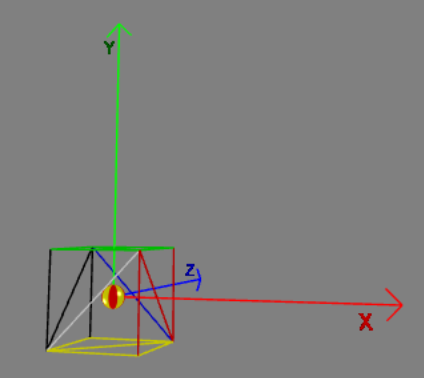
Together an axis and a center of rotation define a straight line in space and in the following animated playgrounds this line is shown in white. The asymmetric pilot mesh is used to demonstrate the rotation.
 The Pilot
In each of the following examples there is
- a center of rotation at CoR_At;
- a marker mesh for the center of rotation, a small sphere positioned at CoR_At;
- an axis to rotate around
- the pilot mesh at a starting position relative to the center of rotation, pilotStart.
How to Use TransformNode as a Center of Rotation
A TransformNode is an object that is not rendered but can be used as a center of rotation (in fact the centre of any transformation). This can decrease memory usage and increase rendering speed.
The TransformNode is used as a pivot point by parenting it to the pilot and rotating it.
import { Space } from "@babylonjs/core/Maths/math.axis";import { TransformNode } from "@babylonjs/core/Meshes/transformNode";var pivot = new TransformNode("root");pivot.position = CoR_At;pilot.parent = pivot;pilot.position = pilotStart;pivot.rotate(axis, angle, Space.WORLD);In these playgrounds a sphere is created only to show the position of the TransformNode.
Rotating TransformNode Rotating Mesh Moving TransformNode along Axis Rotating Mesh Moving TransformNodeHow To Use a Parent as Center of Rotation
The sphere is parented to the pilot, the pilot is positioned, and the sphere is rotated.
import { Space } from "@babylonjs/core/Maths/math.axis";sphere.position = CoR_At;pilot.parent = sphere;pilot.position = pilotStart;sphere.rotate(axis, angle, Space.WORLD);Note: Any movement of the sphere will result in the pilot being moved.
Rotating ParentHow To Use a Pivot as a Center of Rotation
import { Matrix, Vector3 } from "@babylonjs/core/Maths/math.vector";var CoR_At = new Vector3(1, 3, 2);var pilotStart = new Vector3(3, 6, 6);pilot.position = pilotStart;var pivotTranslate = pilotStart.subtract(CoR_At);pilot.setPivotMatrix(Matrix.Translation(pivotTranslate.x, pivotTranslate.y, pivotTranslate.z));import { Space } from "@babylonjs/core/Maths/math.axis";/*-------------------Rotation Animation--------------------*/var angle = 0.025;scene.registerAfterRender(function () { pilot.rotate(axis, angle, Space.LOCAL);});Notice that as the pivot is moved the axis line moves with the pivot, though the axis direction remains the same.
Rotating Mesh Moving PivotHow to Use a Pivot as a Parent
Perhaps you would prefer to position the pivot by changing the pivot's position rather than the pilot's position. This can be done with parenting, as shown in the following example.
The sphere, representing the pivot at the center of rotation, is placed at the pivot position (CoR_At). The sphere is then made the parent of the pilot, the pilot's position relative to the pivot is set by matrix, and the pilot is rotated.
import { Space } from "@babylonjs/core/Maths/math.axis";import { Matrix } from "@babylonjs/core/Maths/math.vector";sphere.position = CoR_At;pilot.parent = sphere;pilot.setPivotMatrix(Matrix.Translation(pilotTranslate.x, pilotTranslate.y, pilotTranslate.z));pilot.rotate(axis, angle, Space.WORLD);When done this way, any movement of the pivot is achieved by moving the parent mesh representing the pivot.
Rotating Mesh Moving Pivot's Parent along Axis Rotating Mesh Moving Pivot's Parent