Mesh Transformations
Transformations
Transformations are the actions that change an object's position, rotation, and scale. Although this section largely covers transformations applied to meshes, some also apply to other Babylon.js objects.
Applying transformations can seem straightforward, and in many cases they are, such as when changing position. Other aspects may appear easy, but in practice can be difficult in concept, execution, or both. In 3D, something as simple as a rotation can prove tricky: once you have rotated a mesh about x and y, its z axis may not be where you expect because a mesh's local frame of reference rotates with it.
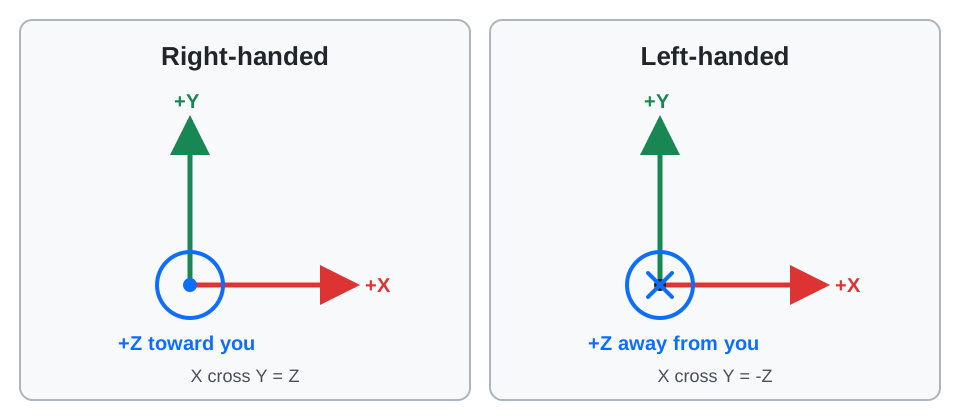
Frames of reference in 3D are formed by an origin and three mutually perpendicular axes through that origin. When created in Babylon.js, objects are placed using a frame of reference in World Space, where there are two horizontal axes, x and z, and a vertical y axis in a left-handed system. See Coordinate Systems and Handedness for Babylon.js's optional right-handed mode and practical glTF conversion guidance.
Each mesh also has its own Local Space. Meshes built within Babylon.js are created with their local space origin at the world space origin and with their local space axes x, y, and z aligned with the x, y, and z axes of world space. The local origin acts as the center of transformation unless pivots or parents are added to the mesh. Both cases are described below.
Meshes created in other packages and imported may use different frames of reference.
Coming next
Centered on Created Origin
Learn origins and pivots in Babylon.js.

Coordinate Systems and Handedness
Understand left-handed and right-handed coordinate systems and move assets safely between Babylon.js, glTF, and content creation tools.
Parents and Pivots
Learn all about parent relationships and pivots in Babylon.js.
Lattice
Learn all about deforming meshes with lattices in Babylon.js.