Video As A Texture
If you want to display a video in your scene, the Babylon engine has a special texture for that. This special texture works similarly to other textures, with the exception of a few parameters. These parameters include video URLs (a URL array), the size of the video texture (256 here), the scene, and a final optional boolean that indicates whether you want to use mipmap or not.
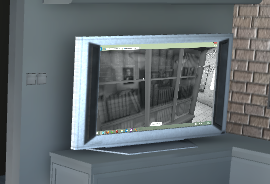
Here is an example from our Flat2009 Demo: Video Texture Example
This plays a video on the demo's ZTV screen (ecran = screen).
import { VideoTexture } from "@babylonjs/core/Materials/Textures/videoTexture";ecran.material.diffuseTexture = new VideoTexture("video", "textures/babylonjs.mp4", scene, true);Note: after loading the texture, the class sets the wrapU and wrapV properties to WRAP_ADDRESSMODE. If you wish to use another address mode, you need to add an observer to VideoTexture.onLoadObservable and modify the properties in this observer.
The VideoTexture object accepts an array of videos (to take into account various codecs). The first video in the array that can be loaded is the one used as the content source. Currently, HTML5 supports .mp4, .webm, and .ogv video formats.
The internal video DOM object is accessible via the VideoTexture.video property, which allows you to control some characteristics and monitor the status of the video, e.g. play, pause, loop, and autoplay. See the link above for the full story.
Even though we are working with advanced texturing techniques, VideoTexture works in conjunction with a StandardMaterial. Simply put, it needs to have some light. As a handy alternative or video illumination assistant, you may want to set an emissiveColor on the base material of the mesh.
import { Color3 } from "@babylonjs/core/Maths/math.color";ecran.material.emissiveColor = new Color3(1, 1, 1);Auto Play
Modern browsers have strict policies for autoplaying video. Without user interaction, most browsers will autoplay only if the audio is muted. When the VideoTexture autoPlay setting is true (the default), Babylon.js will automatically mute the audio if the first attempt to autoplay fails. To play video with audio, a user interaction (such as a tap) is often required. To manually start video texture playback, code like this can be used:
scene.onPointerDown = function () { videoTexture.video.play(); scene.onPointerDown = null;};This will start the video on the first tap in the scene. A demo can be found here: Tap To Play Video Texture
An event is also available to detect whether your browser is preventing autoplay because of its policy:
texture.onUserActionRequestedObservable.add(() => { scene.onPointerDown = function () { videoTexture.video.play(); };});If you wish to display a texture during load time, you can provide the URL of an image in the poster property of the settings. It will be displayed during loading or until the user interacts with the video.
Web RTC
Starting with v2.6, we introduced support for WebRTC. You can now create a specific VideoTexture that will be connected to your default webcam:
import { VideoTexture } from "@babylonjs/core/Materials/Textures/videoTexture";VideoTexture.CreateFromWebCam(scene, function (videoTexture) { }, { maxWidth: 256, maxHeight: 256 });The third parameter is optional and can be used to define minWidth, maxWidth, minHeight, and maxHeight. These values will be used to constrain the camera resolution.
Disposal
VideoTexture creates and uses an HTML video element internally. When VideoTexture.dispose is called, texture resources are disposed as expected. However, the underlying video element is not removed. Fully releasing all underlying video resources is not standardized across browsers, but code like this can be used:
// Store reference to the underlying HTML5 video elementconst videoEl = videoDome.videoTexture.video
// Dispose texturevideoTexture.dispose();
// Remove any <source> elements, etc.while (videoEl.firstChild) {    videoEl.removeChild(videoEl.lastChild);}
// Set a blank srcvideoEl.src = ''
// Prevent non-important errors in some browsersvideoEl.removeAttribute('src')
// Get certain browsers to let govideoEl.load()
videoEl.remove()
This is only important for users who need to load and dispose of multiple VideoTextures over time.