Parallax Mapping
Starting with Babylon.js v2.4, we introduced Parallax Mapping.
Parallax Mapping Example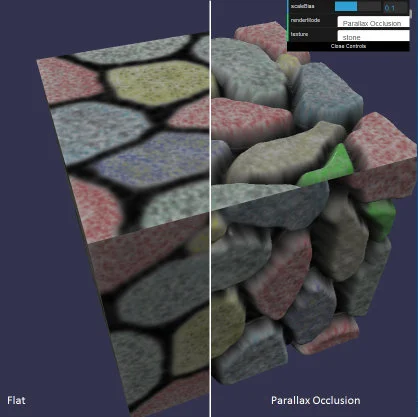
What is Parallax Mapping?
Parallax Mapping is an algorithm that, based on a height map, applies an offset to the material's textures in order to accentuate the relief of the geometry's surface.
While this technique is independent of Normal Mapping (a.k.a. Bump), it is often used in conjunction with it. The simple reason is that the height map needed to perform Parallax Mapping is often encoded in the Alpha channel of the Normal Map texture. (A diffuse texture is required to use parallax mapping).
There are many techniques based on the Parallax Mapping principle, and Babylon.js supports two of them.
Parallax Mapping
The core algorithm performs an offset computation for the texture UV coordinates based on a height map. This algorithm is very fast, and you can almost think of it as being free if you are already using Bump.
Parallax Occlusion Mapping (POM)
While traditional Parallax Mapping computes the offset based on one sample of the height map, the Occlusion version loops to sample the height map many times in order to reach a more precise location for what the computed pixel should reflect.
The outcome is way more realistic than traditional Parallax but there can be a performance hit that needs consideration.
Parallax Mapping with Babylon.js
You can use Parallax Mapping through the following materials:
In Babylon.js, parallax mapping is treated as an extension of Normal Mapping, so to benefit from the former, you have to enable the latter. The reason is that we support only the height map being encoded in the Alpha channel of the normal map, as explained above.
You have three properties to work with Parallax:
- useParallax: enables Parallax Mapping over Bump. This property won't have any effect if you haven't assigned a bumpTexture.
- useParallaxOcclusion: enables Parallax Occlusion, when setting this property, you must also set useParallax to true.
- parallaxScaleBias: applies a scaling factor that determines which "depth" the height map should represent. A value between 0.05 and 0.1 is reasonable in Parallax, and you can reach 0.2 using Parallax Occlusion.
Using Parallax Mapping in Node Material
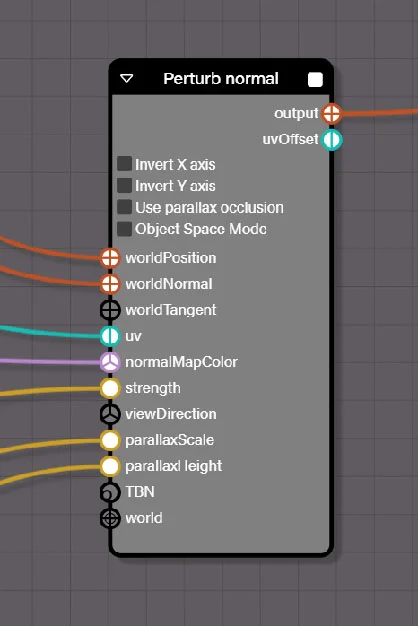
When setting up a node material to use Parallax Mapping, use a PerturbNormal block attached to a PBRRoughnessMetallic block and ensure you have wired values to both the parallax scale input and the parallax height input. This will enable the node material to utilize the parallax occlusion method from our standard shaders.
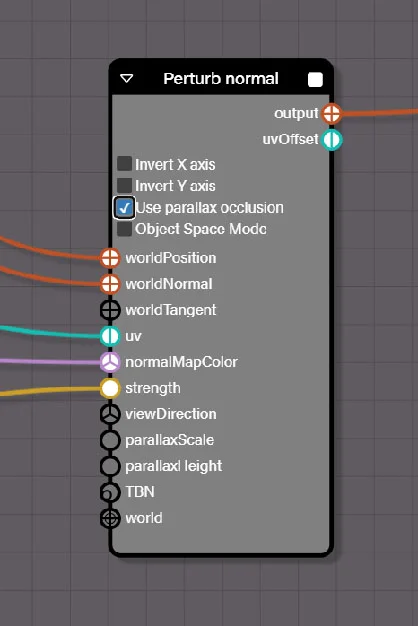
Using Parallax Occlusion Mapping in Node Material
When setting up a node material to use Parallax Occlusion Mapping (POM), you follow much of the same setup as above. Wire a PerturbNormal block to the PBRRoughnessMetallic block to start. This time, however, you want to check the box for Parallax Occlusion Mapping on the PerturbNormal block. Doing this will disable the inputs for both parallax scale and parallax height on the PerturbNormal block, as these contribute to the other method. In the case of Parallax Occlusion Mapping, your height texture needs to be authored into the alpha channel of your normal texture in the same way as when using Standard Material and PBR Material. There is no connection that needs to be made to use the alpha of the attached normal texture for parallax occlusion, as the checkbox tells the engine to look in the attached normal texture's alpha channel for the height texture.