Different Textures On The Front And Back Of A Mesh
Having a front and a back makes the most sense when talking about flat meshes such as a plane, a disc, or a polygon. All of these have exactly two sides, both of which can be seen only when the option sideOrientation is set to BABYLON.Mesh.DOUBLESIDE.
However, many meshes have the option sideOrientation and this method applies to them as well. In which case think of the front as outside and the back as inside.
To have different textures on the front and back, the front and back images must be in the same file, like the one below.
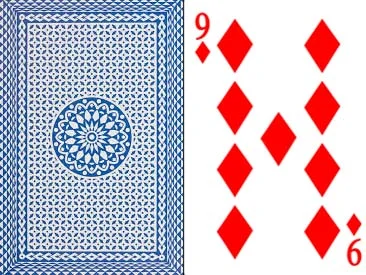
This is then split using the frontUVs and backUVs options.
FrontUVs and BackUVs
Both frontUVs and backUVs have the form Vector4(u0, v0, u1, v1), with 0<= u0, v0, u1, v1 <= 1, where (u0, v0) are the bottom-left coordinates and (u1, v1) the top-right coordinates of the clipping rectangle of the image.
To split the image above, you can define two variables:
import { Vector4 } from "@babylonjs/core/Maths/math.vector";const f = new Vector4(0.5, 0, 1, 1); // front image = half the whole image along the widthconst b = new Vector4(0, 0, 0.5, 1); // back image = second half along the widthand then place them in the options
import { Mesh } from "@babylonjs/core/Meshes/mesh";import { MeshBuilder } from "@babylonjs/core/Meshes/meshBuilder";const plane = MeshBuilder.CreatePlane("plane", { height: 1, width: 0.665, sideOrientation: Mesh.DOUBLESIDE, frontUVs: f, backUVs: b }, scene);taking into account the width-to-height ratio of the section of the image.
You then simply create a StandardMaterial and set the texture to the image.
import { StandardMaterial } from "@babylonjs/core/Materials/standardMaterial";import { Texture } from "@babylonjs/core/Materials/Textures/texture";const mat = new StandardMaterial("", scene);mat.diffuseTexture = new Texture("URL to Image File", scene);plane.material = mat;