Fresnel Parameters
Babylon.js 1.14 introduced new parameters for the StandardMaterial: FresnelParameters.
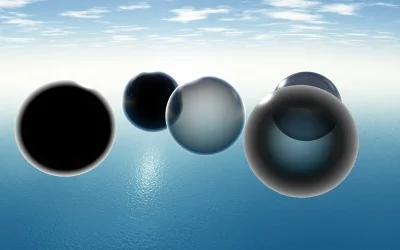
There are 5 of them:
StandardMaterial.diffuseFresnelParametersStandardMaterial.opacityFresnelParametersStandardMaterial.reflectionFresnelParametersStandardMaterial.emissiveFresnelParametersStandardMaterial.refractionFresnelParameters
How Fresnel Works
A Fresnel term is computed by the StandardMaterial to change how a color is applied based on the viewing angle.
For instance, you can simulate great glass or reflection effects by just using a simple Fresnel term. It gives you more reflection on the edges and less in the center.
To do so, just use this code:
import { FresnelParameters } from "@babylonjs/core/Materials/fresnelParameters";material.reflectionFresnelParameters = new FresnelParameters();You can then control if the reflection is applied on the edges or on the center. For instance, if you want the reflection on the edges (by default), you can control it using the color properties:
import { Color3 } from "@babylonjs/core/Maths/math.color";material.reflectionFresnelParameters.leftColor = Color3.White();material.reflectionFresnelParameters.rightColor = Color3.Black();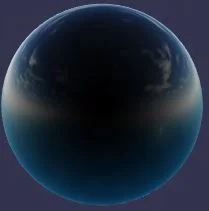
Conversely, if you only want reflection in the center:
import { Color3 } from "@babylonjs/core/Maths/math.color";material.reflectionFresnelParameters.leftColor = Color3.Black();material.reflectionFresnelParameters.rightColor = Color3.White();
By using the bias and power properties, you can control how the Fresnel term is computed along the surface of the object according to this formula:
finalFresnelTerm = pow(bias + fresnelTerm, power)
By default, bias == 0 and power == 1.
For instance, the following code:
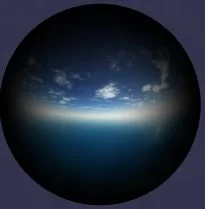
import { FresnelParameters } from "@babylonjs/core/Materials/fresnelParameters";import { Color3 } from "@babylonjs/core/Maths/math.color";material.reflectionFresnelParameters = new FresnelParameters();material.reflectionFresnelParameters.leftColor = Color3.Black();material.reflectionFresnelParameters.rightColor = Color3.White();material.reflectionFresnelParameters.power = 4;...generates the following rendering:
How to use it
A FresnelParameter is defined by the following properties:
isEnabledto activate or deactivate the Fresnel effect- leftColor to define the color used on the edges
- rightColor to define the color used in the center
- bias to define the bias applied to the computed Fresnel term
- power to define the exponent applied to the Fresnel term
Here is a simple example:
import { FresnelParameters } from "@babylonjs/core/Materials/fresnelParameters";import { CubeTexture } from "@babylonjs/core/Materials/Textures/cubeTexture";import { Color3 } from "@babylonjs/core/Maths/math.color";material.reflectionTexture = new CubeTexture("Scenes/Customs/skybox/TropicalSunnyDay", scene);material.diffuseColor = new Color3(0, 0, 0);material.emissiveColor = new Color3(0.5, 0.5, 0.5);material.alpha = 0.2;material.specularPower = 16;// Fresnelmaterial.reflectionFresnelParameters = new FresnelParameters();material.reflectionFresnelParameters.bias = 0.1;material.emissiveFresnelParameters = new FresnelParameters();material.emissiveFresnelParameters.bias = 0.6;material.emissiveFresnelParameters.power = 4;material.emissiveFresnelParameters.leftColor = Color3.White();material.emissiveFresnelParameters.rightColor = Color3.Black();material.opacityFresnelParameters = new FresnelParameters();material.opacityFresnelParameters.leftColor = Color3.White();material.opacityFresnelParameters.rightColor = Color3.Black();