Materials and Vertices
Materials and Vertices
BabylonJS allows you to create many meshes and apply materials to them quite simply and in a range of ways.
Sometimes it may be useful to know more about how this is achieved. Any attempt to answer the question of how colors and textures are applied to a mesh must start by looking at the construction of the mesh.
Below is a simple wireframe cube which has 8 vertices:
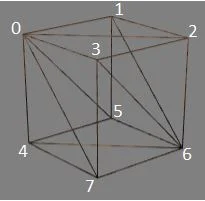
The cube is constructed from 12 facets or triangles, each face having 2 facets.
The color or texture for each facet is determined from those assigned to its vertices.
Colors at Vertices
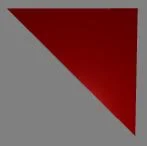
Assigning red to each of the vertices of the facet 3, 2, 6 results in a red facet:
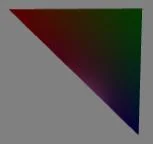
Assigning red to vertex 3, green to vertex 2 and blue to vertex 6 results in a graduated color image:
Textures at Vertices
Applying an image as a texture to the face 3, 2, 6, 7 means assigning image coordinates to each of the vertices; (0, 1) to vertex 3, (1, 1) to vertex 2, (1, 0) to vertex 6 and (0, 0) to vertex 7.
These are then used to map the image across the facets.
Of course, with a mesh consisting of many vertices, wrapping an image as a texture around the mesh means assigning each vertex a point on the image using fractional values, as described in custom meshes.
Issues with Adjoining Faces
The construction method given above will lead to problems if different colors or textures need to be applied to different faces, since adjoining faces use the same vertex indices.
For example if face 3, 2, 6, 7 should be red and face 0, 3, 7, 4 should be green, it is not possible to assign both red and green to vertices 3 and 7.
Sharing vertex indices will also cause problems when wrapping an image around a mesh.
For example, if the image above were wrapped around faces 3, 2, 6, 7, 1, 2, 6, 5, 0, 1, 5, 4, and 0, 3, 7, 4, it would not be possible for vertex 3 to be assigned (1, 0) and (1, 1), nor for vertex 7 to be assigned (0, 0) and (1, 0).
Solutions for Adjoining Faces
There are two solutions, both of which require additional facets:
- Inbetweens
Replace a shared edge with a face. For example, taking the shared edge 3, 7 and replacing it with a face gives:
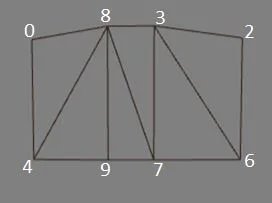
Now vertices 8 and 9 can be assigned green or (1, 1) and (1, 0), and so face 3, 2, 6, 7 can be red or have the start of the image, while face 0, 8, 9, 4 can be green or have the end of the image with no conflict.
Of course, facets 8, 9, 7 and 3, 7, 8 will have graduated fills or distorted images, but by setting vertices 8 and 3 to the same position, and vertices 9 and 7 to the same position, the face 3, 7, 9, 8 disappears. The box then appears to have only six faces, and the adjoining faces have the desired color or image.
Spheres, cylinders, and other self-joining meshes use this method.
- Separated Faces
In this case each face has its own set of indices for its vertices, so each face can have a different material applied:
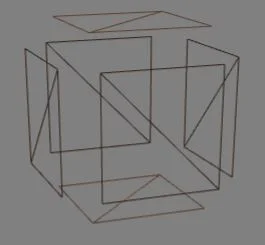
Again correct coincident positioning of vertices leads to a solid looking mesh. Think of the mesh as being made of individual faces that are brought together to form a whole.
Some meshes created with the MeshBuilder method use this approach, allowing the faceColors and faceUV options.
Further reading
Create Custom Meshes From Scratch
Learn how to create custom meshes in Babylon.js.
Updating Vertices
Learn how to update vertices of a mesh in Babylon.js.

Vertex Normals
Learn all about vertex normals in Babylon.js.