.obj File Loader Plugin
OBJ File Import
To use it, you just have to reference the loader file:
<script src="babylon.js"></script><script src="babylon.objFileLoader.js"></script>You can find it here.
When using the Babylon npm packages in your own build, it is preferable to register the OBJ file importer via the top-level dynamic loader registration function registerBuiltInLoaders. See Loading Any File Type for more information.
If you want to import the OBJ file importer statically (not recommended), you can do so via:
import "@babylonjs/loaders/OBJ/objFileLoader";You can read more about NPM support.
Load
See how to load from any file type. Babylon.js will know how to load the obj file and its mtl file automatically:
Good things to know
- Your model doesn't have to be triangulated, as this loader will do it automatically.
- A
Babylon.Meshwill be created for each object/group. - The obj model should be exported with -Z axis forward and Y axis upward to be compatible with Babylon.js.
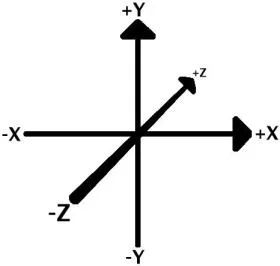
- By default, because the code is optimized for loading time, UV problems can appear, like this:
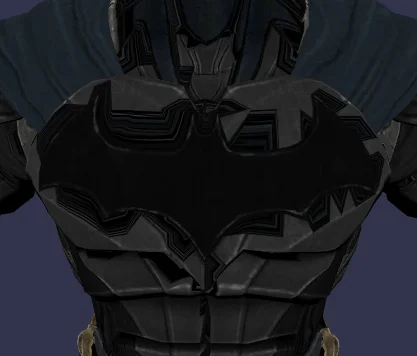
If you meet this problem, set the variable:
import { OBJFileLoader } from "@babylonjs/loaders/OBJ/objFileLoader";OBJFileLoader.OPTIMIZE_WITH_UV = true;Then, you'll get a better texture, but with a longer loading time.
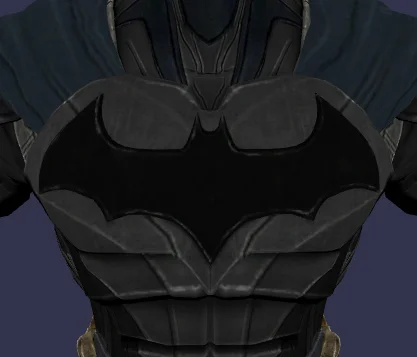
Depending on the modeling program you export your OBJ files from, textures may appear distorted or inverted. As a workaround, you can modify your imported model's UV coordinate scale via setting the variable:
import { Vector2 } from "@babylonjs/core/Maths/math.vector";import { OBJFileLoader } from "@babylonjs/loaders/OBJ/objFileLoader";OBJFileLoader.UV_SCALE = new Vector2(xValue, yValue);Although not part of the Wavefront OBJ file format, some OBJ files include vertex colors. If you are loading such a file and want vertices with colors, set the variable:
import { OBJFileLoader } from "@babylonjs/loaders/OBJ/objFileLoader";OBJFileLoader.IMPORT_VERTEX_COLORS = true;If you have an OBJ file without normals or wish to have them calculated for you, set the variable:
import { OBJFileLoader } from "@babylonjs/loaders/OBJ/objFileLoader";OBJFileLoader.COMPUTE_NORMALS = true;When using OPTIMIZE_WITH_UV = true you may experience some discontinuities in shading. Setting OPTIMIZE_NORMALS will help with this problem:
import { OBJFileLoader } from "@babylonjs/loaders/OBJ/objFileLoader";OBJFileLoader.OPTIMIZE_NORMALS = true;To have your imported model inverted on the y-axis, set the variable:
import { OBJFileLoader } from "@babylonjs/loaders/OBJ/objFileLoader";OBJFileLoader.INVERT_Y = true;To invert your imported textures on the y-axis, set the variable:
import { OBJFileLoader } from "@babylonjs/loaders/OBJ/objFileLoader";OBJFileLoader.INVERT_TEXTURE_Y = true;By default if an MTL file cannot be loaded (missing/error) it will silently fail. The model will still be loaded, but if you want to enforce a stricter loading of materials you can use onSuccess() and onError() callbacks accordingly. Set the variable:
import { OBJFileLoader } from "@babylonjs/loaders/OBJ/objFileLoader";OBJFileLoader.MATERIAL_LOADING_FAILS_SILENTLY = false;If an MTL is defined in your OBJ and you wish to have it ignored, set the variable:
import { OBJFileLoader } from "@babylonjs/loaders/OBJ/objFileLoader";OBJFileLoader.SKIP_MATERIALS = true;The OBJ-Loader's behavior has changed in this PR - https://github.com/BabylonJS/Babylon.js/pull/14920 to support handedness correctly. If you have issues loading your OBJ after the change, but it had worked previously, you can set the following flag to fix it:
OBJFileLoader.USE_LEGACY_BEHAVIOR = true;Supported
- Object/group
- Geometric vertex
- colors
- Faces
- triangles
- quads
- polygons
- Colors
- diffuseColor
- ambientColor
- specularColor
- specularPower
- alpha
- Textures
- ambientTexture
- diffuseTexture
- specularTexture
- bumpTexture
- opacityTexture
- Multimaterial
- For each material defined in the same mesh, it creates a new BABYLON.Mesh.
- The name of the created BABYLON.Mesh follows this syntax: meshName_mmX
- X is the nth BABYLON.Mesh created with this method
Not supported currently
- Smoothing groups (s parameter in OBJ file)
- Illumination (illum parameter in MTL file)
- The different options for loading textures in MTL file.
- A good description about MTL files and their options can be found here: http://paulbourke.net/dataformats/mtl/